
Last Updated on 5 months ago by Grace Nyambura
Deductive Coding in NVivo: Step-by-Step Guide [With Examples]
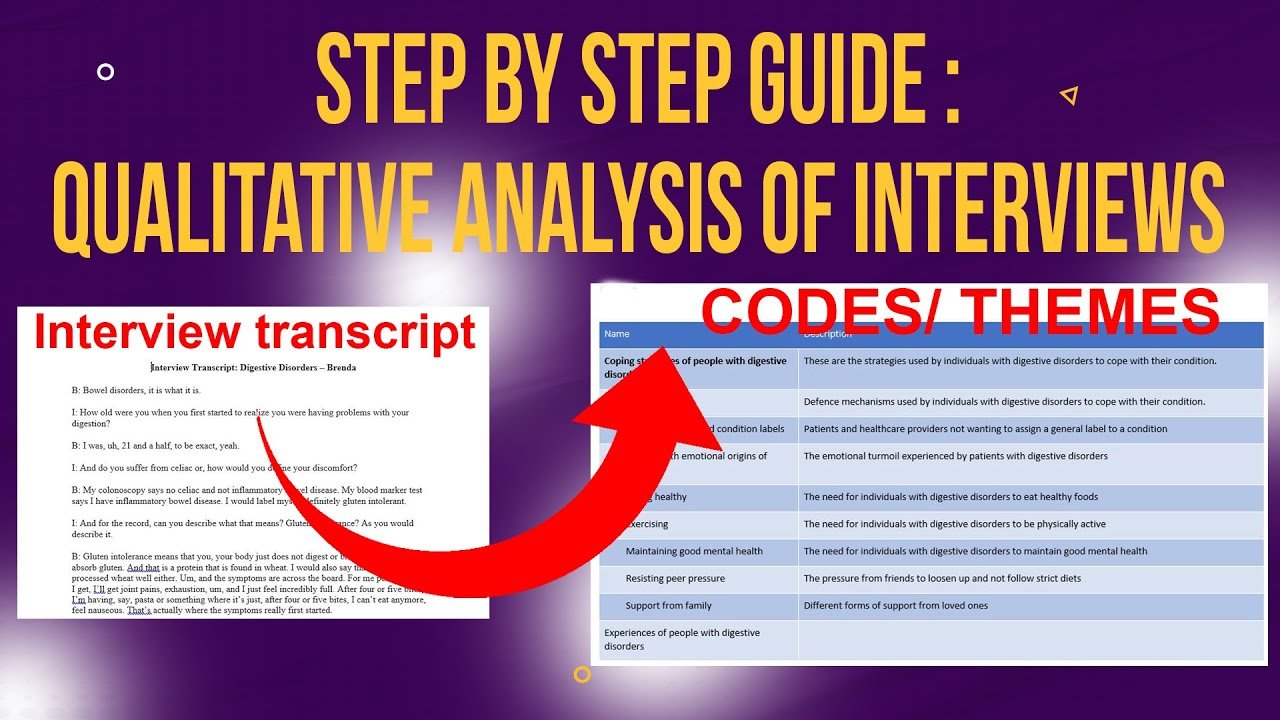
In this article, I’m going to show you exactly how to do deductive coding in NVivo using a real interview dataset. You’ll go from raw transcripts all the way to a complete qualitative data analysis report — following eight clear steps.
If you’re new to coding in NVivo, you might also want to read my article on qualitative coding in NVivo which covers the foundational concepts before you get into deductive approaches.
- Deductive Coding in NVivo: Step-by-Step Guide [With Examples]
- What Is Deductive Coding?
- Deductive vs Inductive Coding: What’s the Difference?
- When Should You Use Deductive Coding in NVivo?
- The Study We’ll Use: Digestive Disorders Research
- Step-by-Step: How to do Deductive Coding in N-Vivo
- Step 1: Create a New NVivo Project
- Step 2: Create a Folder and Import Your Transcripts
- Step 3: Skim Through the Interview Transcripts
- Step 4: Set Your Primary Themes from Your Research Questions
- Step 5: Code Each Transcript Under the Primary Themes
- Step 6: Export a Hierarchy Chart
- Step 7: Export the Codebook
- Step 8: Write Your Results Report
- Frequently Asked Questions
- Key Takeaways
- Need Help With Your Qualitative Analysis?
What Is Deductive Coding?
| Definition: Deductive CodingDeductive coding is a qualitative analysis approach where you come to your data with pre-determined codes or themes — usually derived from your research questions, a theoretical framework, or existing literature. Instead of letting themes emerge from the data, you decide the categories in advance and then systematically assign data to them. |
This is the opposite of inductive coding, where themes emerge from the data itself. In deductive coding, you already know what you’re looking for before you open the transcript.
Deductive vs Inductive Coding: What’s the Difference?
The distinction matters for your methodology chapter. Here’s the simplest way to think about it:
•Inductive coding — themes emerge from the data. You read the transcript with an open mind and let the data tell you what matters. Best for exploratory research.
•Deductive coding — themes are set in advance from research questions or theory. You go into the data knowing what you’re looking for. Best for confirmatory or theory-driven research.
For a detailed comparison with real examples in NVivo, read my article on thematic analysis examples: inductive and deductive.
According to Saldaña’s Coding Manual for Qualitative Researchers, deductive coding is often referred to as “theory-driven” or “concept-driven” coding, and is particularly appropriate when a researcher is testing or confirming an existing framework against new data.
When Should You Use Deductive Coding in NVivo?
Use deductive coding when:
- Your research questions are clearly defined and specific
- You’re working within an established theoretical framework
- You want to test whether a theory or framework holds up against your data
- Your study is confirmatory rather than exploratory
If your study is more exploratory and you want themes to emerge organically, the inductive approach is more appropriate. I cover that in my article on
inductive thematic analysis using NVivo (Saldana Method).
The Study We’ll Use: Digestive Disorders Research
For this tutorial, I’m using interview data from a graduate student’s research on experiences with digestive disorders. The study has two research questions:
•What are the experiences of people with digestive disorders?
•How do people with digestive disorders cope with them?
These two research questions will directly become our two primary themes — which is the core logic of deductive coding.
If you need hands-on support setting up your own deductive analysis, I offer one-on-one qualitative data analysis consulting sessions here.
Step-by-Step: How to do Deductive Coding in N-Vivo
Step 1: Create a New NVivo Project
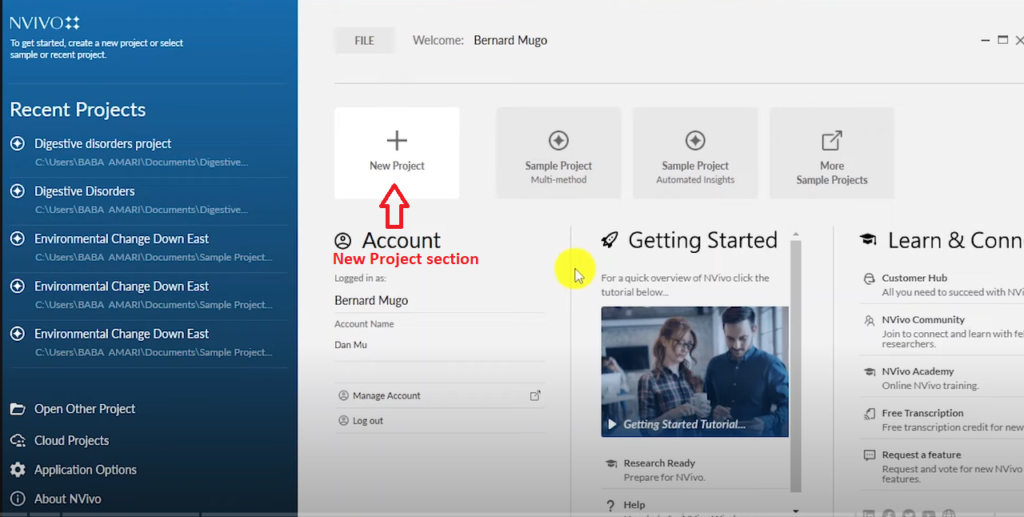
NVivo 14 new project section where researchers create a project for qualitative coding
When you open NVivo 14, you’ll see the start screen with a section for new projects.
1.Click on New Project.
2.Name your project after your study title — in this case, Digestive Disorders.
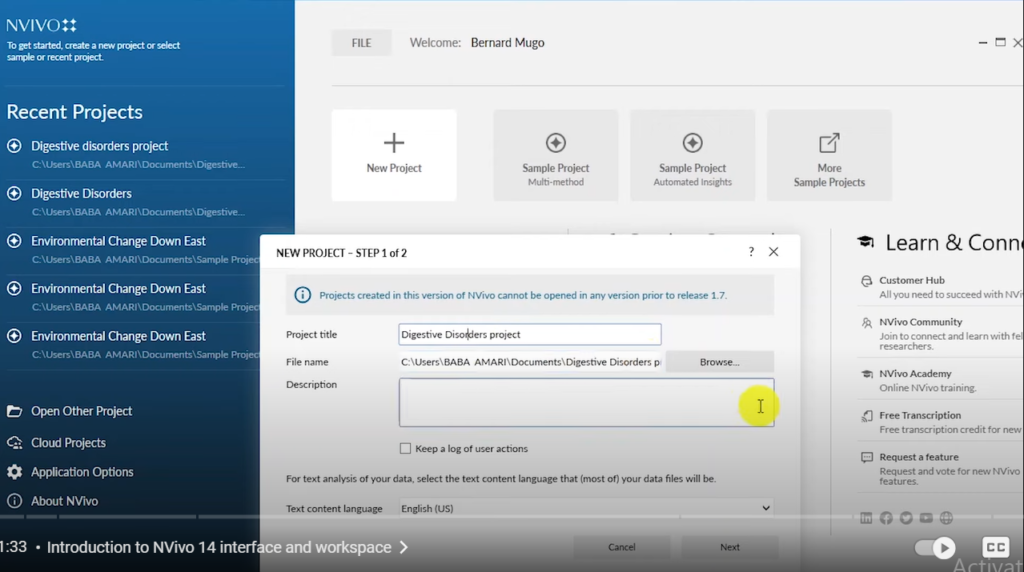
NVivo 14 new project section where researchers create a project for qualitative coding
3.Click Create. Your project will open showing the main interface.
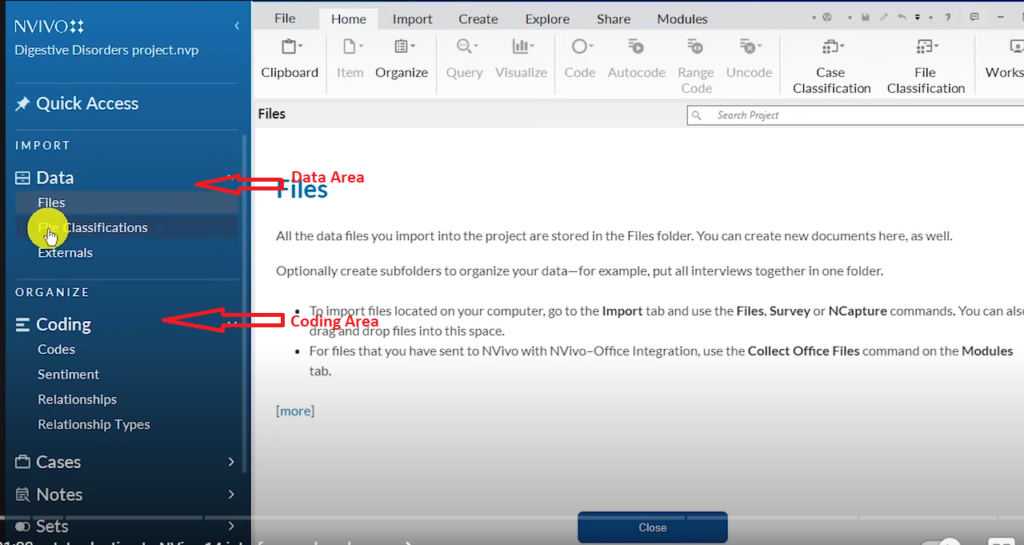
NVivo 14 interface showing the data area and coding area used for qualitative analysis
You’ll see two main areas you’ll use throughout this tutorial: the Data area (which contains Files) and the Coding area (which contains Codes). Focus only on these two for now.
Step 2: Create a Folder and Import Your Transcripts
Before importing transcripts, create a folder to keep your files organised.
1.Right-click in the Files section and select New Folder.
2.Name the folder Interview Transcripts and press OK.
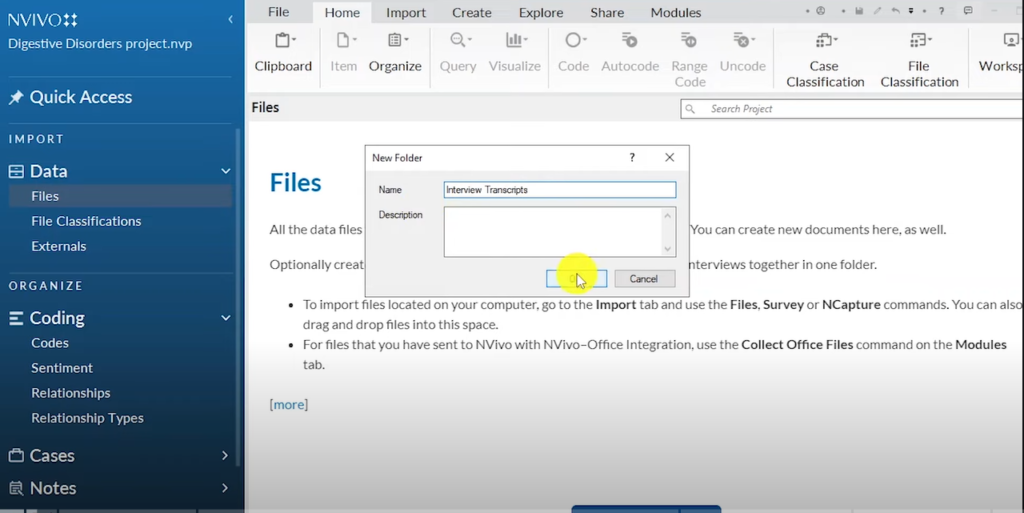
Creating a folder in NVivo 14 to organise interview transcripts for deductive coding
Creating separate folders matters when you have multiple data types — interview transcripts, videos, audio files. Keeping them organised from the start saves significant time later.
Step 3: Skim Through the Interview Transcripts

Skimming through interview transcripts in NVivo 14 to understand context before starting deductive coding
Before creating any codes, open each transcript and read through it quickly. You’re not coding yet — you’re familiarising yourself with the data. This gives you a sense of the participants’ language and the overall context of the interviews, which makes your coding sharper and more consistent.
Step 4: Set Your Primary Themes from Your Research Questions

Identifying primary themes in NVivo 14 based on research questions as the starting point for deductive coding
This is the defining step of deductive coding. In deductive analysis, your research questions become your primary themes. You don’t wait to see what the data says — you set the categories first.
For this study, the two research questions give us two primary themes:
•Experiences of People with Digestive Disorders
•Coping Strategies of People with Digestive Disorders
To create each primary theme in NVivo, right-click in the Codes section and select New Code. Type the theme name and click OK.
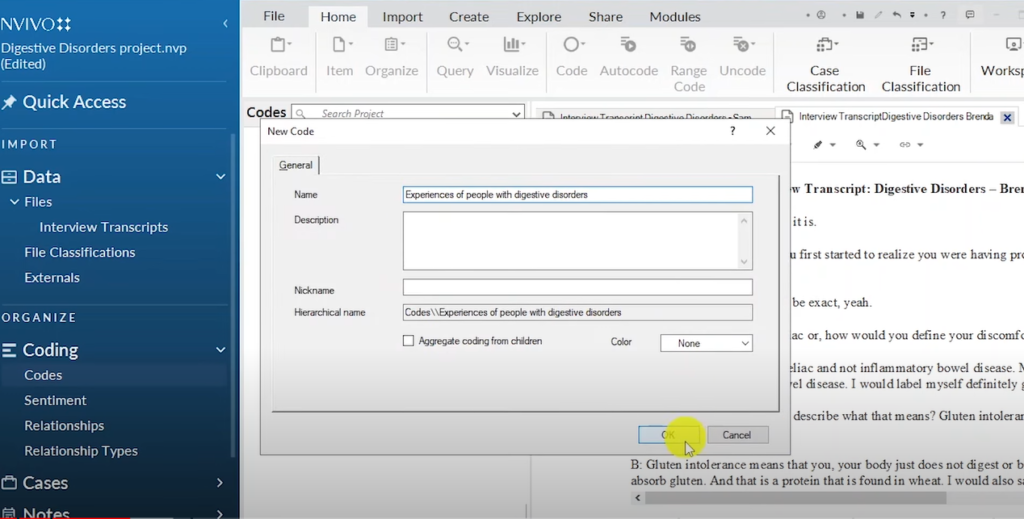
Creating the first primary theme ‘Experiences of People with Digestive Disorders’ in NVivo 14 deductive coding
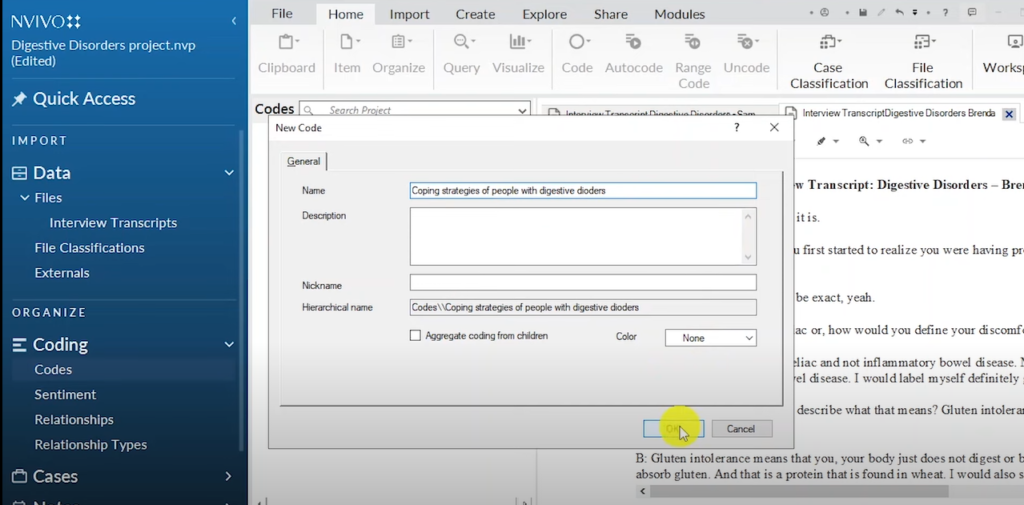
Creating the second primary theme ‘Coping Strategies of People with Digestive Disorders’ in NVivo 14
These two primary themes now sit in your Codes section. Every sub-code you generate from the transcripts will go underneath one of them.
Step 5: Code Each Transcript Under the Primary Themes

Categorizing each Code under a Primary Theme
Now open your first transcript and start reading it carefully. When you reach a passage that relates to either of your primary themes, highlight it and drag it into the Codes section. You can either:
•Drop it directly onto an existing primary theme (if it fits exactly), or
•Create a new sub-code under the relevant primary theme
Here’s how this looks in practice with the first transcript:
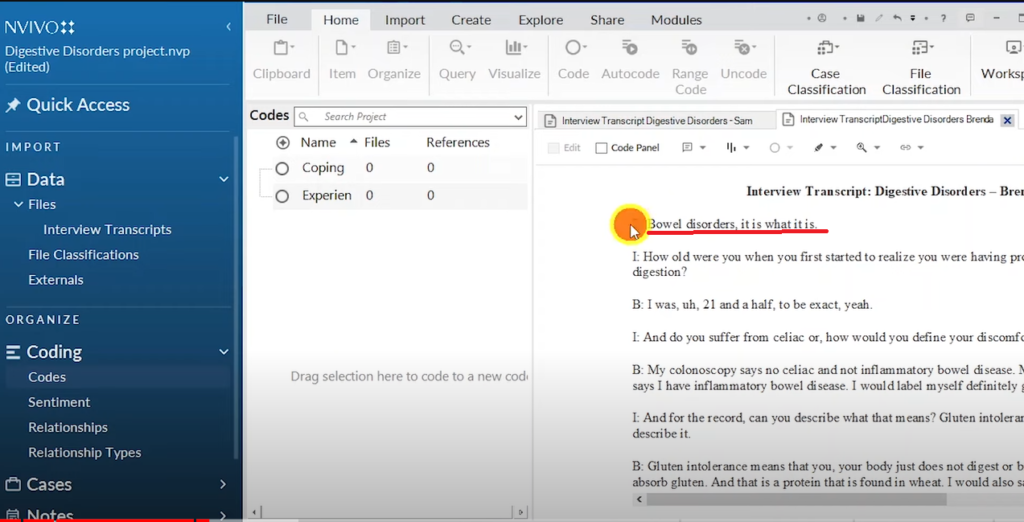
NVivo 14 transcript highlighting the passage ‘Bowel disorders, it’s what it is’ selected for deductive coding
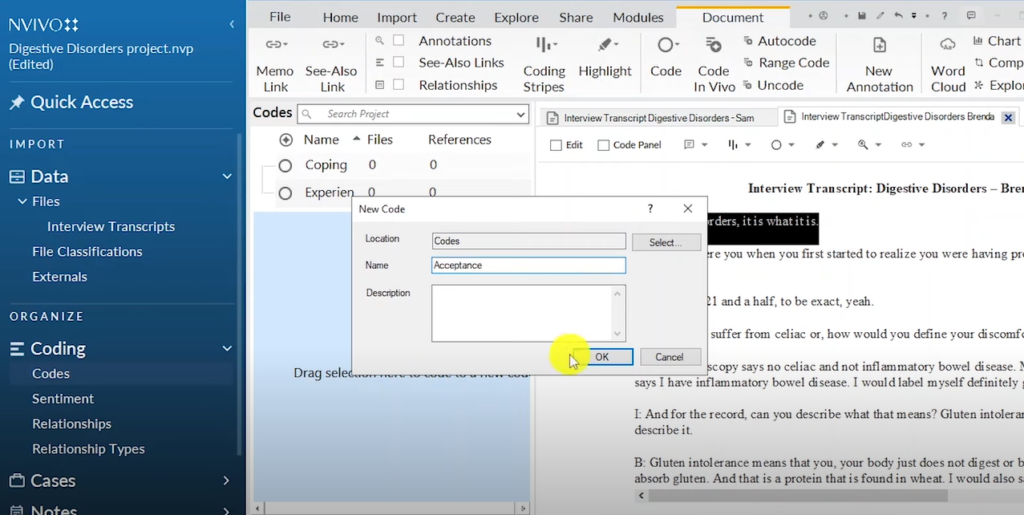
Creating the qualitative code ‘Acceptance’ in NVivo 14 from a highlighted digestive disorder transcript passage
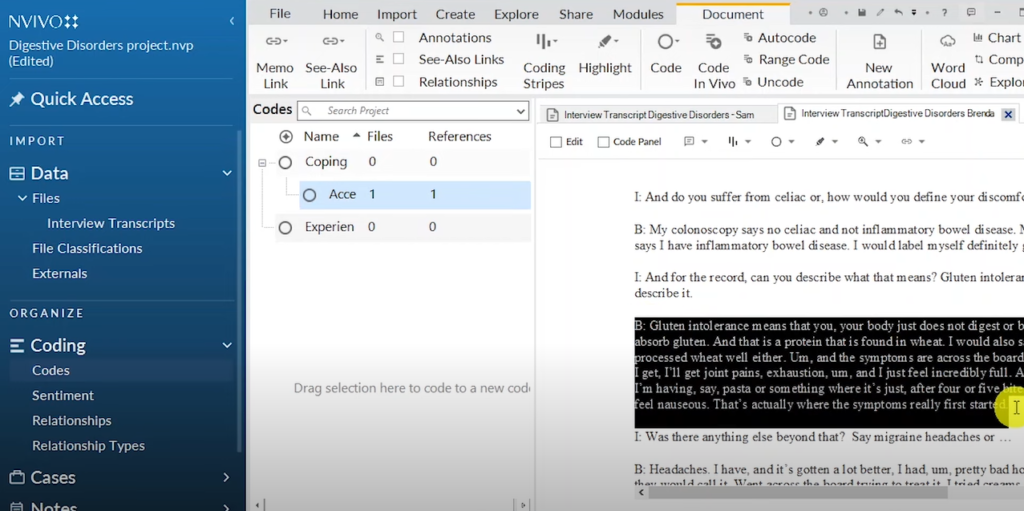
NVivo 14 transcript highlighting the section where Brenda describes her digestive disorder symptoms for coding
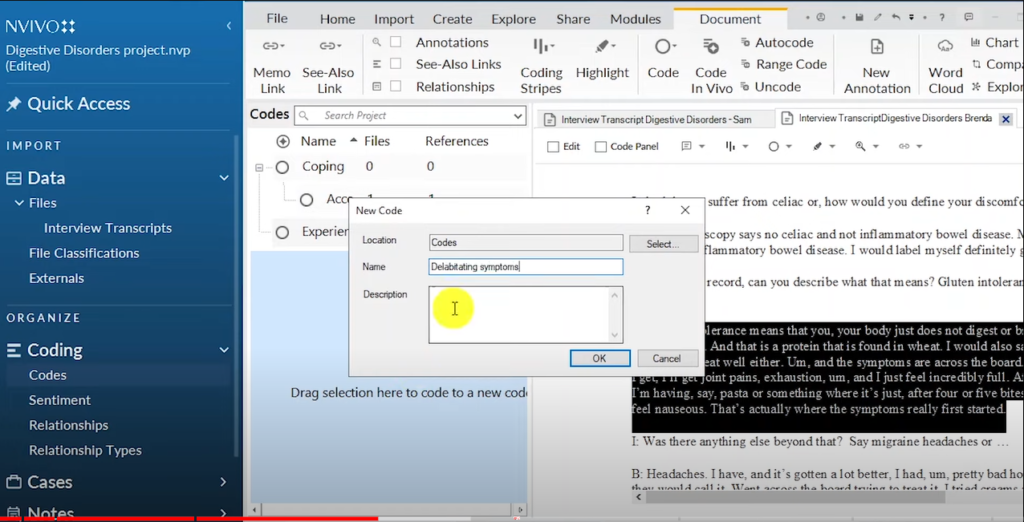
Creating the NVivo 14 code ‘Delabitating Symptoms’ under the experiences primary theme in deductive coding
Debilitating symptoms — including joint pains, exhaustion, nausea, and hormonal acne — all fall under the Experiences primary theme.
Work through both transcripts. After completing the coding, here are all the sub-codes generated under each primary theme:
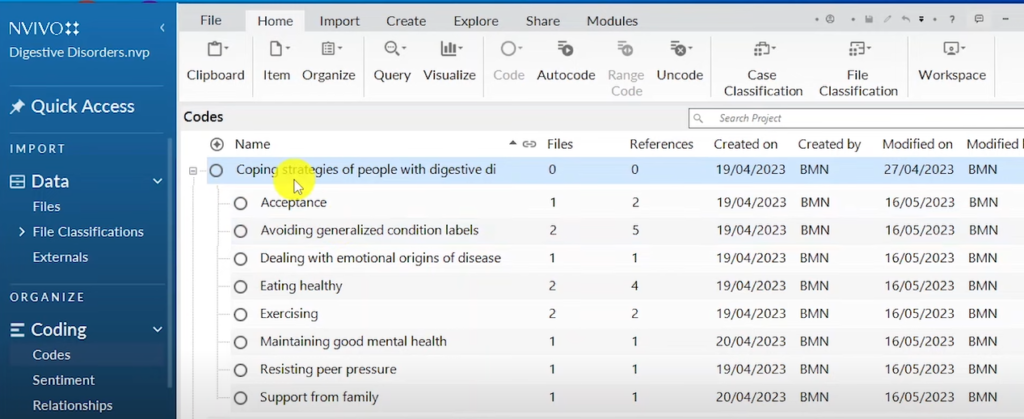
NVivo 14 showing all codes under the primary theme ‘Coping Strategies for People with Digestive Disorders’
Coping strategies sub-codes: Acceptance, Avoiding generalized condition labels, Dealing with emotional origins of disease, Eating healthy, Exercising, Maintaining good mental health, Resisting pressure, Support from family.
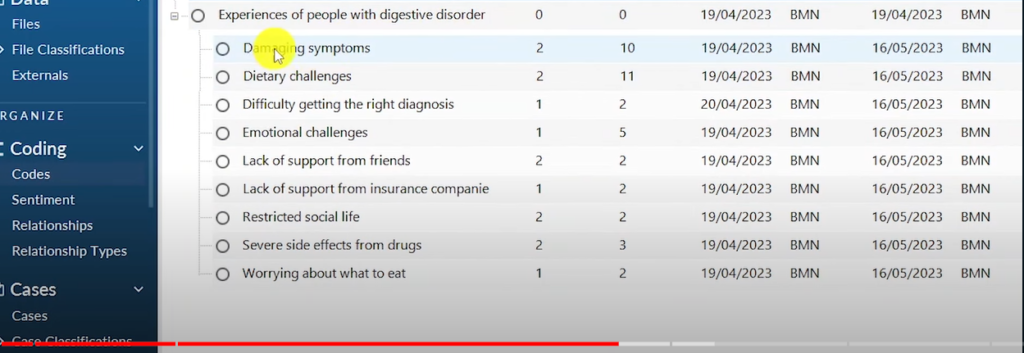
NVivo 14 showing all codes under the primary theme ‘Experiences of People with Digestive Disorders’
Experiences theme sub-codes: Debilitating symptoms, Dietary challenges, Difficulty getting the right diagnosis, Emotional challenges, Lack of support from friends, Lack of support from insurance companies, Restricted social life, Severe side effects from drugs, Worrying about what to eat.
Step 6: Export a Hierarchy Chart
Creating and exporting a hierarchy chart in NVivo 14 to visualise deductive coding results
Once coding is complete, you can visualise your results. Right-click on one of your primary themes in the Codes section, scroll to Visualize, and select Hierarchy Chart of Codes.

NVivo 14 hierarchy chart showing the distribution of codes under the coping strategies theme as a pie chart
The hierarchy chart shows which codes appear most prominently under each primary theme. For coping strategies, the dominant codes are: Avoiding generalized condition labels, Eating healthy, Exercising, and Acceptance. Press Ctrl+Shift+E to export the chart for your report.
Step 7: Export the Codebook
Before exporting, add a description to each primary theme. Right-click the theme, select Code Properties, and write a clear one-sentence description of what that theme captures. These descriptions will appear in your exported codebook.
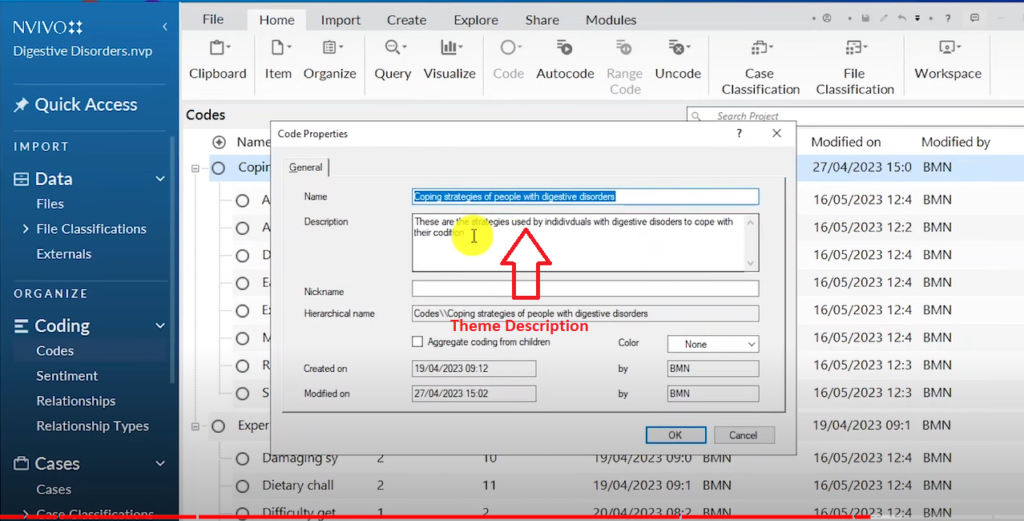
NVivo 14 code properties showing the description added to the coping strategies theme for the codebook
To export the codebook, go to Share → Export → Export Codebook.
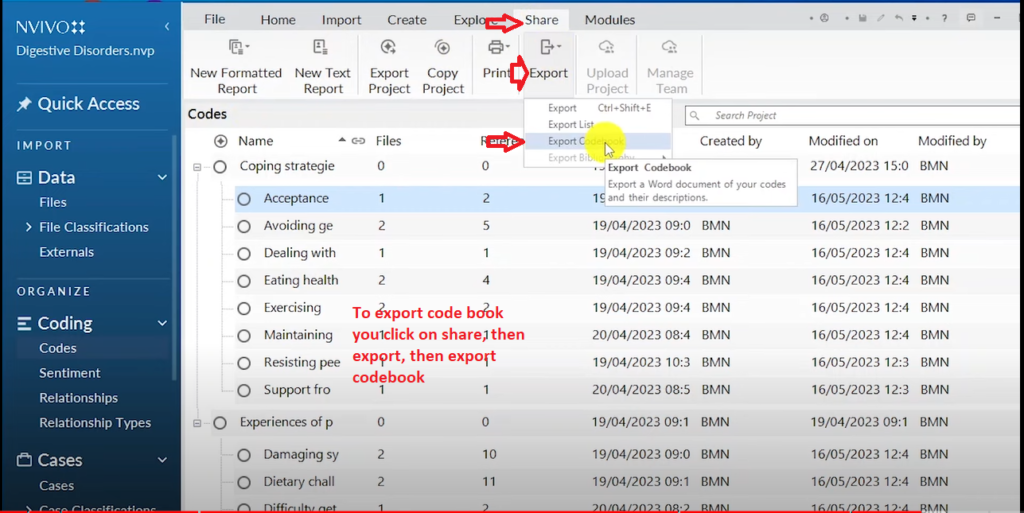
NVivo 14 Share Export menu showing how to export a codebook after completing deductive qualitative coding
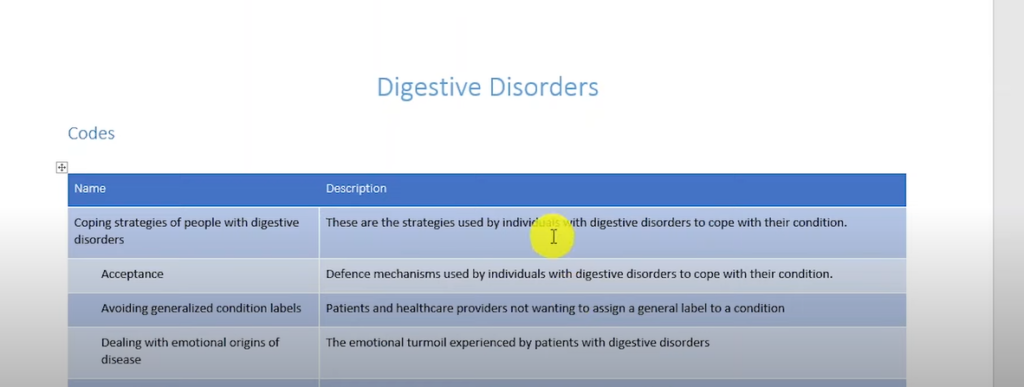
NVivo 14 codebook showing primary themes and codes with descriptions exported for qualitative research reporting
The codebook is a critical output for your methodology chapter. It shows reviewers and examiners exactly how your coding was structured, what each code means, and how it connects to your research questions — demonstrating rigour and transparency in your analysis.
Step 8: Write Your Results Report
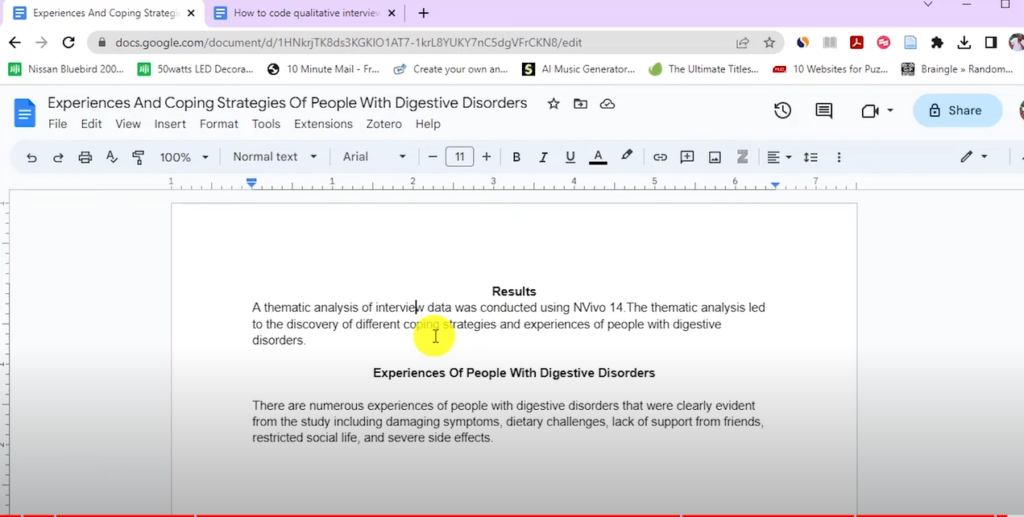
A section of the qualitative results report produced after completing deductive coding in NVivo 14
The final step is compiling your findings into a results report. Use the codebook, hierarchy charts, and coded quotes from NVivo to structure your findings chapter. Organise findings by primary theme, with sub-codes supporting each theme through direct participant quotes.
For a detailed guide on how to structure and write up this section, read my article on how to report findings after performing data analysis with NVivo.
For a broader look at deductive and inductive coding approaches side by side, Scribbr’s guide to deductive reasoning in research provides a clear external reference.
Frequently Asked Questions
What is the difference between deductive and inductive coding in NVivo?
In deductive coding, you create your primary themes before reading the data — usually based on research questions or theory. In inductive coding, themes emerge from the data itself. Deductive is theory-confirming; inductive is theory-building. I compare both approaches with full NVivo examples in my article on thematic analysis examples: inductive and deductive.
Can I mix deductive and inductive coding in the same study?
Yes — this is called an abductive or hybrid approach. You start with pre-set primary themes (deductive) but allow new sub-codes to emerge from the data that weren’t anticipated (inductive). Many qualitative PhD studies use this combined approach.
What is a codebook and why do I need one?
A codebook is a document that lists all your codes, their definitions, and examples of how they were applied. It’s essential for demonstrating rigour in your analysis. Supervisors, examiners, and peer reviewers use it to assess whether your coding was systematic and consistent. NVivo generates it automatically once you’ve added descriptions to your codes.
How many primary themes should I have in deductive coding?
Your primary themes should map directly to your research questions. If you have two research questions, you’ll typically have two primary themes. Each primary theme then has sub-codes under it that emerge from the transcripts. There’s no ideal number of sub-codes — let the data determine that.
Do I need to code every line of the transcript?
No. In deductive coding, you only code passages that are relevant to your research questions — which are already captured by your primary themes. Passages that don’t address either research question don’t need to be coded. This is one of the efficiency advantages of the deductive approach.
Key Takeaways
- Deductive coding means setting your primary themes before reading the data — derived from your research questions or theoretical framework
- In NVivo, create your primary themes first in the Codes section, then assign sub-codes from the transcript under each one
- Your research questions should map directly to your primary themes — one research question, one primary theme
- Always add descriptions to your codes before exporting the codebook — it’s required for your methodology chapter
- Export both a hierarchy chart and a codebook — these are essential outputs for your findings and methodology chapters
- Deductive coding is best for confirmatory research; if your study is exploratory, consider the inductive approach instead
Need Help With Your Qualitative Analysis?
If you’re stuck on deductive coding — or any stage of your NVivo analysis — I offer one-on-one consulting sessions where we work through your data together. Get in touch and let’s move your analysis forward.