

Last Updated on 4 months ago by Bernard Mugo
In this guide, I will show you how to perform deductive thematic analysis in MAXQDA — from setting up your predetermined themes in the code system to matching participant data against your codebook and generating a structured set of codes ready for your findings report.
I use a real qualitative dataset throughout this tutorial: a study on challenges in managing HIV and non-communicable diseases (NCDs) among health workers in South Central Uganda. By the end, you will be able to replicate this process using your own transcripts and your own predetermined themes.
- Inductive vs Deductive Thematic Analysis: Key Differences
- What Is the Codebook Approach in Deductive Thematic Analysis?
- Step 1 — Set Up Your MAXQDA Project
- Step 2 — Import Your Transcript into MAXQDA
- Step 3 — Enter Your Predetermined Themes into MAXQDA
- Step 4 — Code Your Transcript Against the Predetermined Themes
- Step 5 — Review and Refine Your Codes
- Comparison Table: Inductive vs Deductive Thematic Analysis
- Frequently Asked Questions
- Can I use MAXQDA for inductive thematic analysis as well?
- What if some of my data does not fit any of my predetermined themes?
- What is the difference between a codebook approach and template analysis?
- Should my predetermined themes come from my research questions or from the literature?
- How many codes should I aim for under each theme?
- Key Takeaways
- What's Next After Deductive Thematic Analysis in MAXQDA?
Inductive vs Deductive Thematic Analysis: Key Differences
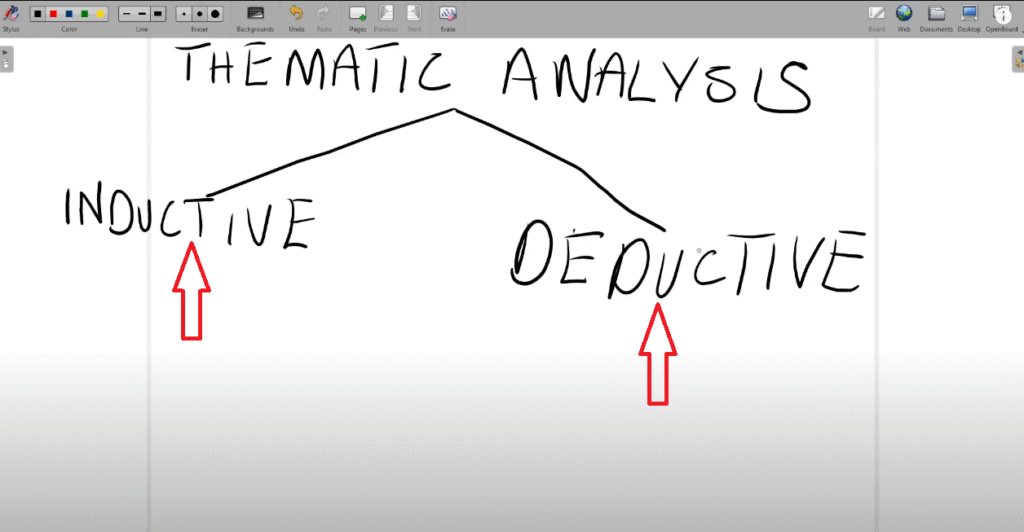
What Is Inductive Thematic Analysis?
In inductive thematic analysis, you approach the data with an open mind and allow themes to emerge from the data itself. You do not have any preconceived themes before you begin coding. Instead, you generate open codes first, then group them into categories, and then develop themes from those categories.
The two most widely used frameworks for inductive thematic analysis are:
Saldaña’s method — a four-step inductive process I cover in detail in my guide to inductive thematic analysis in MAXQDA
Reflexive Thematic Analysis (RTA) — the Braun and Clarke six-step framework, the most cited approach in qualitative research
What Is Deductive Thematic Analysis?
In deductive thematic analysis, you come to the data with predetermined themes already in place. These themes are defined in advance — typically drawn from your research questions, a theoretical framework, or an existing body of literature — and your task is to find codes in the data that fit within them.
The two main frameworks for deductive thematic analysis are:
- Codebook approach — you create a codebook with your themes and their definitions before coding begins, then match data to the codebook
- Template analysis — structurally similar to the codebook approach; themes are called templates. Both terms refer to the same fundamental process.

In this tutorial, I use the codebook approach.
Which Approach Should You Use?
The choice between inductive and deductive thematic analysis depends on your research design:
- Use inductive thematic analysis when your research is exploratory and you want the themes to emerge from your data without imposing a framework
- Use deductive thematic analysis when your research is theory-driven, when you are testing an existing framework against new data, or when your research questions already specify what you are looking for
If you are unsure which approach is right for your study, my overview of qualitative data analysis methods explains all six main approaches and when to use each.
What Is the Codebook Approach in Deductive Thematic Analysis?
The codebook approach to deductive thematic analysis works in this sequence:
- Define your themes and write a clear description for each one — before touching your data
- Enter the themes into MAXQDA — creating a code system that mirrors your codebook
- Read through your transcripts — identifying segments that relate to each theme
- Code each relevant segment — assigning it to the predetermined theme it fits
- Review and refine — merge, split, or rename codes as needed based on what the data reveals
The key discipline of deductive thematic analysis is this: your themes are fixed at the start. Codes emerge from the data, but they are always assigned to one of your existing themes. You are not creating new themes during coding — you are finding evidence for themes you already have.
For a deeper understanding of deductive reasoning in research design, Scribbr’s guide to deductive research provides a clear, student-friendly explanation.
Step 1 — Set Up Your MAXQDA Project
Open MAXQDA and create a new project. Give it a descriptive name that reflects your study — for this tutorial, I called mine “Deductive Thematic Analysis.” Click Save.

When you open MAXQDA, you will see three main interface areas:
- Top menu — file management, import, export, and analysis tools
- Secondary ribbon — context-sensitive tools that change based on your current action
- Left panel (Documents and Codes) — where your transcripts and code system live; this is where you will spend most of your time


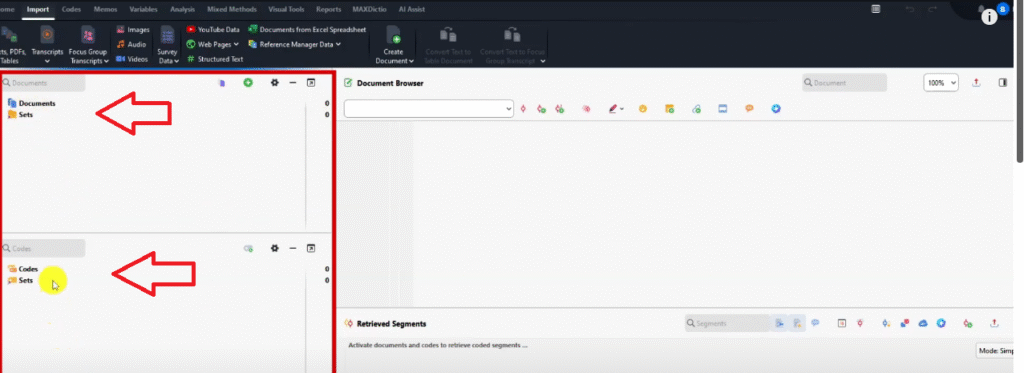
For deductive thematic analysis, you will work primarily in two sections of the left panel: Documents (to store your transcripts) and Codes (to build your theme structure).
For a full orientation to the MAXQDA interface, see the MAXQDA official how-to resource centre.
Step 2 — Import Your Transcript into MAXQDA
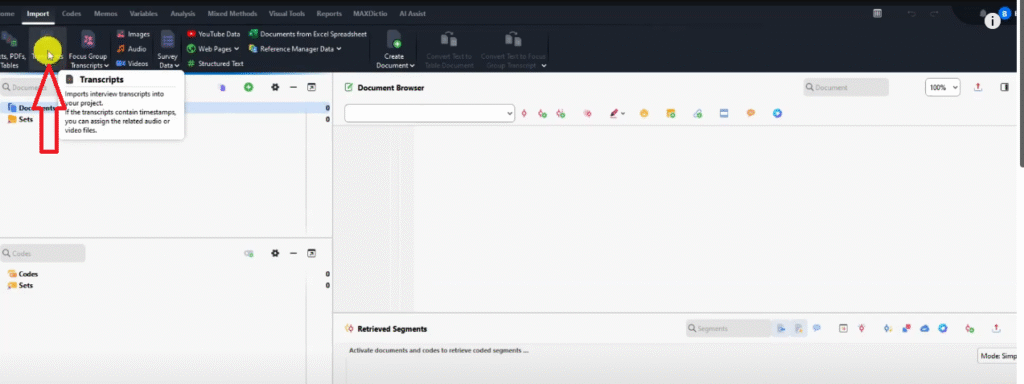
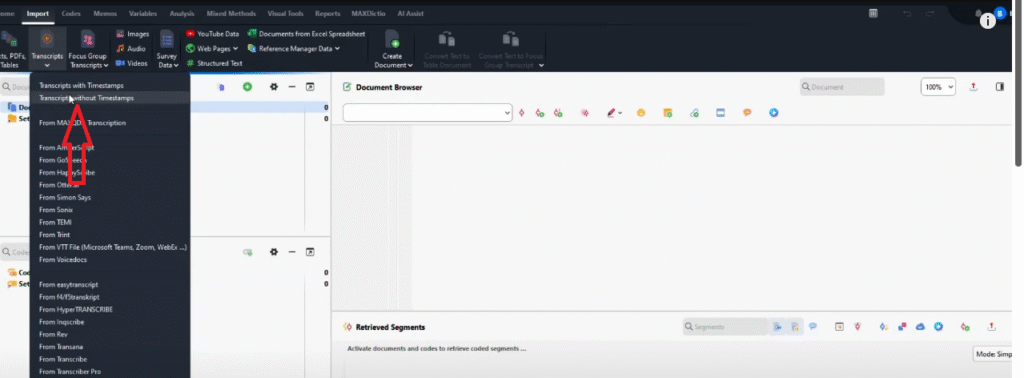
To import a transcript into MAXQDA:
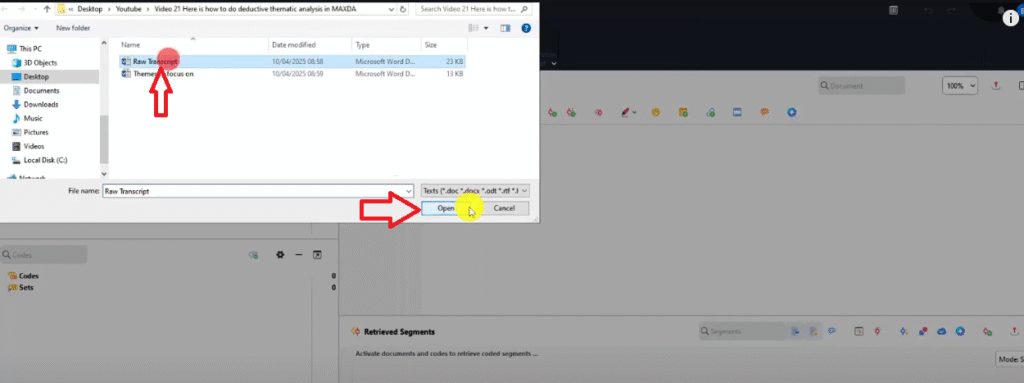
- In the secondary ribbon, click Transcripts
- Select Transcript without timestamps
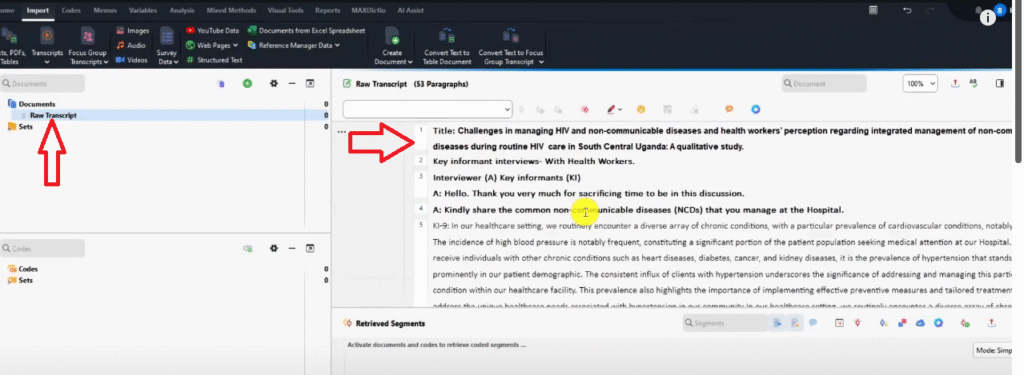
- Browse to your transcript file and click Open
Alternatively, you can drag and drop your transcript file directly into the Documents section in the left panel. Both methods produce the same result.
For this tutorial, I imported one transcript from the HIV/NCD study. The transcript contains focus group data from multiple key informants (labelled KI-1, KI-2, KI-4, KI-9, KI-16, KI-19, KI-20) who were asked about their experiences managing non-communicable diseases during routine HIV care.
Step 3 — Enter Your Predetermined Themes into MAXQDA
This step is what separates deductive from inductive analysis. Before coding a single line of your transcript, you enter your predetermined themes directly into MAXQDA’s code system.
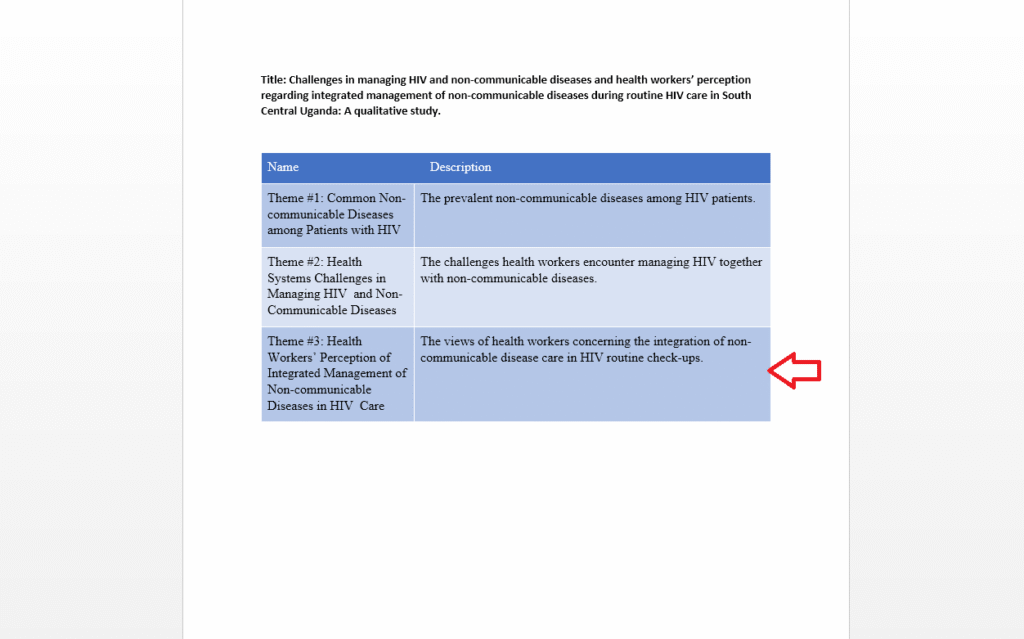
For this tutorial, the three predetermined themes are drawn from the study’s research questions:
- Theme 1: Common non-communicable diseas
- es among patients with HIV — the prevalent NCDs among HIV patients
- Theme 2: Health system challenges in managing HIV and non-communicable diseases — the challenges health workers encounter managing both conditions simultaneously
- Theme 3: Health workers’ perceptions of integrated management of NCDs in HIV care — views on integrating NCD management into routine HIV checkups
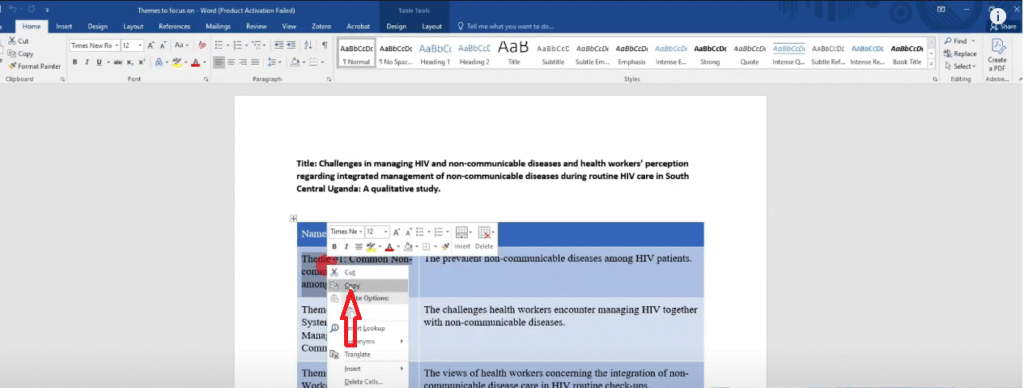
To enter each theme into MAXQDA:
- Click the plus (+) sign in the Codes section of the left panel
- Paste your theme name into the code name field
- Click the memo icon next to the code and paste your theme description into the memo — this is the equivalent of a codebook entry and documents what belongs under this theme
- Repeat for each theme
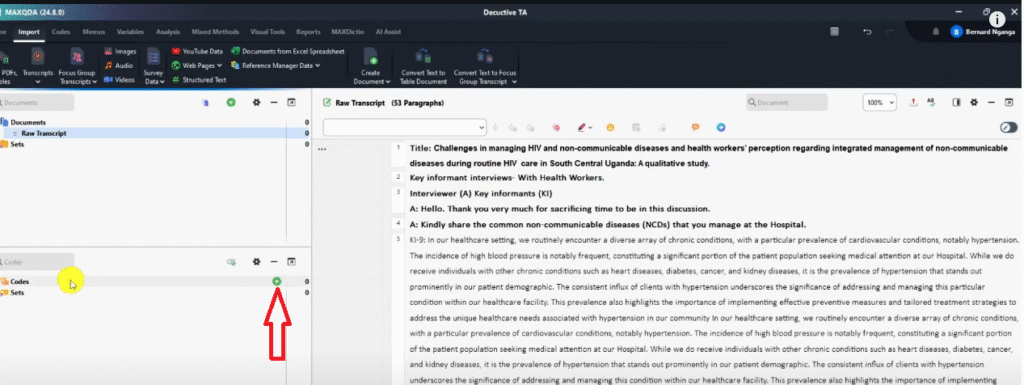


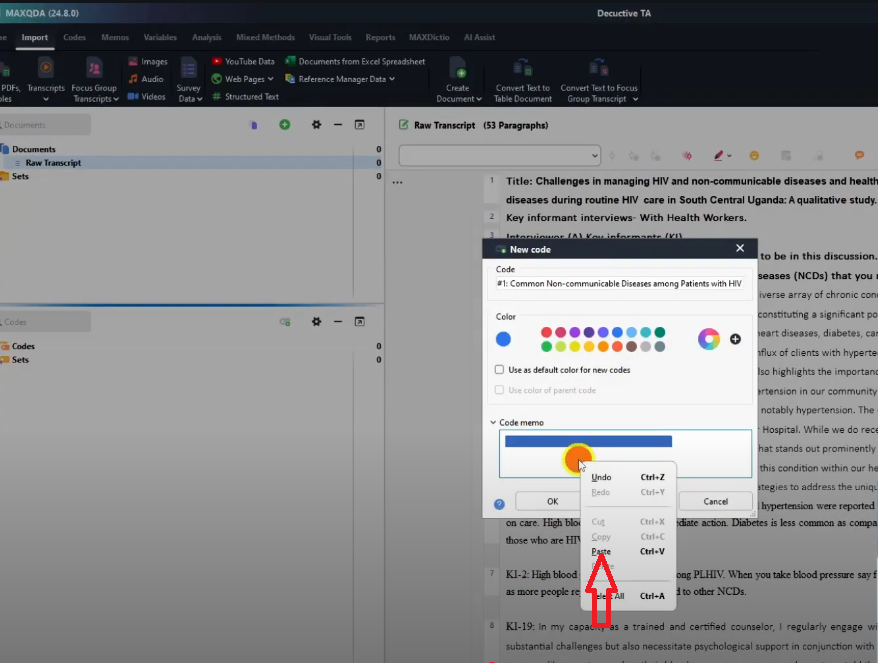

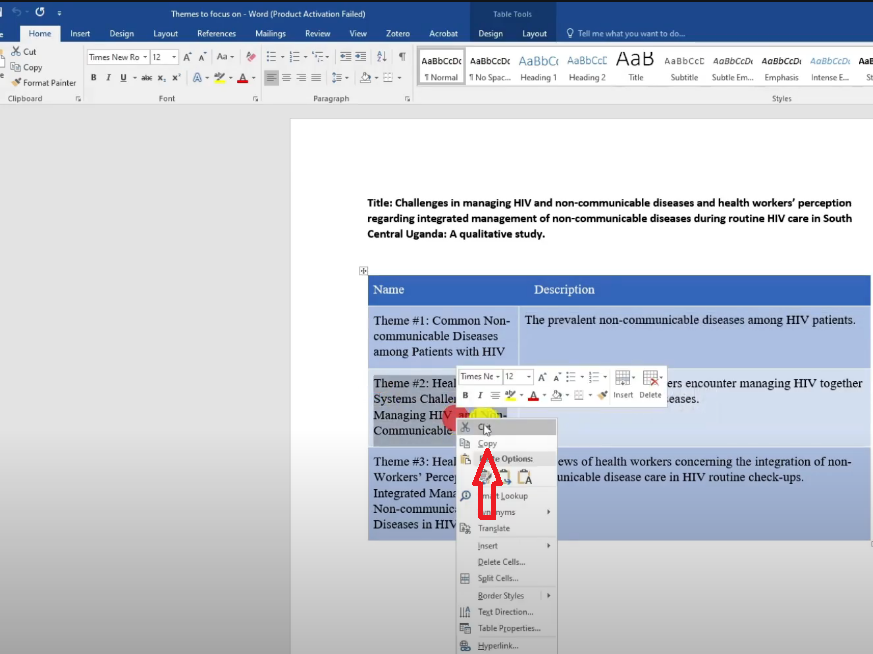

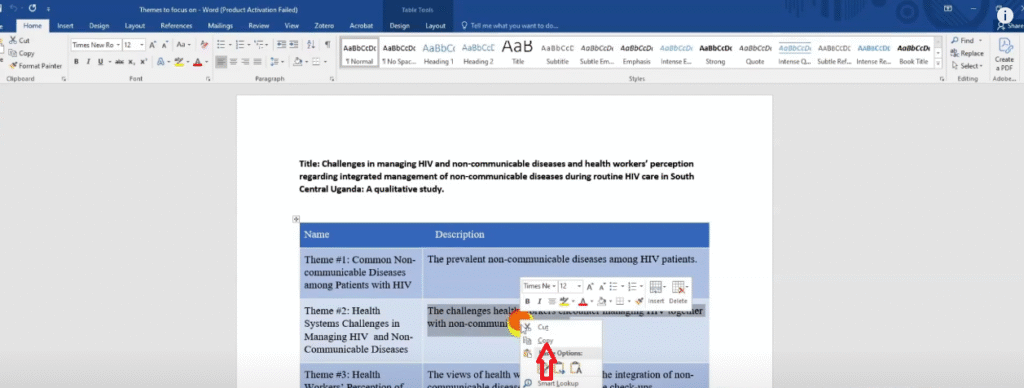
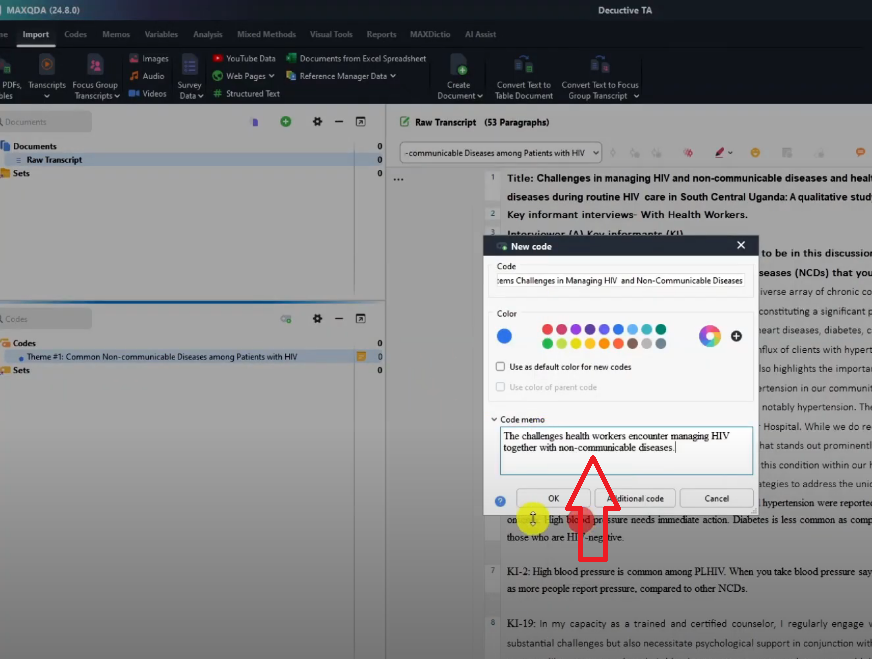

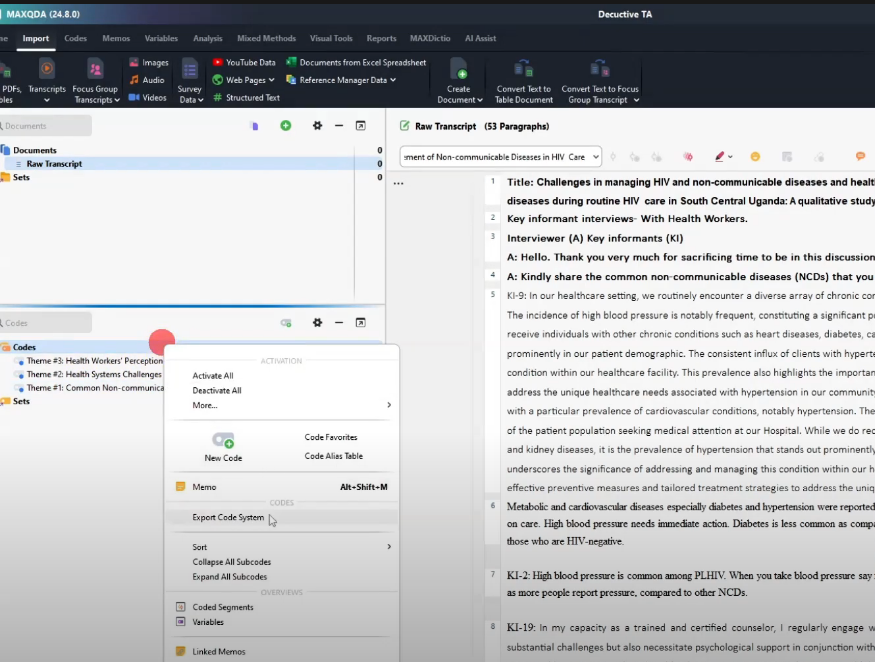

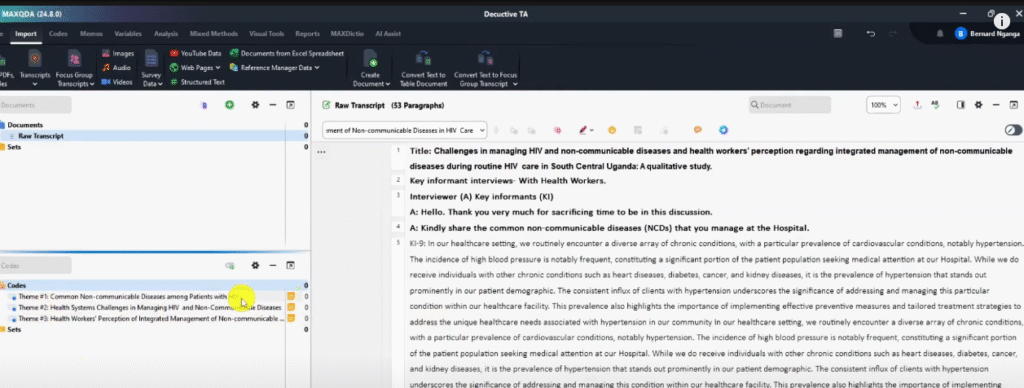
Once all three themes are entered, right-click in the Codes section and select Sort A to Z. This ensures your themes display in the correct order (Theme 1, Theme 2, Theme 3) rather than in entry order.
You now have a code system in MAXQDA that mirrors your codebook. Every code you create during the next step will be placed under one of these three themes.
Step 4 — Code Your Transcript Against the Predetermined Themes
With your themes in place, open your transcript and begin reading. Your task is to identify every segment of participant data that is relevant to one of your predetermined themes, create a code for it, and drag that code under the correct theme.
There are two ways to create a code from a highlighted segment in MAXQDA:
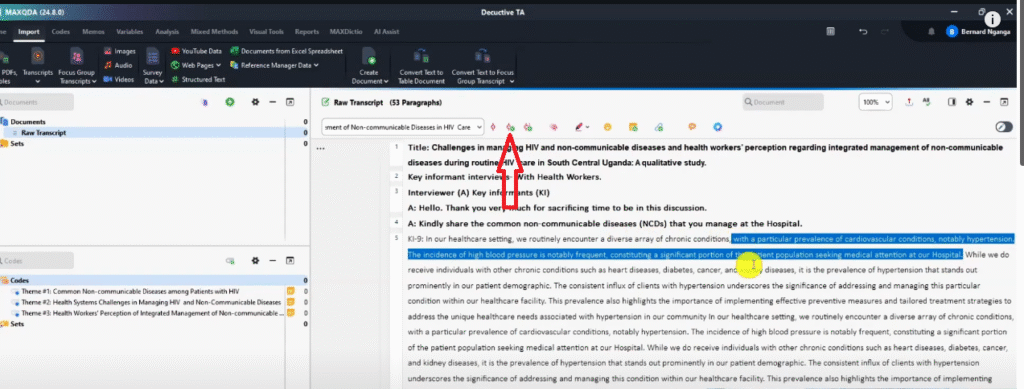
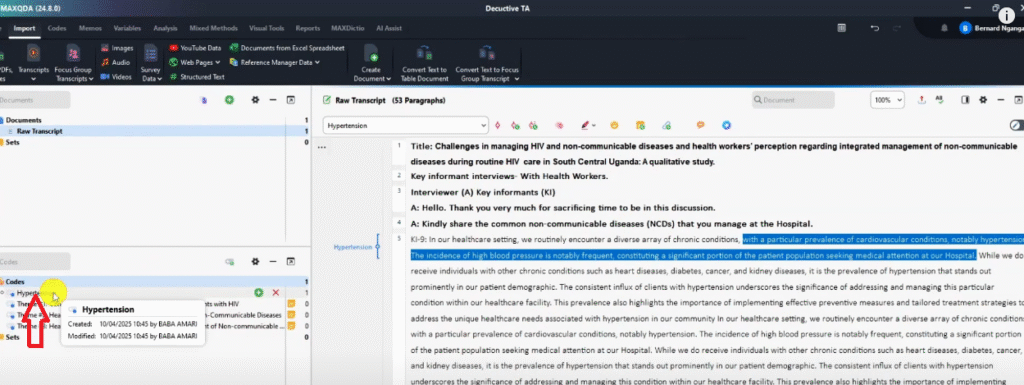
- Code with new code — highlight the segment, click the “Code with new code” button, and give the code a descriptive name
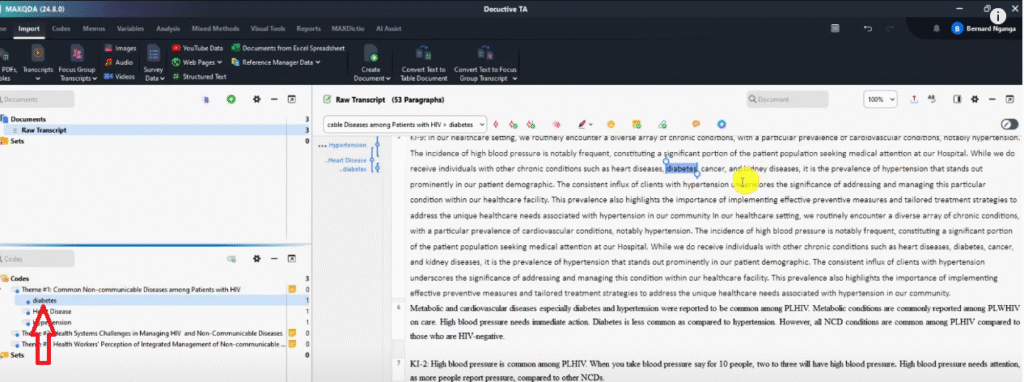
- Code in-vivo — when the participant’s exact word or phrase is itself the best label (e.g., ‘diabetes’, ‘hypertension’), highlight it and use code in-vivo — the participant’s language becomes the code name
After creating each code, drag and drop it under the predetermined theme it belongs to. You can edit any code name at any point by right-clicking → Properties.

Coding Theme 1: Common Non-Communicable Diseases Among HIV Patients
The first interview question asked participants to share the common non-communicable diseases they manage at their hospital. Working through the transcript, I identified and coded the following under Theme 1:
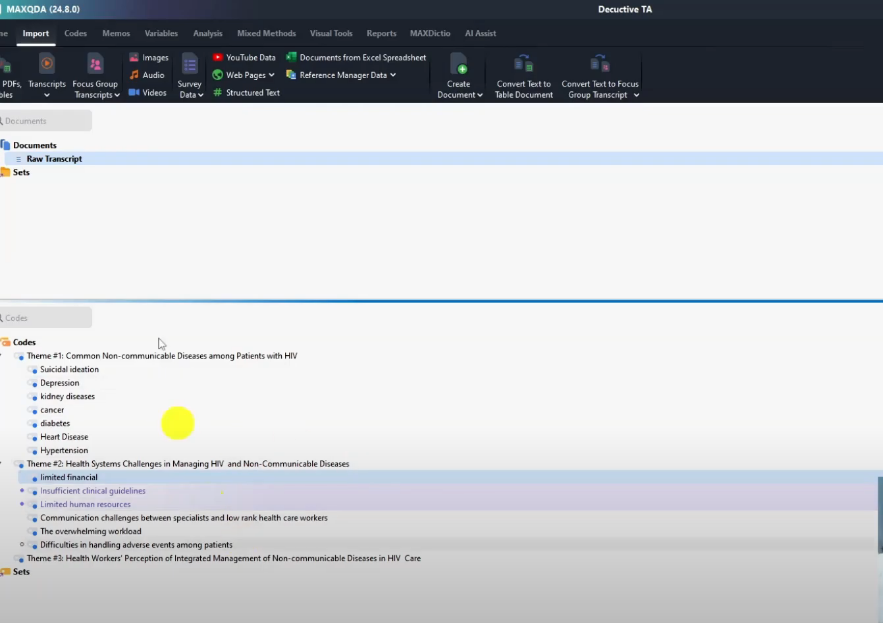
- Hypertension — multiple participants identified high blood pressure as the most common NCD among HIV patients; I added quotes from KI-2, KI-4, KI-9, and KI-19 into this code
- Diabetes — participants mentioned both diabetes and hyperglycaemia; I used code in-vivo for ‘diabetes’ and dragged additional hyperglycaemia quotes into the same code
- Heart disease — referenced alongside cardiovascular conditions; coded in-vivo
- Cancer and kidney diseases — both mentioned; coded in-vivo
- Depression — emerged as a prominent mental health NCD; KI-1, KI-16, and KI-20 all contributed quotes to this code
- Suicidal ideation — raised as a mental health concern alongside depression; coded separately
An important technique: when you find a new quote that supports an existing code, do not create a new code. Highlight the quote and drag it directly into the existing code. The reference count next to the code will increase, showing how many participant quotes support it.
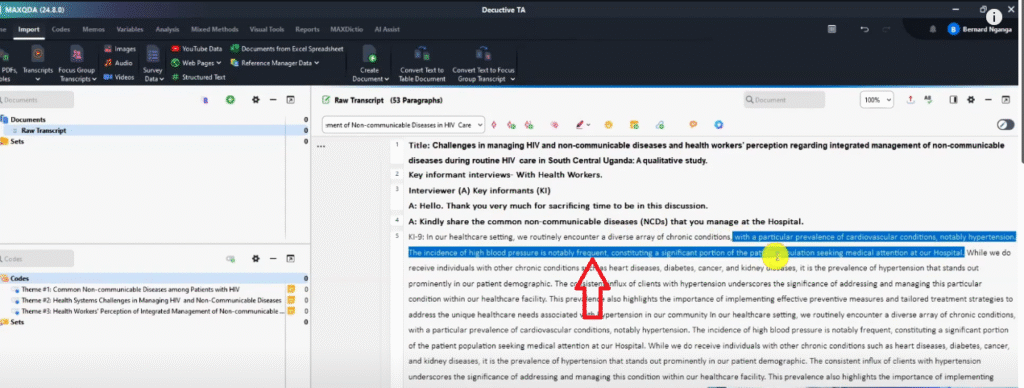




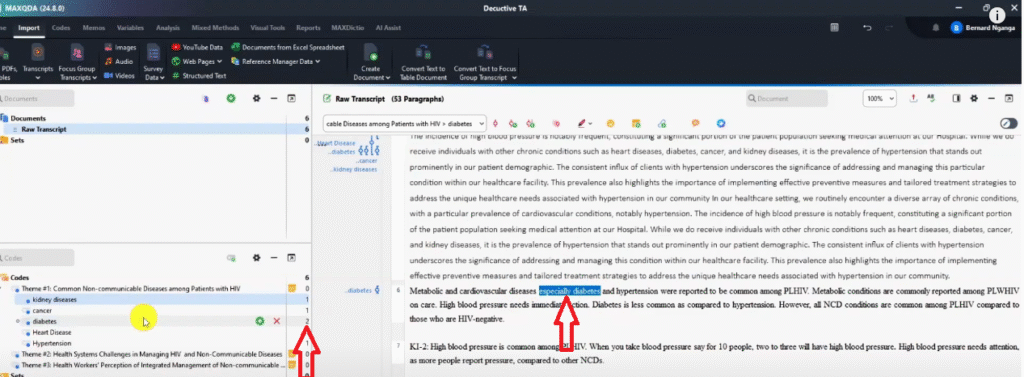
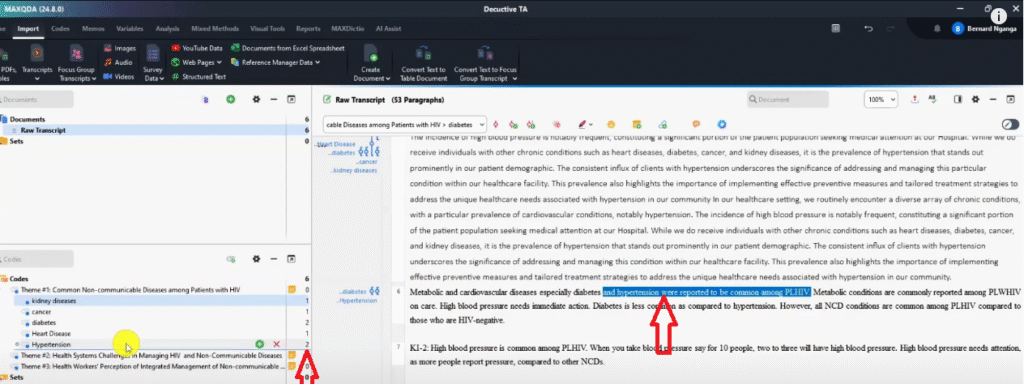
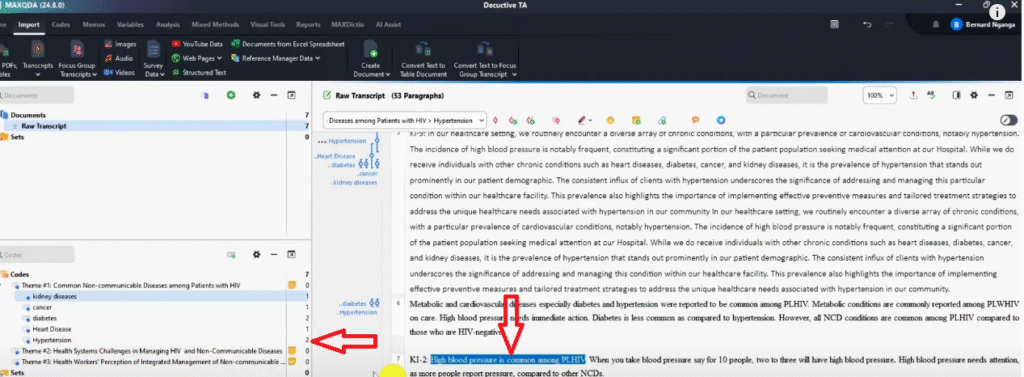
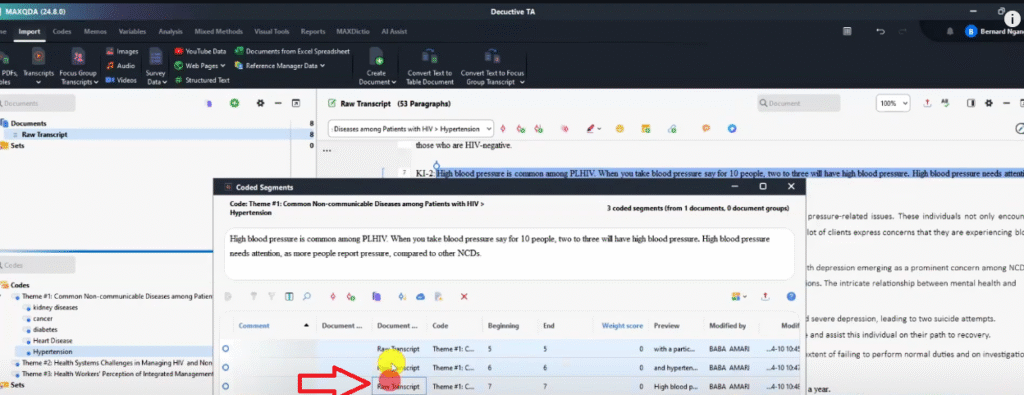
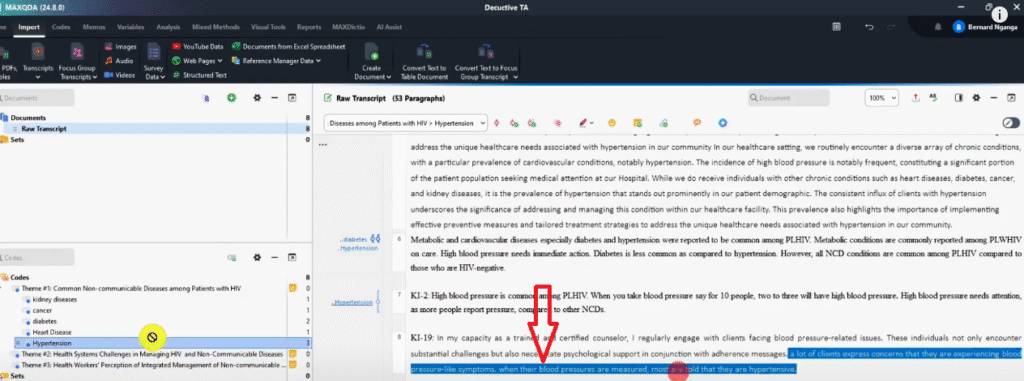
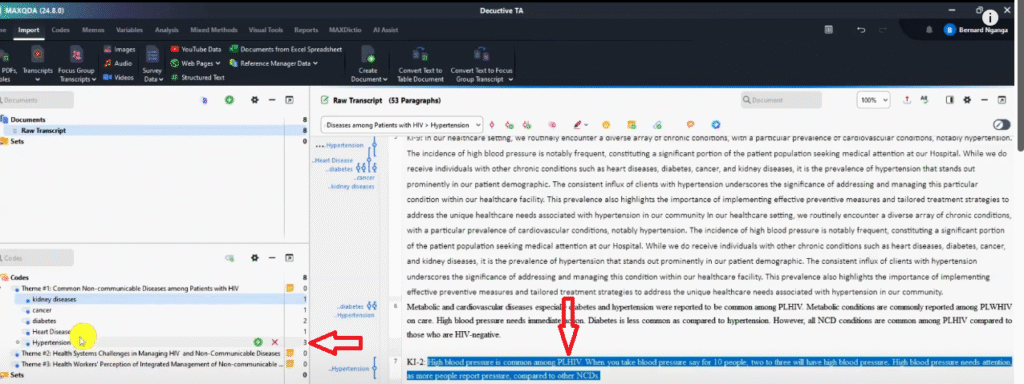
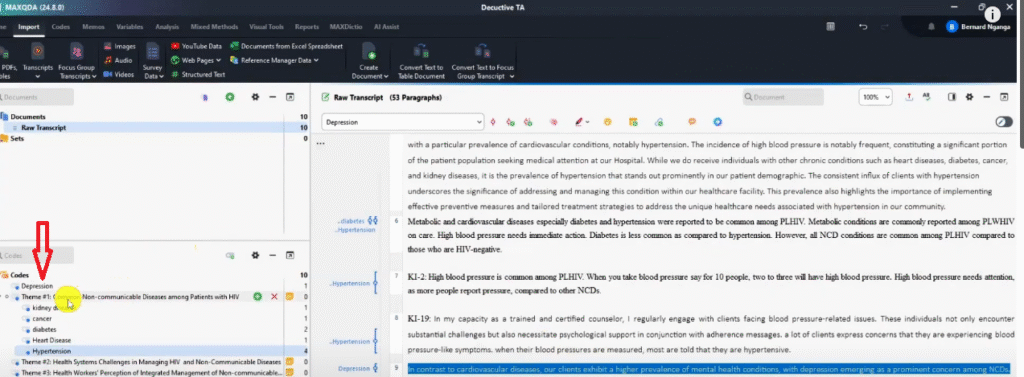
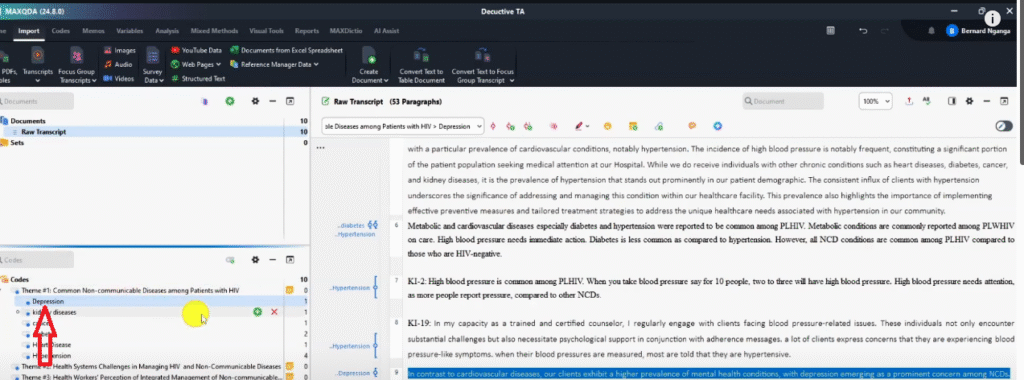
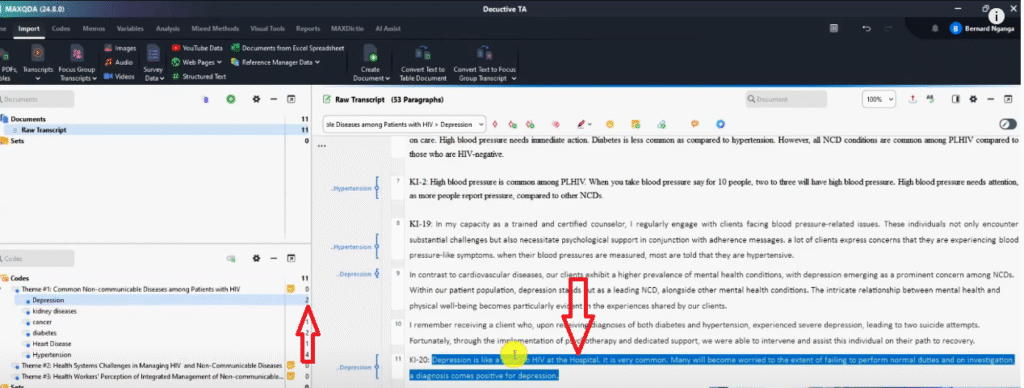
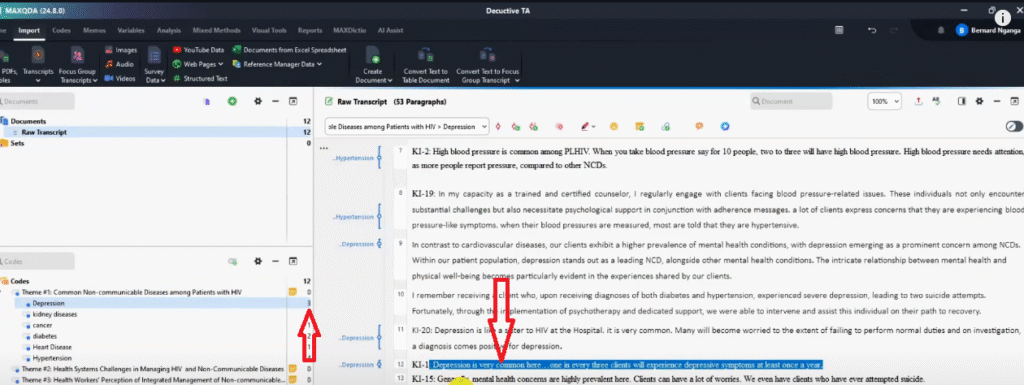
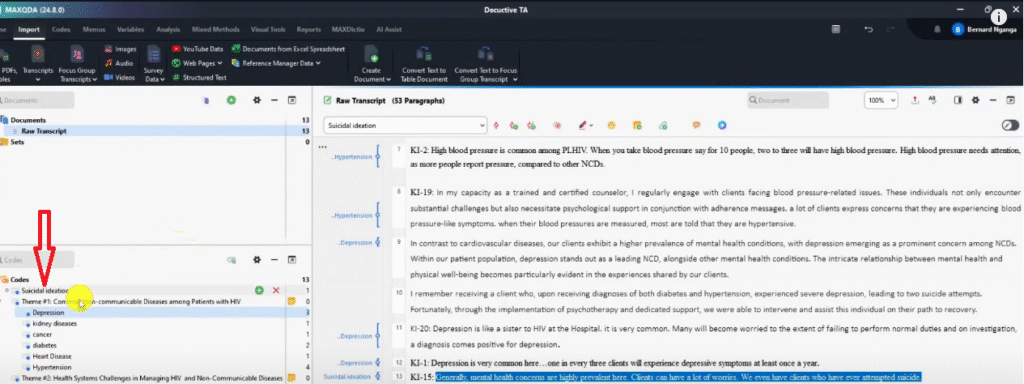
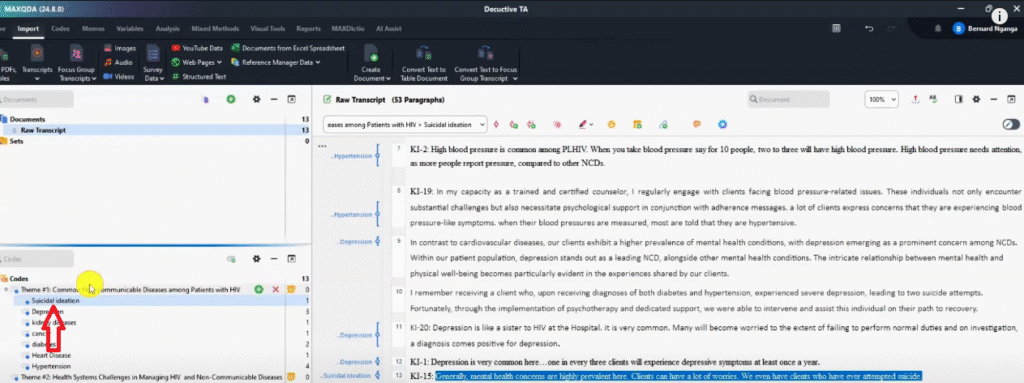
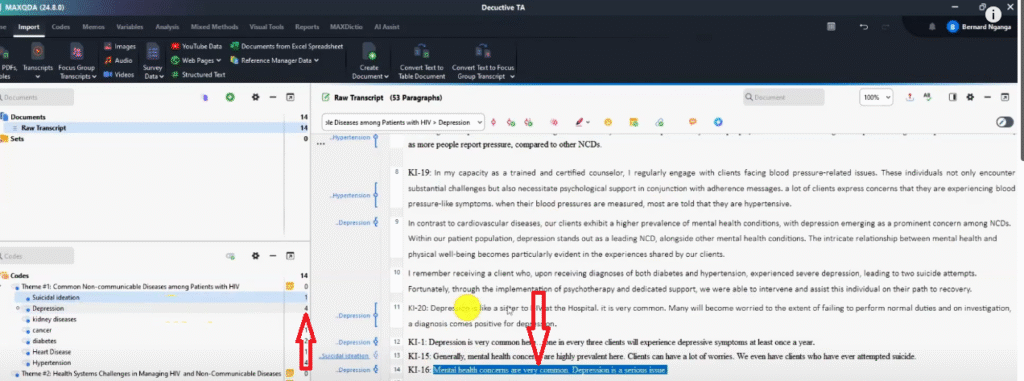
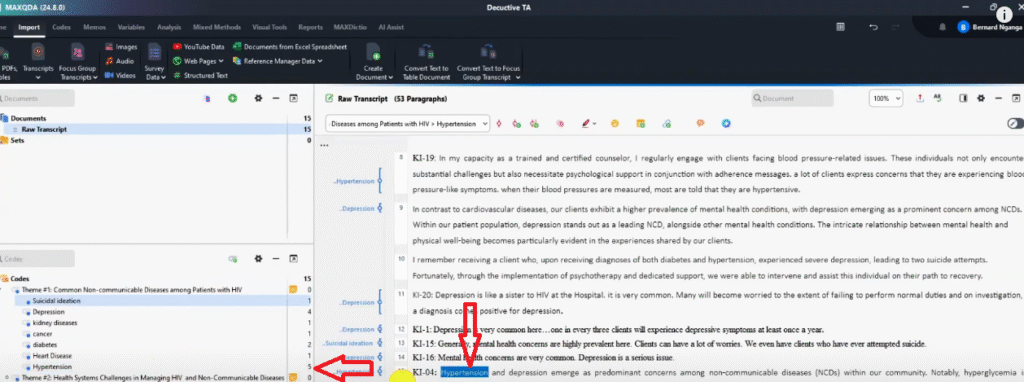
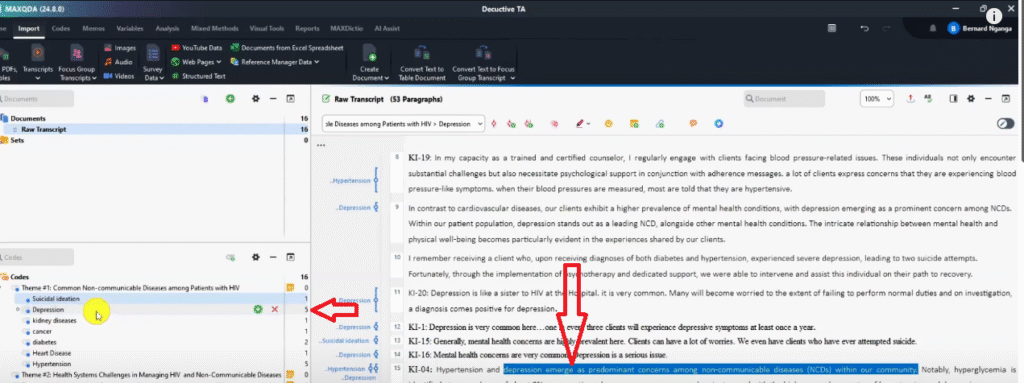

By the end of coding Theme 1, I had six codes under the theme with multiple participant quotes supporting each one. The reference count on codes like Hypertension and Depression reached four or more — indicating these are well-supported findings.
Coding Theme 2: Health System Challenges in Managing HIV and NCDs
The second interview question asked participants to describe the challenges they face managing HIV and NCDs together. Working through the relevant transcript sections, I created the following codes under Theme 2:
- Difficulties in handling adverse events among patients — participants described the complexity of managing treatment side effects across two conditions
- Overwhelming workload — coded in-vivo; multiple participants described unsustainable patient loads
- Communication challenges between specialists and lower-cadre health workers — a structural gap between hospital specialists and frontline staff
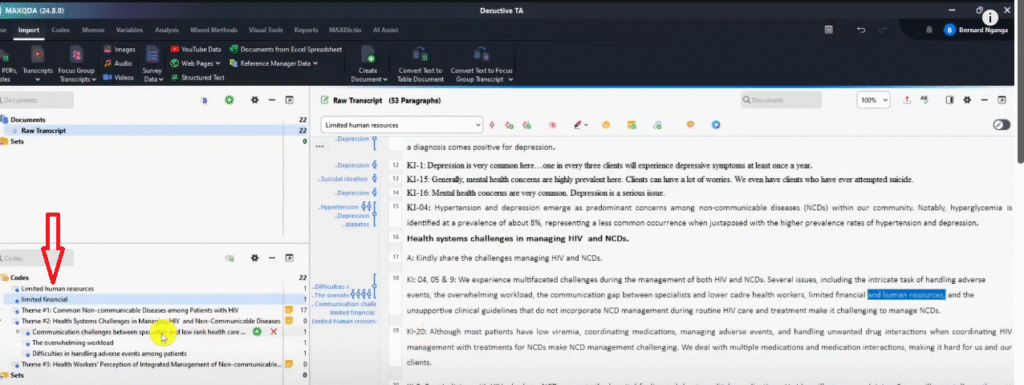
- Limited financial resources — underfunding of integrated care programmes
- Limited human resources — insufficient staffing to manage combined HIV and NCD caseloads
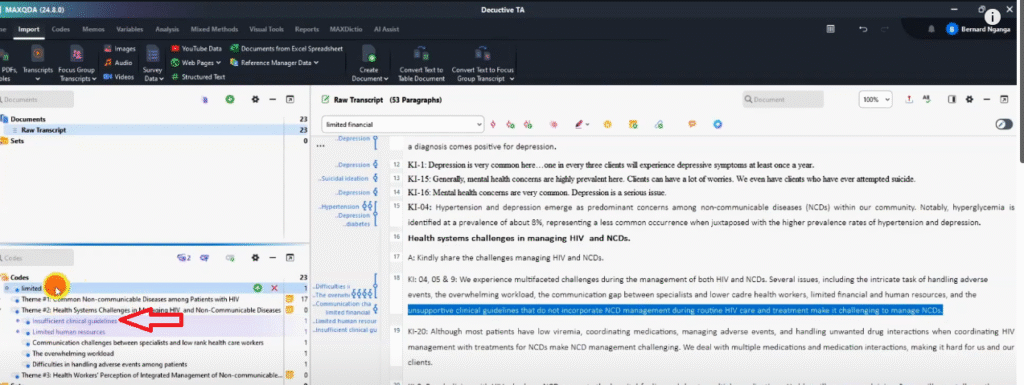
- Insufficient clinical guidelines — existing guidelines do not incorporate NCD management during routine HIV care


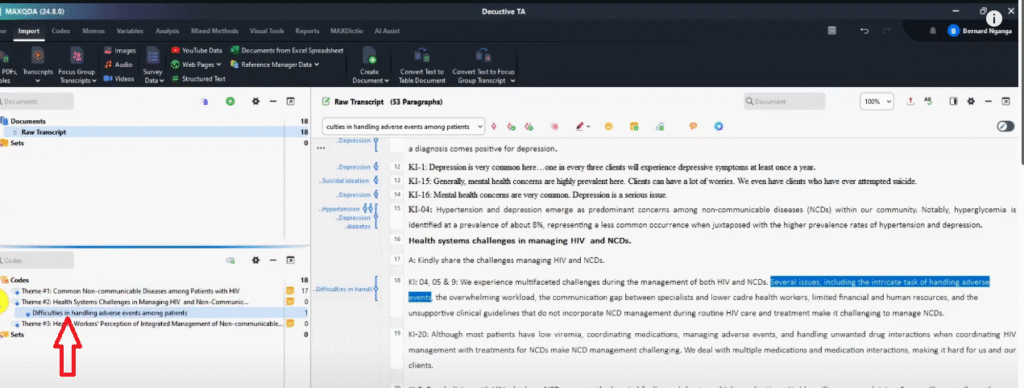
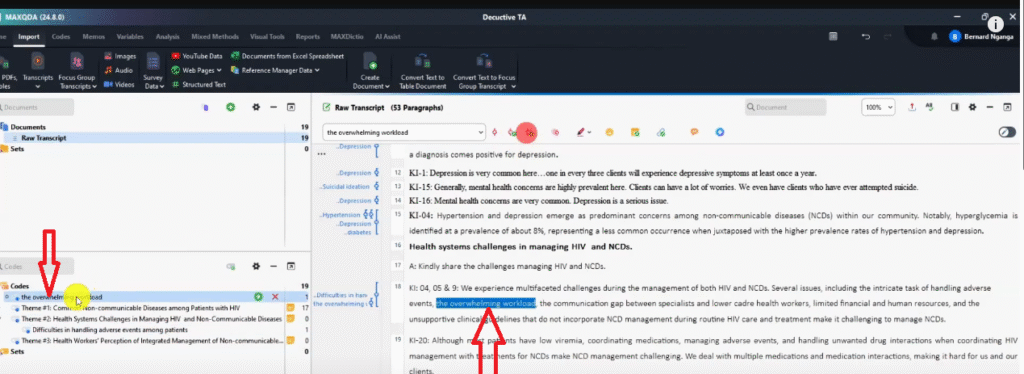

Note that I coded ‘limited financial resources’ and ‘limited human resources’ as two separate codes rather than combining them. While they are related, they represent distinct challenges with different solutions — keeping them separate preserves analytical precision. You can always merge codes later during the review step if you decide they are too similar.
Step 5 — Review and Refine Your Codes
Once you have finished coding your transcripts, review your code system critically. At this stage, you are looking for:
- Codes that overlap significantly — consider merging them into one
- Codes that are placed under the wrong theme — move them
- Codes with only one participant quote — consider whether they are genuinely important or should be removed
- Code names that are unclear — rename them for precision
- Codes that represent a pattern important enough to deserve their own theme — this is unusual in deductive analysis but can happen if your data reveals something not anticipated in your original framework
To merge codes in MAXQDA, right-click the code you want to absorb → Cut, then right-click the target code → Merge into selected code. This consolidates the quotes from both codes into a single code.
After reviewing, your code system should be clean, well-organised, and directly aligned with your predetermined themes. This is your final analytical product — the codebook you will use to write your findings chapter.



For guidance on how to write up your findings after completing your analysis, I cover the full reporting process in my guide on how to report thematic analysis findings.
Comparison Table: Inductive vs Deductive Thematic Analysis
Use this table to confirm which approach is right for your study before you begin. Deductive rows are highlighted.
| Inductive Thematic Analysis | Deductive Thematic Analysis | |
| Starting point | Open mind — no themes in advance | Predetermined themes from theory, literature, or research questions |
| Where themes come from | Emerge from the data through open coding | Defined in advance; researcher finds codes to fit them |
| Coding process | Open coding first, then grouping into themes | Themes entered first; coding matches data to themes |
| Philosophical fit | Interpretivist, constructivist research | Post-positivist, theory-driven research |
| Common frameworks | Braun & Clarke (RTA), Saldaña’s method, Collaizzi | Codebook approach, Template analysis |
| Best used when | Exploring a new topic with no prior framework | Testing or applying an existing theoretical framework to data |
| Risk | Themes may not align with research questions if coding is too open | Researcher may force data to fit predetermined themes |
Frequently Asked Questions
Can I use MAXQDA for inductive thematic analysis as well?
Yes — MAXQDA supports both approaches equally well. The difference is in your starting point: for inductive analysis, you build your code system as you code (codes come first, themes emerge later). For deductive analysis, you build your theme structure first and find codes to fill it. I cover the full inductive thematic analysis process in MAXQDA using Saldaña’s method in a dedicated guide.
What if some of my data does not fit any of my predetermined themes?
This is normal and expected. In deductive thematic analysis, not all data needs to be coded — only segments relevant to your predetermined themes. However, if significant amounts of data consistently fall outside your themes, this may indicate that your predetermined framework does not fully capture your participants’ experiences. In that case, you can add a residual theme or consider whether a partial inductive approach is more appropriate for your study.
What is the difference between a codebook approach and template analysis?
Functionally, they are very similar — both involve defining themes before coding begins and then finding codes to fit within them. The codebook approach tends to be described in terms of a formal codebook document with theme definitions, while template analysis uses the term ‘template’ for the same structure. Most researchers use them interchangeably in practice. The key shared feature is that both are deductive: the framework comes before the data.
Should my predetermined themes come from my research questions or from the literature?
Both are valid sources, and they are often used together. Themes drawn from research questions ensure your analysis directly addresses what your study set out to investigate. Themes drawn from existing literature or theory allow you to test whether established frameworks apply to your specific context. In practice, most deductive studies draw on both — research questions provide the structure, literature provides the theoretical grounding.
How many codes should I aim for under each theme?
There is no fixed number. The codes under each theme should represent the full range of ideas participants expressed in relation to that theme. In this tutorial, Theme 1 had six codes and Theme 2 had six codes — each representing a distinct NCD or challenge. Aim for enough codes to capture the breadth of participant responses without creating so many that the theme loses coherence.
Key Takeaways
- Deductive thematic analysis starts with predetermined themes — your job is to find codes in the data that fit within those themes, not to discover new themes
- The codebook approach and template analysis are two names for the same process — both require defining themes and their descriptions before coding begins
- In MAXQDA, enter your themes into the code system first, add memos as descriptions, then sort them before opening your transcript
- Use ‘code in-vivo’ when a participant’s exact word is itself the best label; use ‘code with new code’ for more interpretive labels
- When you find a new quote supporting an existing code, drag it into the existing code rather than creating a duplicate
- Code names can be long and descriptive at this stage — you will review and refine them in Step 5
- The review step is where you merge overlapping codes, move misplaced codes, and ensure your final code system is clean and aligned with your themes
What’s Next After Deductive Thematic Analysis in MAXQDA?
If you’re working through your MAXQDA analysis and need expert support at any stage — from coding to visualization to the final findings report — I offer a done-for-you qualitative analysis service and one-to-one consulting sessions. Reach out at bernardmugo@survivingresearch.com — I’m happy to help.
![How to Code Qualitative Data in MAXQDA [Step-by-Step Guide]](https://survivingresearch.com/wp-content/uploads/2024/08/Maxqda-Tutorial.webp)
![Is AI Ethical for Qualitative Data Analysis? [Tested]](https://survivingresearch.com/wp-content/uploads/2025/04/Can-I-use-AI-to-do-qualitative-coding-ethically.jpg)
Pingback: MAXQDA Free Training for Beginners: Start Coding Your Data -