

Last Updated on 5 months ago by Bernard Mugo
| What You’ll Learn: This free MAXQDA tutorial for beginners walks you through the two most critical starting steps of qualitative analysis — familiarising with your data and generating your first codes. By the end, you’ll understand the MAXQDA interface, know how to import transcripts, and be able to create and colour-code your first set of qualitative codes using the Braun and Clarke 6-step framework. |
- Why You Need a Framework Before You Open MAXQDA
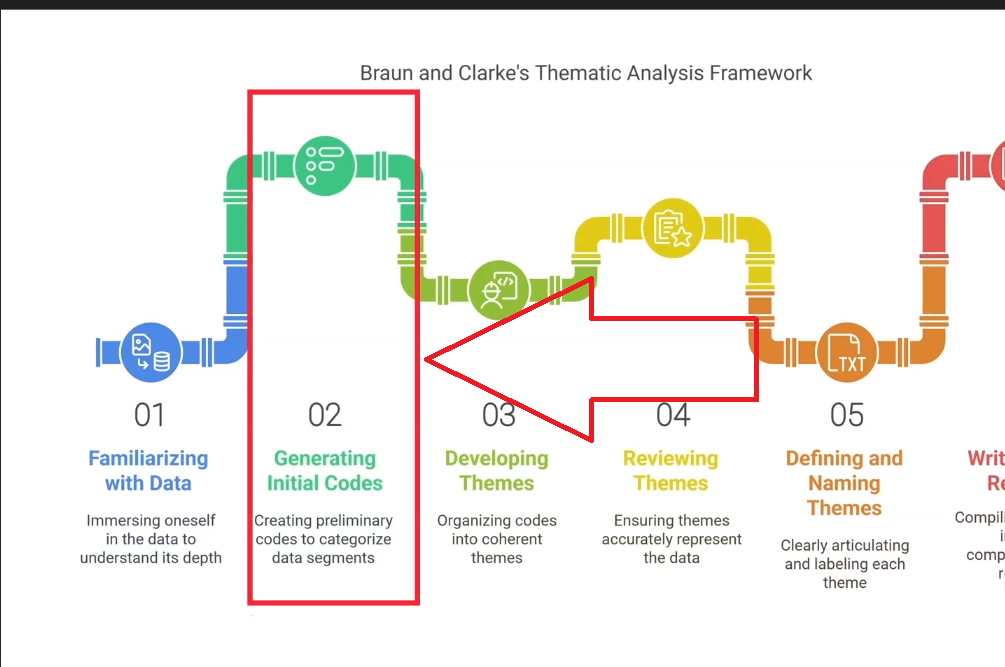
- The Braun and Clarke 6-Step Thematic Analysis Framework
- Getting Started: The MAXQDA Interface Explained
- Step 1 — Importing Transcripts and Familiarising With Your Data
- Step 2 — Generating Initial Codes in MAXQDA
- What Comes Next: Steps 3–6 of the Braun and Clarke Framework
- Frequently Asked Questions
- Key Takeaways
Whenever you want to conduct thematic analysis using MAXQDA, the first thing to get right isn’t the software — it’s your framework. Many beginners open MAXQDA and start clicking before they’ve decided how they’re going to analyse their data. That’s the fastest way to end up with a disorganised code system and a findings chapter that doesn’t hold together.
My name is Bernard Mugo. I’ve helped more than 600 PhD students and researchers analyse qualitative data using MAXQDA. In this free beginner training, I’ll show you exactly how to get started — from understanding the MAXQDA interface all the way through to creating and organising your first qualitative codes. If you want the complete workflow in one place, my full MAXQDA qualitative analysis tutorial covers all six steps from import to findings report.
Why You Need a Framework Before You Open MAXQDA
MAXQDA is a tool for managing and organising your qualitative analysis — it is not the analysis itself. The framework you choose determines how you read your data, what you look for, and how you move from raw transcripts to meaningful findings. Without a clear framework in place before you start, MAXQDA becomes a very expensive highlighter.
The most common mistake beginners make is treating MAXQDA as the methodology. It isn’t. Whether you’re using Braun and Clarke’s reflexive thematic analysis, Saldaña’s inductive approach, or deductive thematic analysis — the framework comes first. MAXQDA then helps you execute it systematically.
The Braun and Clarke 6-Step Thematic Analysis Framework
The Braun and Clarke 6-step framework is one of the most widely used approaches to thematic analysis in qualitative research. Developed by Virginia Braun and Victoria Clarke, it provides a clear, structured path from raw data to final themes. SAGE Research Methods describes it as one of the most cited frameworks in qualitative methodology.
The six steps are:
- Familiarising with the data — reading and re-reading your transcripts to understand the context and nuance
- Generating initial codes — labelling meaningful passages with short interpretive statements
- Developing preliminary themes — grouping codes that share a pattern of meaning
- Reviewing themes — checking themes against your coded data and refining them
- Defining and naming themes — writing clear, precise descriptions for each theme
- Writing the report — presenting your themes with supporting quotes and analysis in your findings chapter
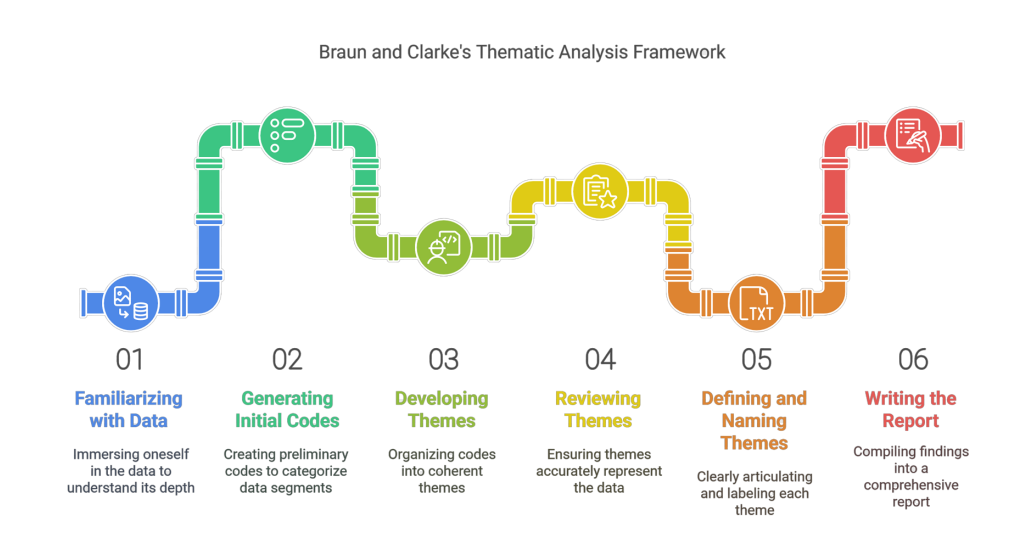
This tutorial covers Steps 1 and 2 in detail. For a complete walkthrough of all six steps in MAXQDA, see my guide on reflexive thematic analysis using MAXQDA.
Getting Started: The MAXQDA Interface Explained
Before importing any data, it helps to understand where everything lives in MAXQDA. For a full overview of the software’s features, visit the MAXQDA official how-to resource centre. Here’s what you need to know to get started.
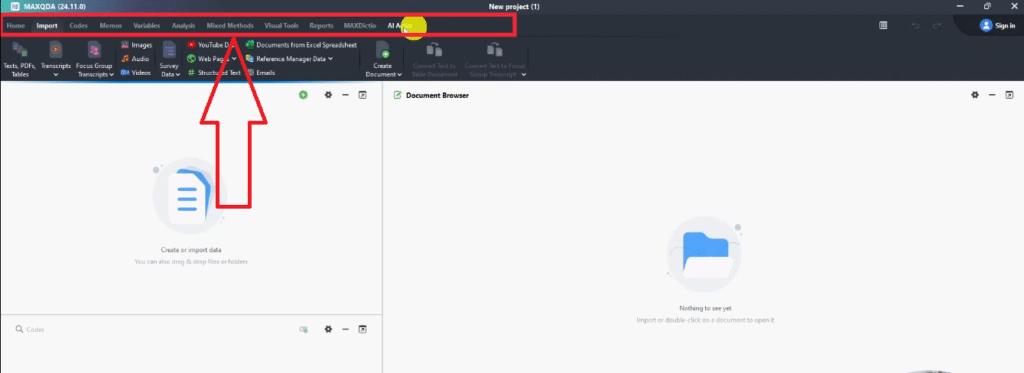
The Main Toolbar
The top menu bar contains the main tools you’ll use throughout your analysis. The key tabs are:
- Home — project management and settings
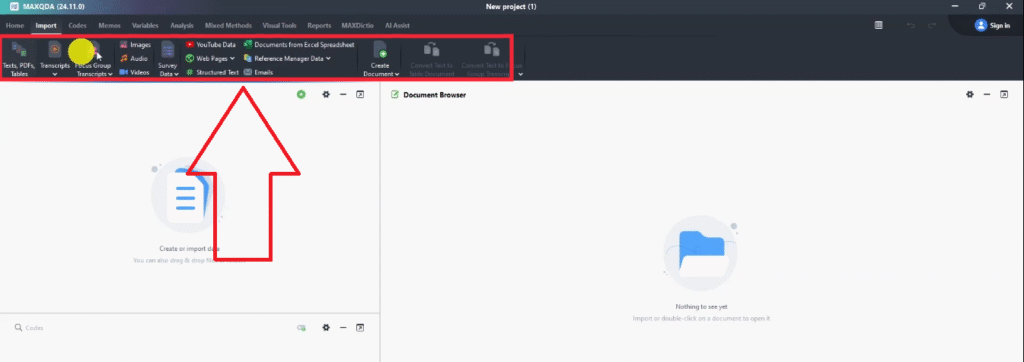
- Import — bringing in transcripts, PDFs, audio files, and other data sources
- Codes — creating, editing, and organising your code system
- Analysis — running queries, retrieving coded segments, and exploring your data
- Visual Tools — generating charts, code maps, and visualizations for your findings report
- Reports — exporting your code system, coded segments, and findings
The Four Key Panels You Need to Know
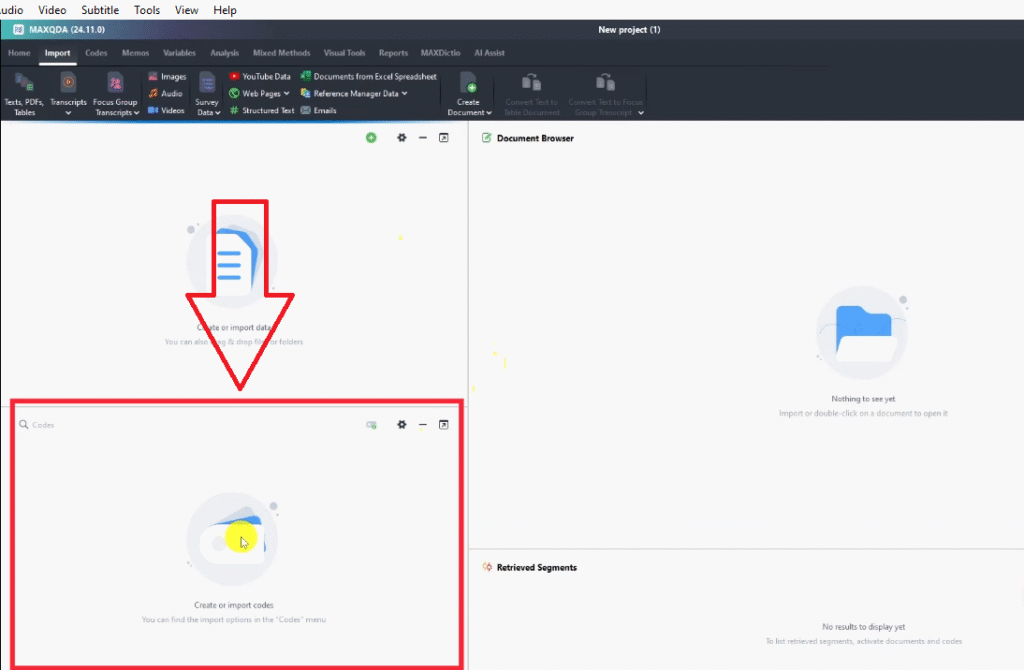
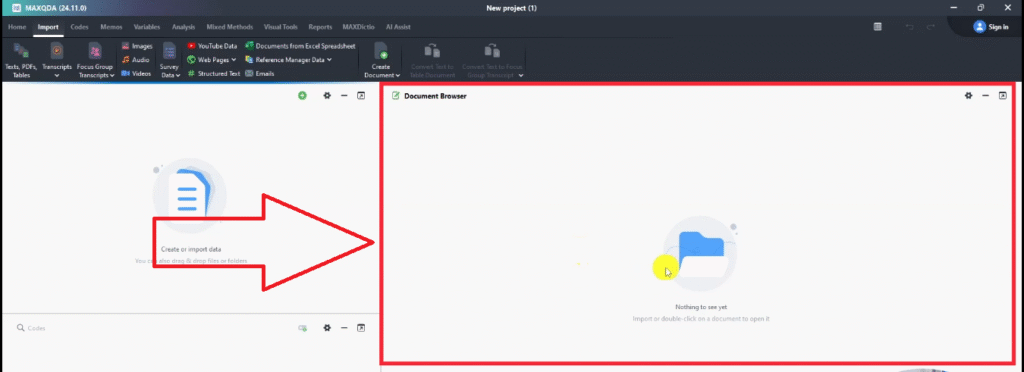
Below the toolbar, MAXQDA is divided into four main panels. Getting familiar with these early saves a lot of time:
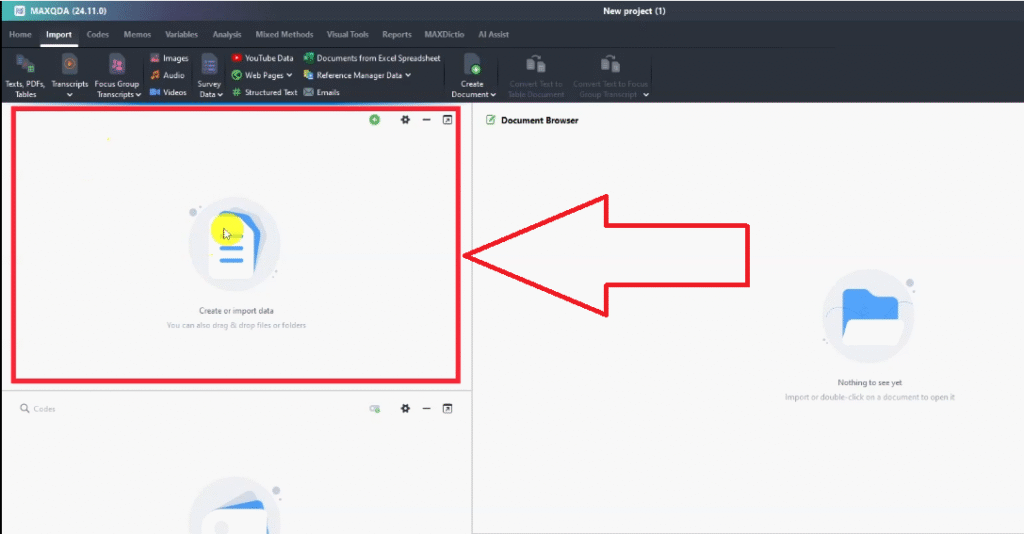
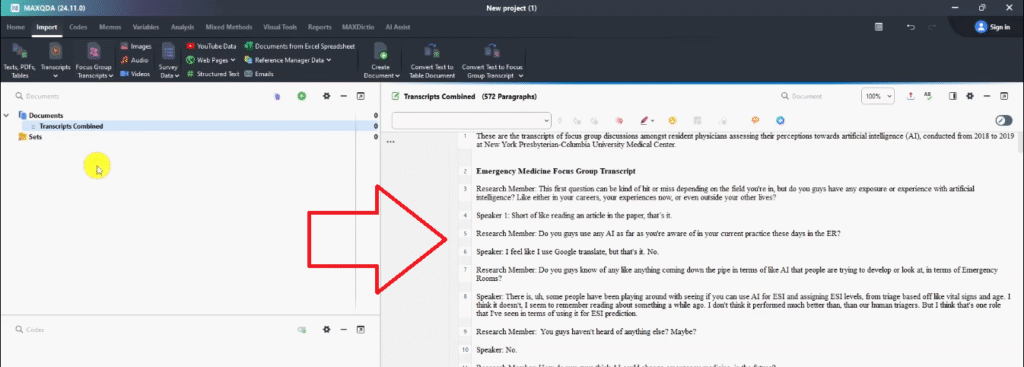
- Document System (top left) — this is where your transcripts appear after import. Each document you add will show up here as a named file.
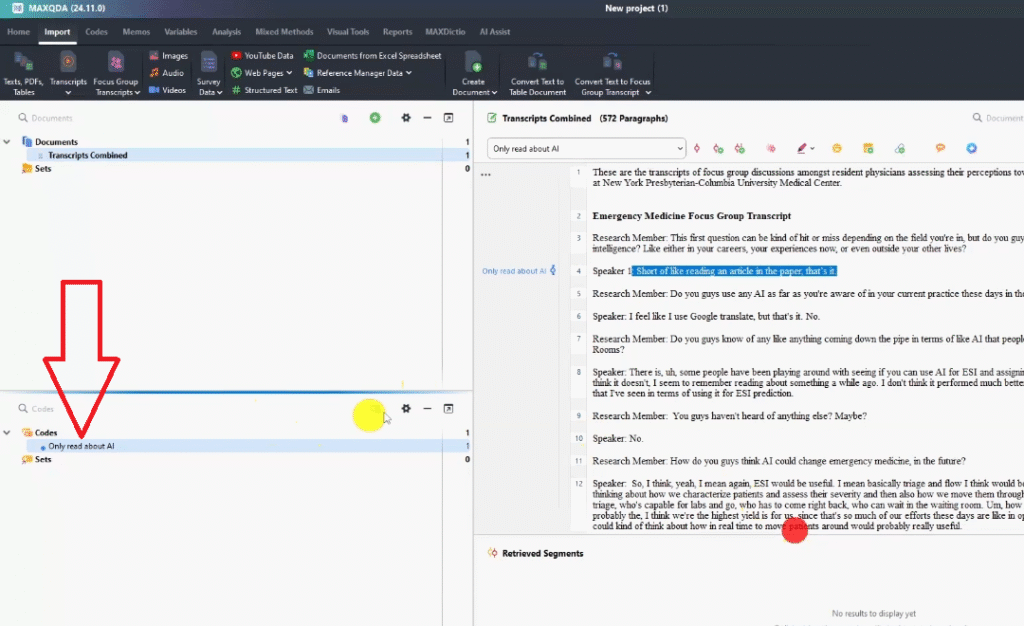
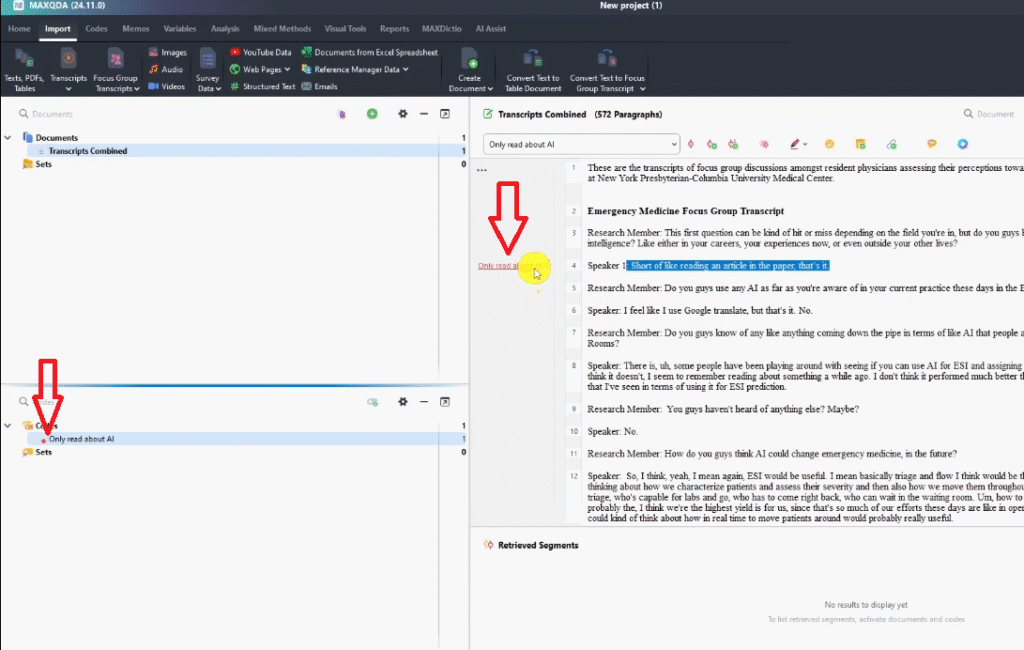
- Code System (bottom left) — this is where your codes live. As you create codes, they appear in a hierarchical list you can expand, collapse, and reorganise.
- Document Browser (top right) — this is where you read and code your transcript. Highlighting a passage and right-clicking lets you assign a code directly.
- Retrieved Segments (bottom right) — this shows all the passages associated with a selected code, across all your documents. This is what you’ll use when writing up your findings.
Step 1 — Importing Transcripts and Familiarising With Your Data
The first step of the Braun and Clarke framework is familiarisation — reading your data thoroughly before you touch a single code. This step is often skipped by beginners eager to start coding, and it consistently leads to poor-quality codes that miss the nuance of what participants actually said.
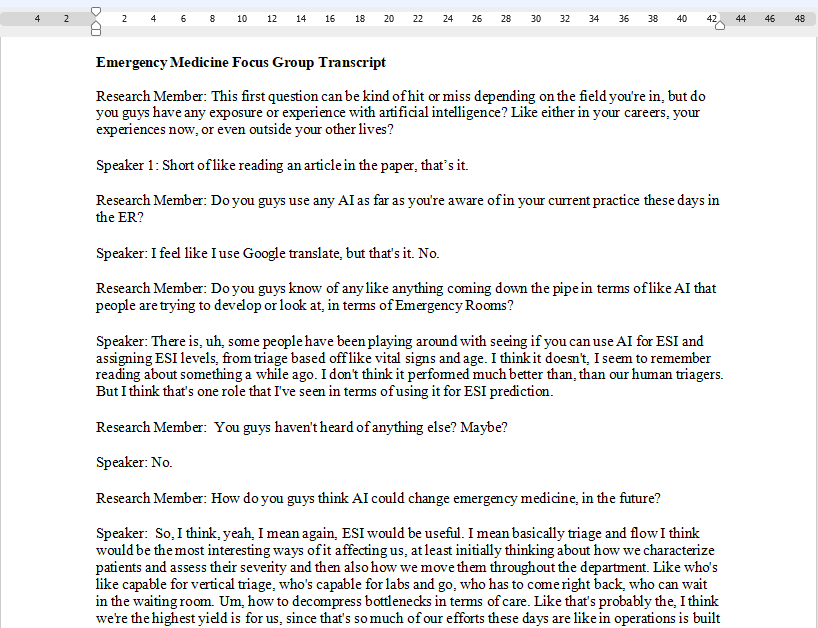
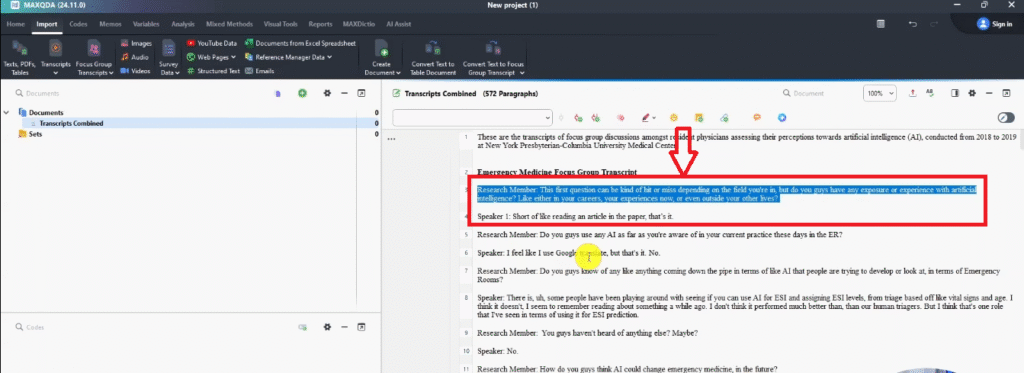
Start by importing your transcripts. Drag and drop your Word or PDF files directly into the Document System panel, or use the Import tab in the toolbar. Once imported, open each transcript and read through it fully — not coding, just reading. Make a note of recurring ideas, surprising responses, and anything that feels significant in relation to your research questions.
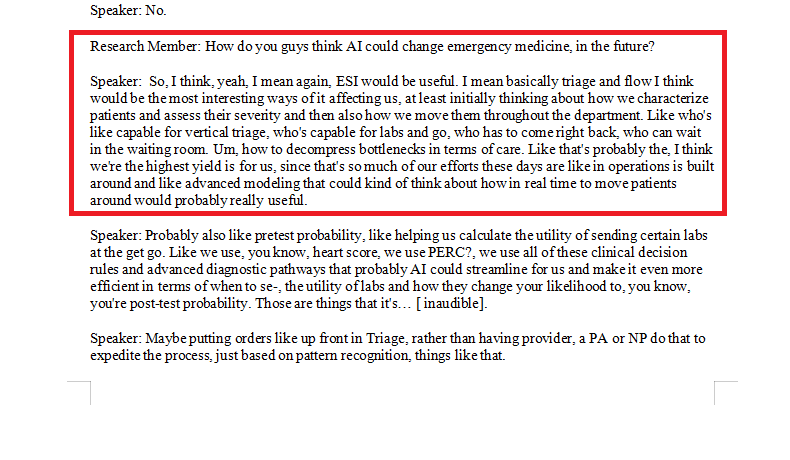
In the example used in this tutorial, the transcript is from a focus group of resident physicians discussing their perceptions of artificial intelligence in emergency medicine, conducted between 2018 and 2019. Reading through it, you quickly pick up the context: participants had minimal direct AI experience at the time, were aware of early use cases like ESI triage prediction, and were cautiously optimistic about AI improving patient flow. That context shapes every coding decision that follows.
Don’t rush this step. The time you invest in familiarisation directly improves the quality of your codes.
Step 2 — Generating Initial Codes in MAXQDA
Once you’ve familiarised yourself with the data, Step 2 is generating initial codes. This is the core of qualitative analysis — and the step where most of the intellectual work happens.
What Is a Qualitative Code?
| Definition: A qualitative code is a short, interpretive label attached to a segment of data that captures its meaning in relation to your research questions. A code is not a description of what was said — it is an interpretation of what it means. |
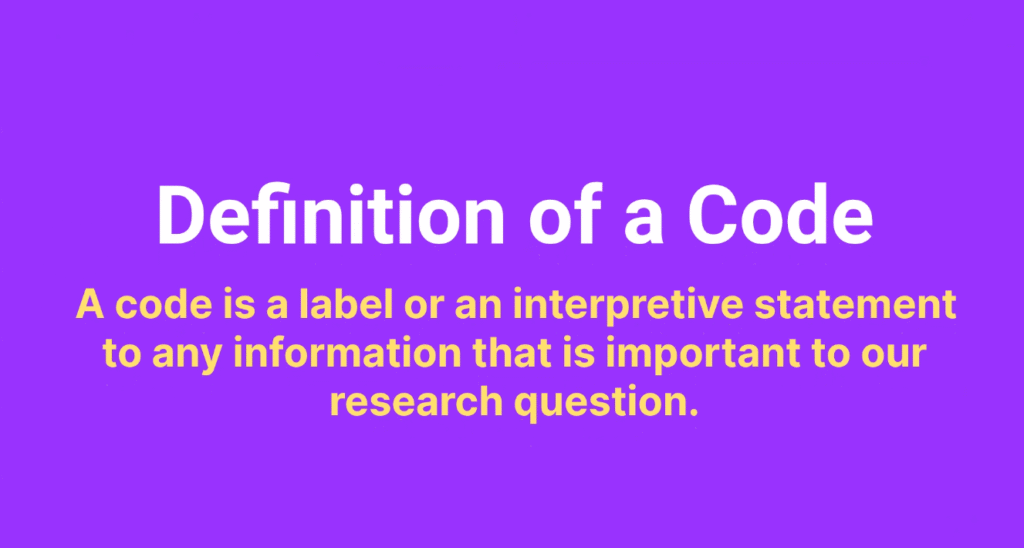
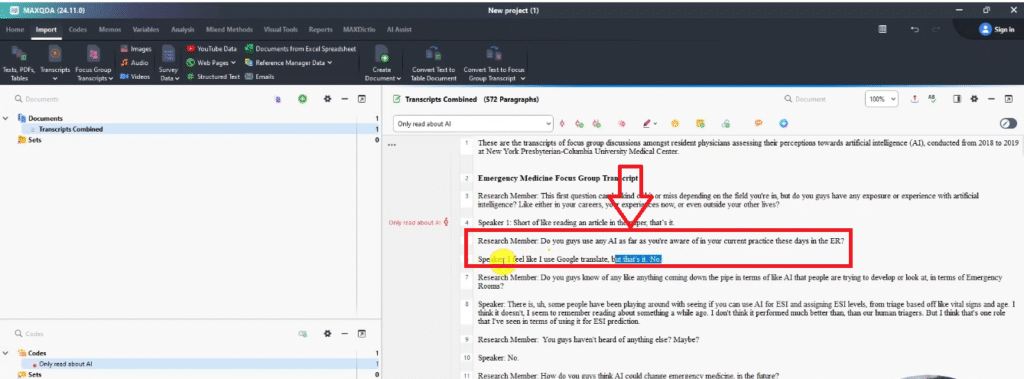
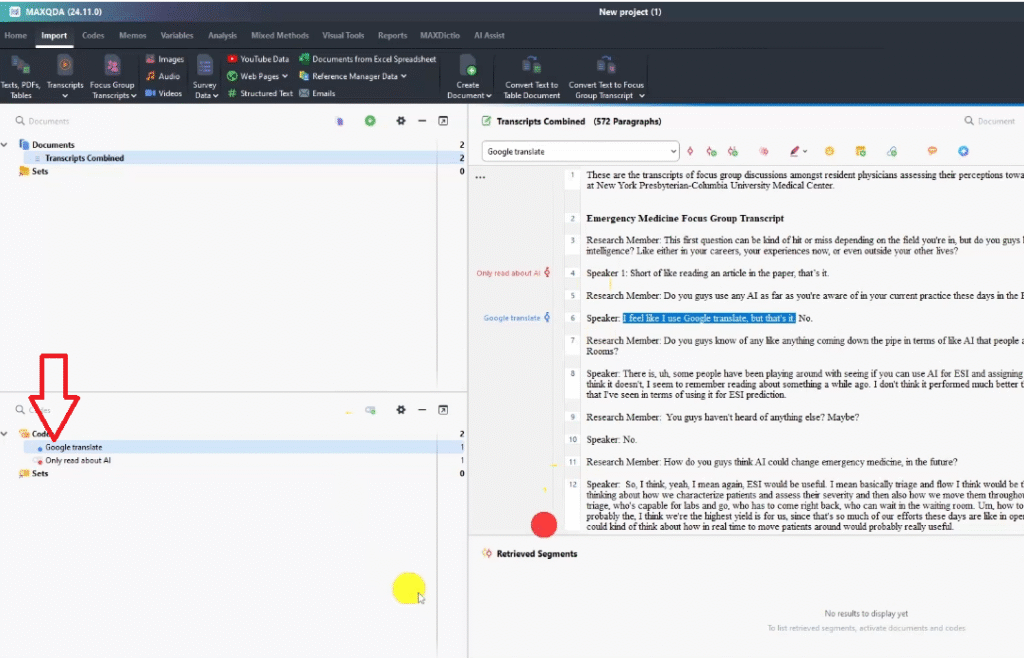
For example, if a participant says ‘I feel like I use Google Translate, but that’s it’ in response to a question about AI use in clinical practice, a good code is not ‘uses Google Translate’ — it’s ‘limited AI exposure in daily practice’. That label captures the meaning, not just the surface content.
Using Colour-Coding to Track Your Research Questions
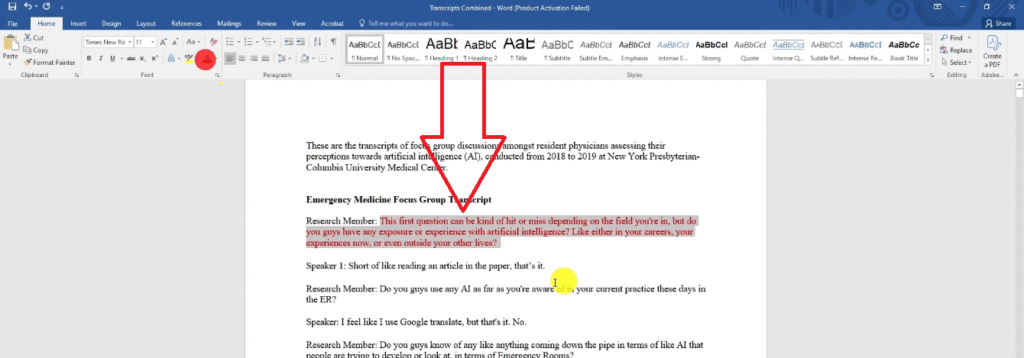
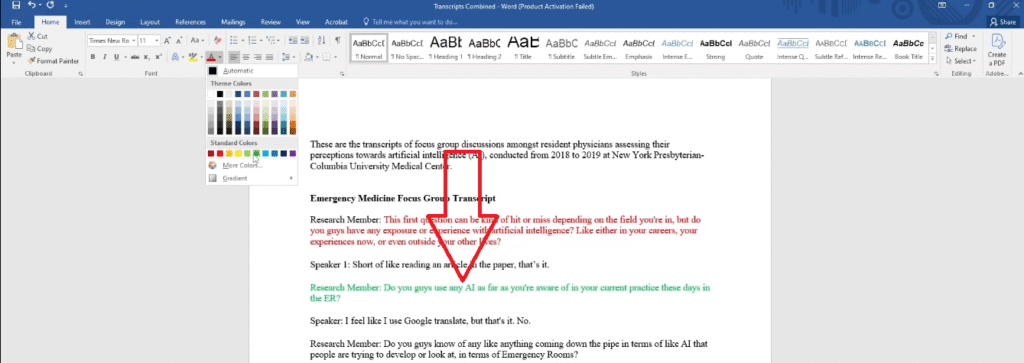
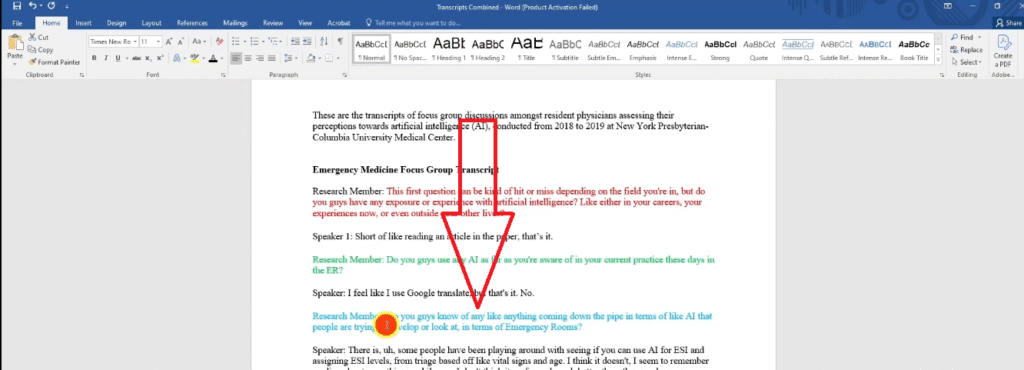
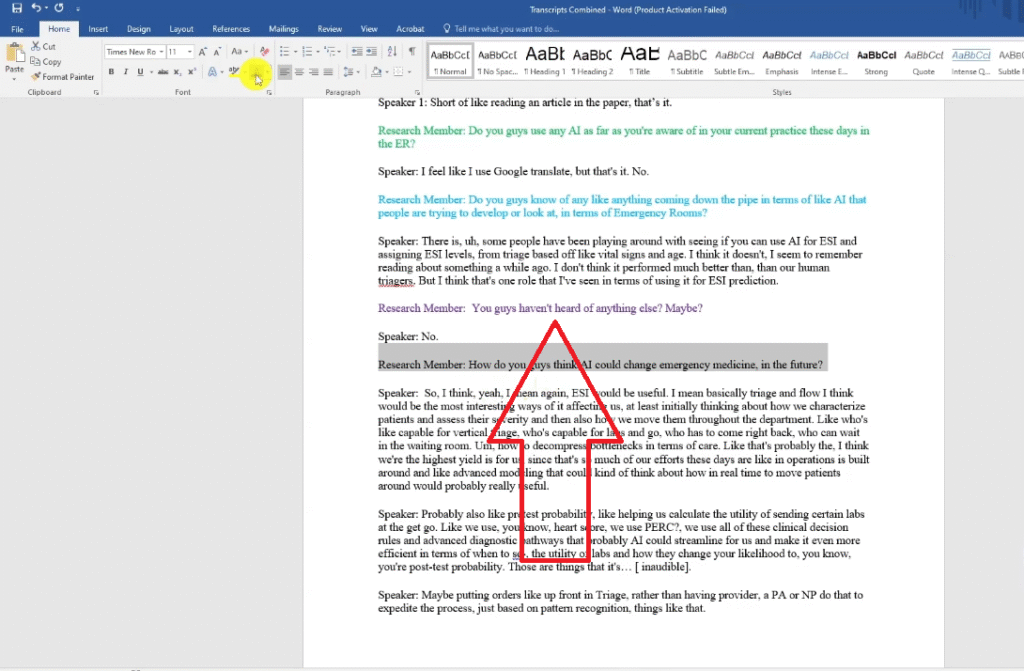
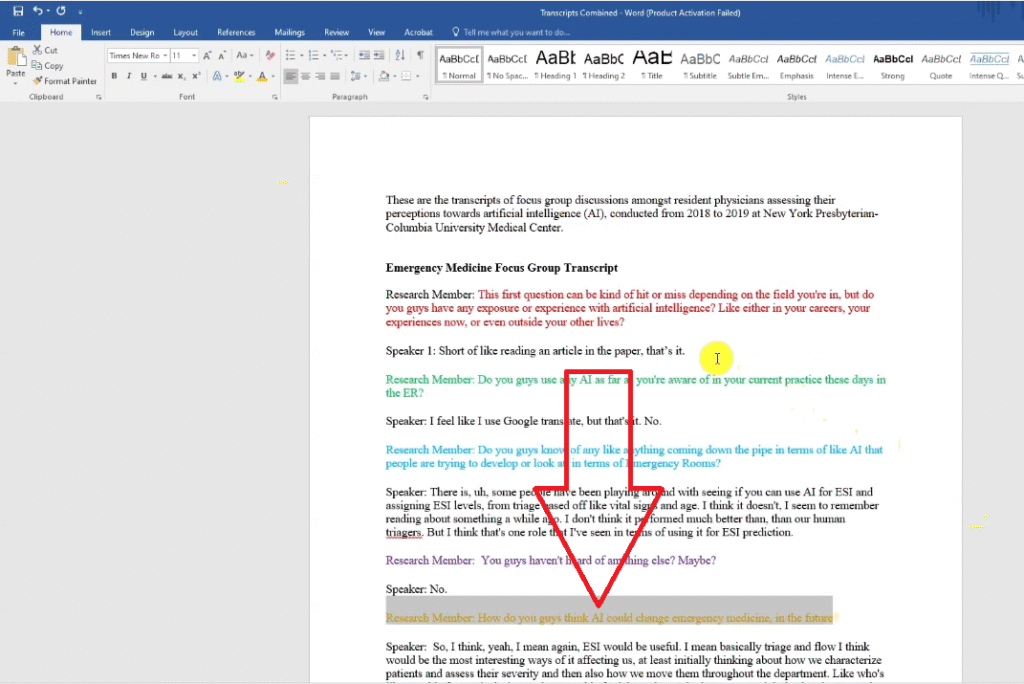
One technique I use consistently with every client project is assigning a colour to each research question before coding begins. The process is simple:
- Mark your first research question red — all codes from that question get a red label
- Mark your second research question green — all codes from that question get green
- Continue assigning colours for each subsequent research question
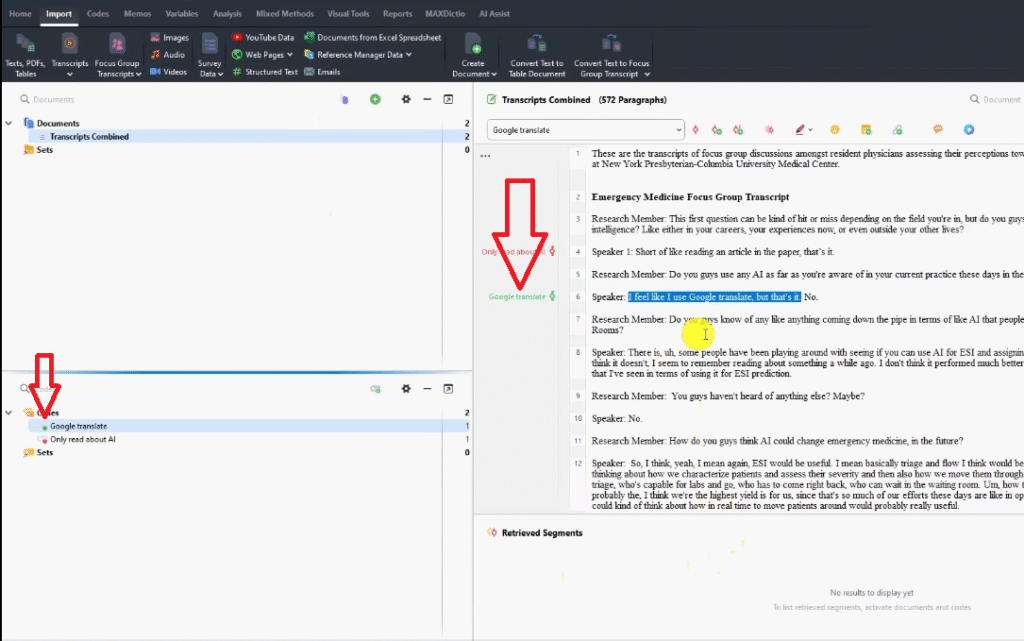
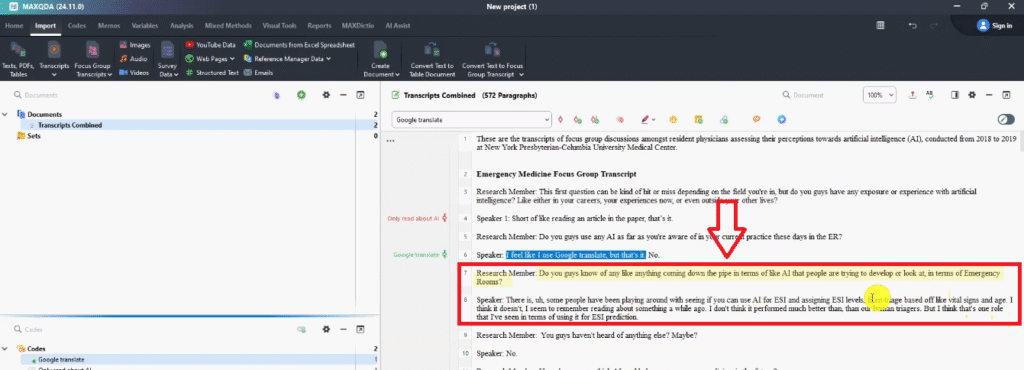
In the focus group example: the question about current AI experience was red, the question about known AI developments was blue, and the question about future AI impact was gold. Every code created from a given question inherits that colour.
Why does this matter? When you move to Step 3 — combining codes to form themes — your colour system tells you immediately which research question each code came from. This makes grouping by shared meaning much faster and more structured. For a deeper walkthrough of this technique, see my guide on interview coding in MAXQDA.
How to Create Your First Code in MAXQDA
Creating a code in MAXQDA is straightforward:
- Open your transcript in the Document Browser panel.
- Read the first question and the participant responses beneath it.
- Highlight any passage that is meaningful in relation to your research questions.
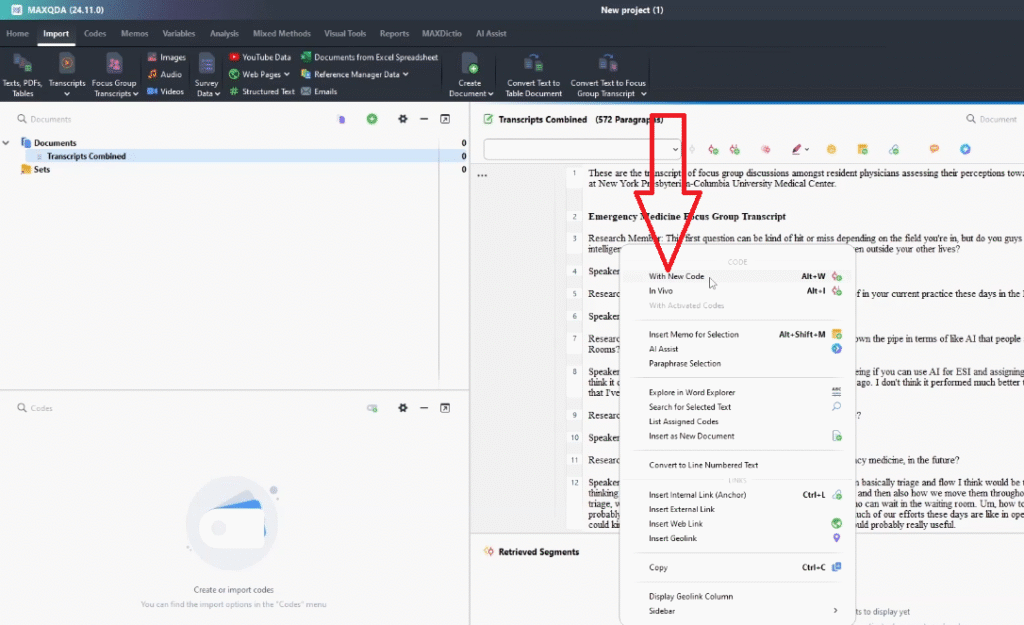
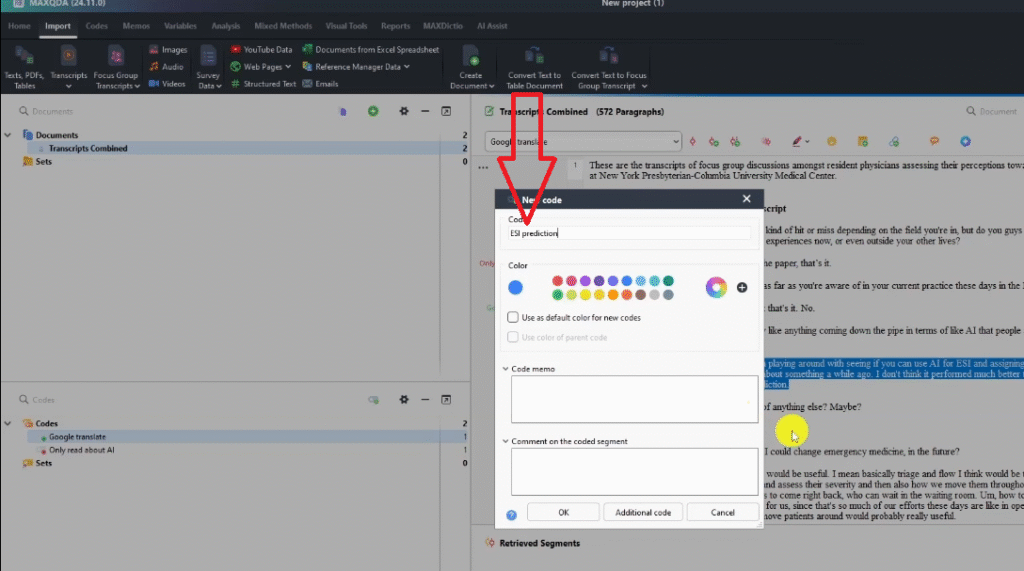
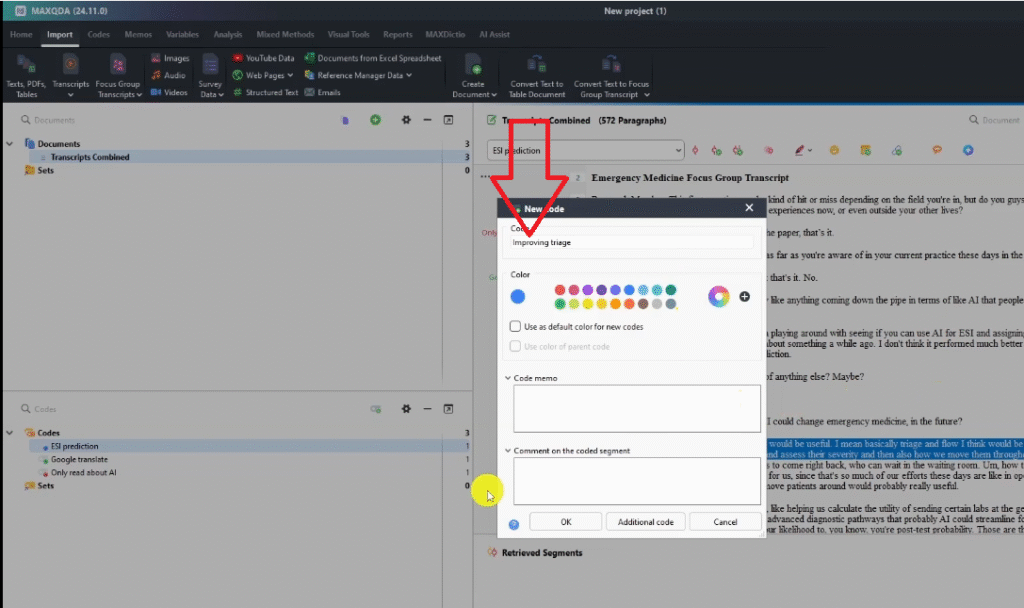
- Right-click the highlighted text and select New Code.
- Type a short, interpretive label for the code and press Enter.
In the focus group example, the first question asked participants about their experience with AI. One participant responded they had only read about it in a newspaper. The code for that passage: only read about AI — a concise label that interprets the participant’s limited familiarity with the technology.
As you code more passages, you’ll notice some fit codes you’ve already created. In that case, highlight the passage and drag it directly into the existing code in the Code System panel, rather than creating a duplicate. Keeping your code list clean from the start makes the move to themes significantly easier.
What Comes Next: Steps 3–6 of the Braun and Clarke Framework
This tutorial has covered Steps 1 and 2 — familiarisation and generating initial codes. Here’s a quick roadmap of what follows:
- Step 3 — Developing preliminary themes: group related codes by shared meaning to form draft themes.
- Step 4 — Reviewing themes: go back to the coded data and check that each theme holds together and is supported by sufficient evidence.
- Step 5 — Defining and naming themes: write a precise one-sentence definition for each theme and confirm its final name.
- Step 6 — Writing the report: present your themes with direct participant quotes in your Chapter 4 findings.
Once your analysis is complete, MAXQDA’s visual tools can help you present your findings more compellingly. See my guide on 8 must-know MAXQDA visualizations for research presentations for practical ideas.
Frequently Asked Questions
Is MAXQDA free for beginners?
MAXQDA is not free software, but it offers a 14-day free trial that gives you full access to all features — including import, coding, and visualization. Student and academic licences are available at reduced cost, and many universities provide institutional licences. Visit the MAXQDA official website to check current pricing and trial options.
Do I need to know thematic analysis before using MAXQDA?
You don’t need to be an expert, but you do need to choose a framework before you start coding. MAXQDA is a tool for executing qualitative analysis — it doesn’t decide your methodology for you. The Braun and Clarke 6-step framework is the best starting point for most beginners because it’s well-documented, widely accepted, and maps clearly onto MAXQDA’s features.
How many codes should I aim for in my first pass?
There’s no target number — code until you’ve read and labelled every meaningful passage across all your transcripts. For a typical PhD study with 10–15 interviews, first-pass coding often produces 50–100 initial codes. These get refined and merged in later steps. Quantity matters less than coverage — make sure no significant idea goes unlabelled.
Can I use MAXQDA for focus group data, not just interviews?
Yes. MAXQDA handles any text-based qualitative data — interviews, focus groups, open-ended survey responses, field notes, policy documents, and more. The coding process is identical regardless of data type. The example used in this tutorial is focus group data on AI in emergency medicine.
What is the difference between Saldaña’s method and the Braun and Clarke framework?
Both are approaches to inductive thematic analysis, but they differ in structure. Braun and Clarke use a six-step framework emphasising reflexivity and researcher interpretation. Saldaña’s approach is rooted in his coding manual and places particular emphasis on the role of codes and analytic memos in generating themes. I’ve written a separate guide on Saldaña’s inductive thematic analysis in MAXQDA if you want to compare them directly.
Key Takeaways
- Choose your analytical framework before opening MAXQDA — the software executes your methodology, it doesn’t provide one.
- The Braun and Clarke 6-step framework is the most accessible starting point for MAXQDA beginners.
- Step 1 (familiarisation) is often skipped but is critical — time spent reading your data before coding directly improves code quality.
- A code is an interpretive label, not a description — it captures what a passage means in relation to your research questions, not just what was said.
- Colour-coding by research question before you start coding makes the transition from codes to themes significantly faster.
- The complete MAXQDA tutorial covers all six steps of the Braun and Clarke framework from import to findings report.
| Whether you want to learn the process properly or hand your transcripts to an expert, I have two options. |
| → Done-for-You MAXQDA Analysis Service — coding, themes, and findings report → Book a One-on-One Consulting Session. |
![How to Code Qualitative Data in MAXQDA [Step-by-Step Guide]](https://survivingresearch.com/wp-content/uploads/2024/08/Maxqda-Tutorial.webp)
![Is AI Ethical for Qualitative Data Analysis? [Tested]](https://survivingresearch.com/wp-content/uploads/2025/04/Can-I-use-AI-to-do-qualitative-coding-ethically.jpg)