

Last Updated on 5 months ago by Grace Nyambura
This is article two in the MAXQDA series. In the previous article, we covered how to code interview transcripts in MAXQDA — reading the data, writing interpretive labels, and building out your initial code list. Now it’s time to take those codes and develop them into themes.
Developing themes is where qualitative analysis starts to feel like research. You are no longer just labelling data — you are identifying patterns, making interpretive decisions, and building the argument your findings chapter will rest on.
Here is exactly how I do it in MAXQDA.
| Quick Answer: To develop themes in MAXQDA, duplicate your project file, use colour-coding to group codes by shared meaning, create a new theme entry in the Code System, add a descriptive memo to each theme, then drag and drop your codes underneath it. Repeat until every code belongs to a theme. The seven steps below walk through this in full. |
- What Is the Difference Between a Code and a Theme?
- Step 1 — Duplicate Your MAXQDA File Before You Start
- Step 2 — Use Colour-Coding to Group Codes by Shared Meaning
- Step 3 — Create a New Theme in the MAXQDA Code System
- Step 4 — Add a Description (Memo) to Every Theme
- Step 5 — Drag and Drop Codes Under the Right Theme
- Step 6 — Repeat Until All Codes Are Assigned to a Theme
- Step 7 — Export Your Code System to Review the Structure
- Frequently Asked Questions
- Key Takeaways
What Is the Difference Between a Code and a Theme?
Before developing themes, it helps to be clear on what separates a code from a theme — because these two things are often confused.
What Is a Qualitative Code?
A qualitative code is a label or interpretive statement attached to a piece of data that is relevant to your research question. When you read through a transcript and highlight a passage about a teacher changing their communication style, you might code it “Adapting communication style”. Codes are specific, grounded in the data, and there can be dozens or hundreds of them in a single study. For more on how qualitative coding works, Scribbr’s guide to thematic analysis provides a clear overview of the process from data to theme.
What Is a Theme in Thematic Analysis?
A theme is made up of a collection of codes that share a pattern of meaning. The key phrase here is shared pattern of meaning — not just codes that are about the same topic, but codes that together say something meaningful about your research question. Following Braun and Clarke’s (2006) thematic analysis framework, themes should capture something important about the data in relation to the research question.
The difference in practice: you might have ten codes about leadership behaviours, but those ten codes could belong to two very different themes — “Adapting to new environments” and “Motivating students” — depending on what pattern of meaning they form together.
Step 1 — Duplicate Your MAXQDA File Before You Start
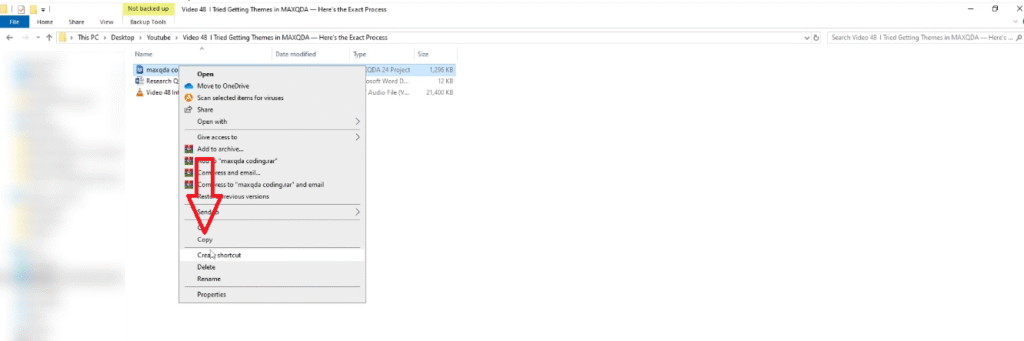
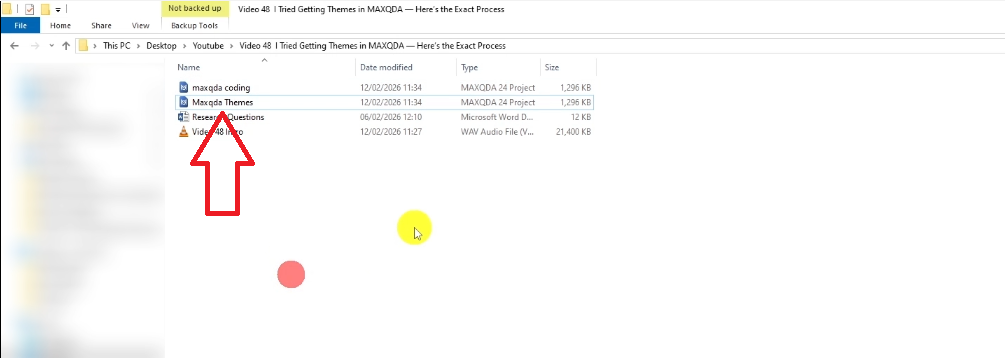
This is the most important practical step and most people skip it. Before you touch anything in MAXQDA, duplicate your project file and rename the duplicate something like “MAXQDA Themes”.
Why? Because once you start reorganising codes under themes, your original coding structure will change. Duplicating the file preserves a clean copy of your initial codes exactly as they were — which you will need to reference when writing your data analysis process section.
To duplicate in MAXQDA: right-click the project file → Copy. Save the copy in the same folder, then rename it. Open the copy and do all your theme work there.
Step 2 — Use Colour-Coding to Group Codes by Shared Meaning
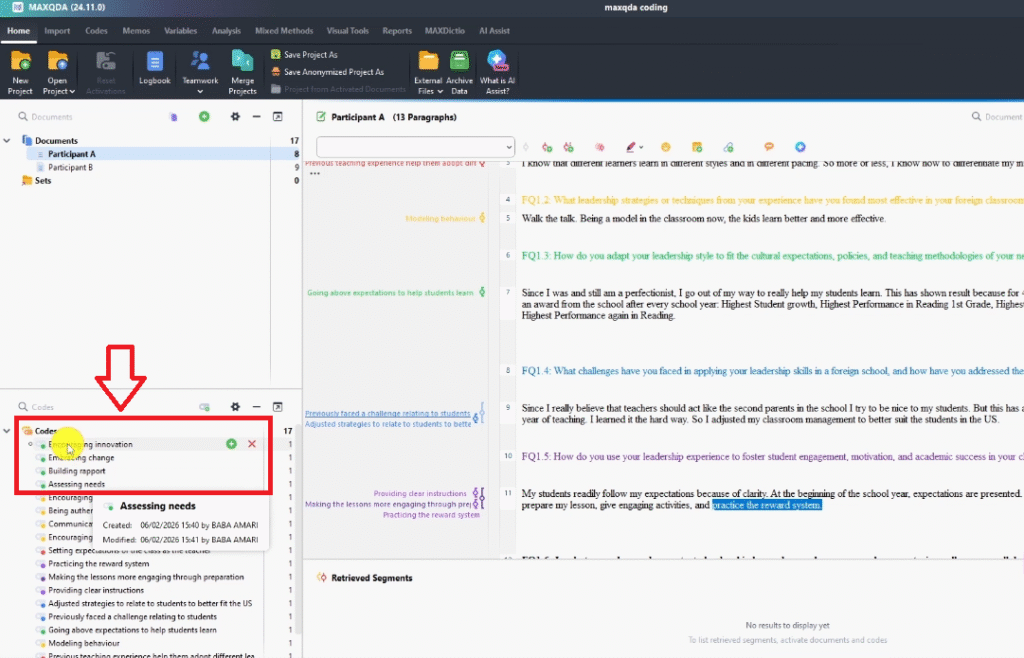
Before creating themes in MAXQDA, I use the colour-coding system to visually group codes that belong together. This is a planning step that makes the actual theme-building much faster.
In my study on Filipino migrant teachers’ leadership, my two research questions were: (1) how do teachers apply their leadership skills in a foreign classroom environment, and (2) what factors influence how they apply those skills. I assigned a different colour to codes related to each question. For example:
- Green codes — related to adapting leadership style to new environments
- Yellow codes — related to effective leadership strategies or techniques
- Blue codes — related to challenges in applying leadership skills
Once the colours are assigned, I can see at a glance which codes are clustered together. Codes of the same colour sharing a pattern of meaning will become one theme. The colour-coding does not define the theme — your interpretation does — but it gives you a visual scaffold to work from.
Step 3 — Create a New Theme in the MAXQDA Code System
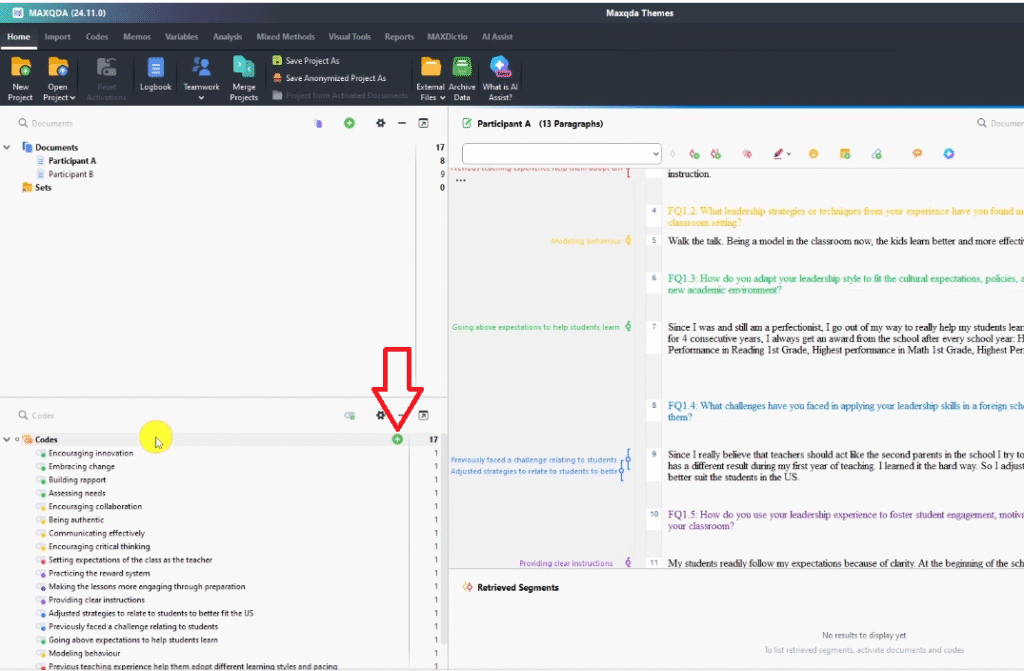
Now open your duplicated MAXQDA file and create your first theme in the Code System panel. A theme in MAXQDA is simply a new code entry at the top level — you will nest your existing codes underneath it.
To create a theme:
- Go to the Code System panel
- Click the plus (+) icon to add a new code at the top level
- Type your theme name — make it sound like a heading, not a label
For example, looking at the green codes in my study, I could see they all described how teachers adapted their leadership style to fit a new academic environment. So I created a theme called: “Approaches of Adapting Leadership Style to Meet New Teaching Environments.”
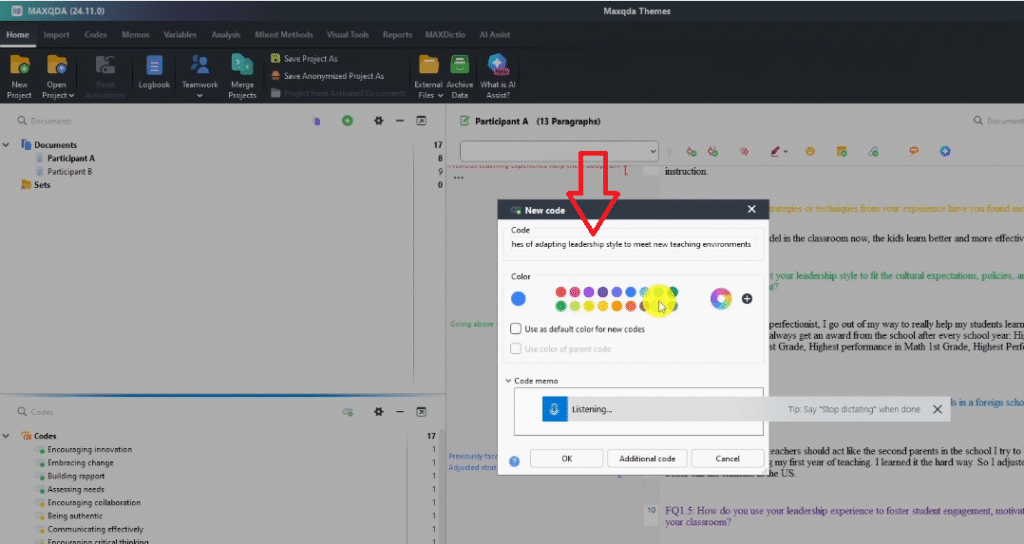
A few naming rules to follow:
- Themes should read like a section heading in your findings chapter
- Avoid vague names like “Theme 1” or “Leadership” — be specific
- The name should signal what the codes underneath it have in common
Step 4 — Add a Description (Memo) to Every Theme
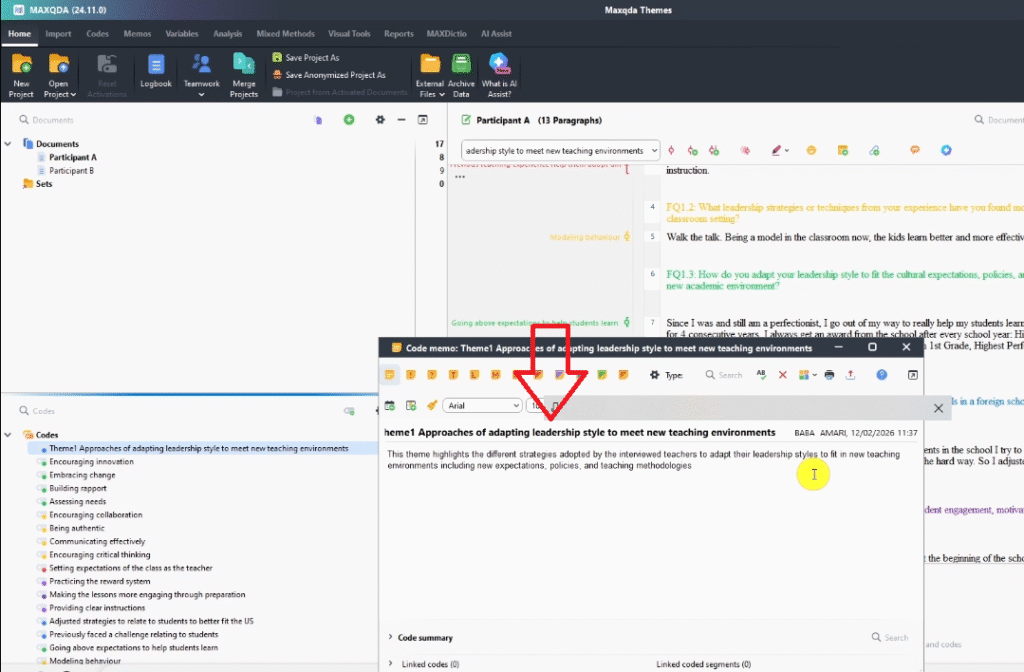
Every theme must have a description. This is non-negotiable — in your findings chapter, you will need to explain what each theme means, and the description you write now becomes the first draft of that explanation.
To add a description in MAXQDA:
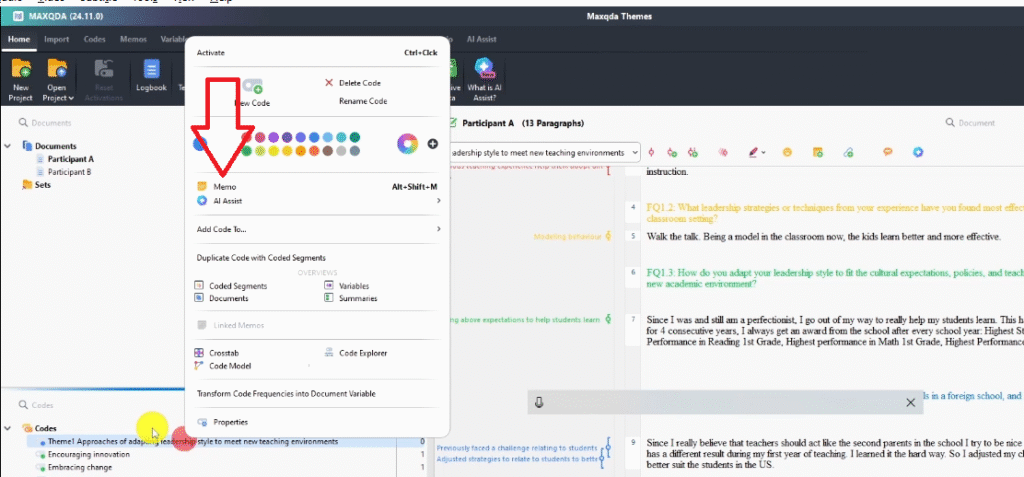
- Right-click on the theme in the Code System panel
- Select Memo
- Write a 2–3 sentence description of what this theme is about
Here is the description I wrote for the first theme in my study: “This theme highlights the different strategies adopted by the interviewed teachers to adapt their leadership styles to fit in new teaching environments including new expectations, policies, and teaching methodologies.”
That is a first draft — it can be refined later. The important thing is to write something now while the theme is fresh. The memo is also useful for your supervisor — if they ask you to explain your themes, you have a written rationale ready.
Step 5 — Drag and Drop Codes Under the Right Theme
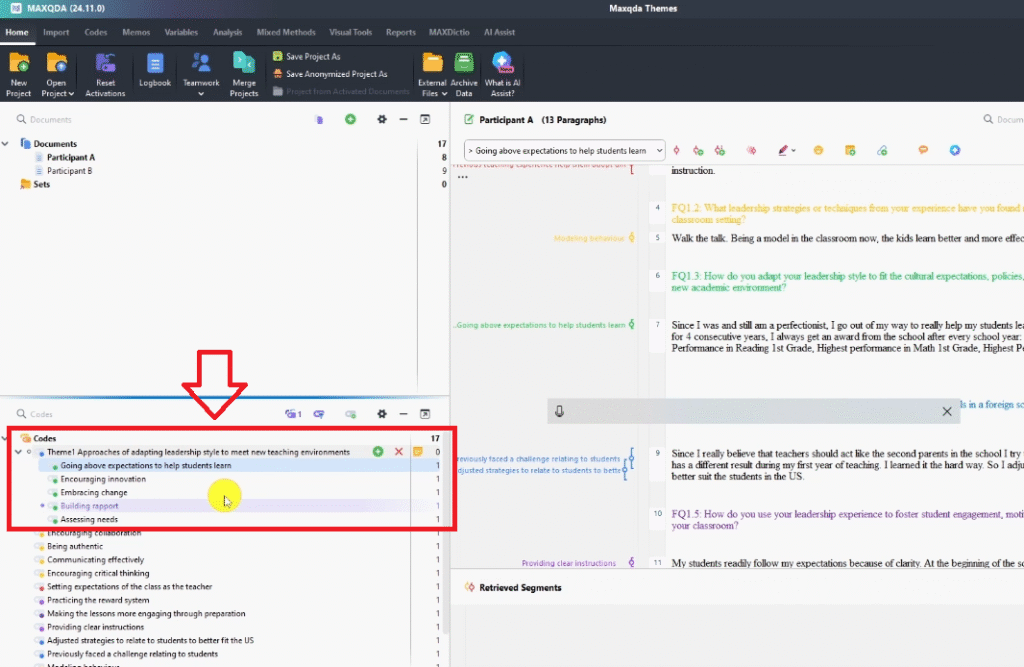
Now you assign codes to their theme. In MAXQDA, this is a literal drag-and-drop operation.
- In the Code System panel, find the codes that belong to your first theme
- Click a code and drag it onto the theme name
- Drop it — it will nest underneath the theme as a sub-code
- Repeat for all codes that share the same pattern of meaning
For my first theme (adapting leadership style), I dragged all the green codes underneath it: Encouraging innovation, Embracing change, Building rapport, Assessing needs, Going above expectations. Each of those codes, when read together, described the same underlying pattern — teachers changing their approach to fit a new context.
Do not move a code under a theme just because it is topically related. Ask: does this code, together with the others, say something coherent about the same pattern of meaning? If the answer is yes, it belongs. If it feels forced, leave it out and revisit later.
Step 6 — Repeat Until All Codes Are Assigned to a Theme
Work through your remaining colour groups and create a theme for each one, following the same process: name the theme, write the memo description, drag and drop the codes.
In my study, I ended up with three themes:
- Approaches of Adapting Leadership Style to Meet New Teaching Environments (green codes)
- Effective Leadership Strategies or Techniques (yellow codes)
- Challenges in Application of Leadership Skills (blue codes)
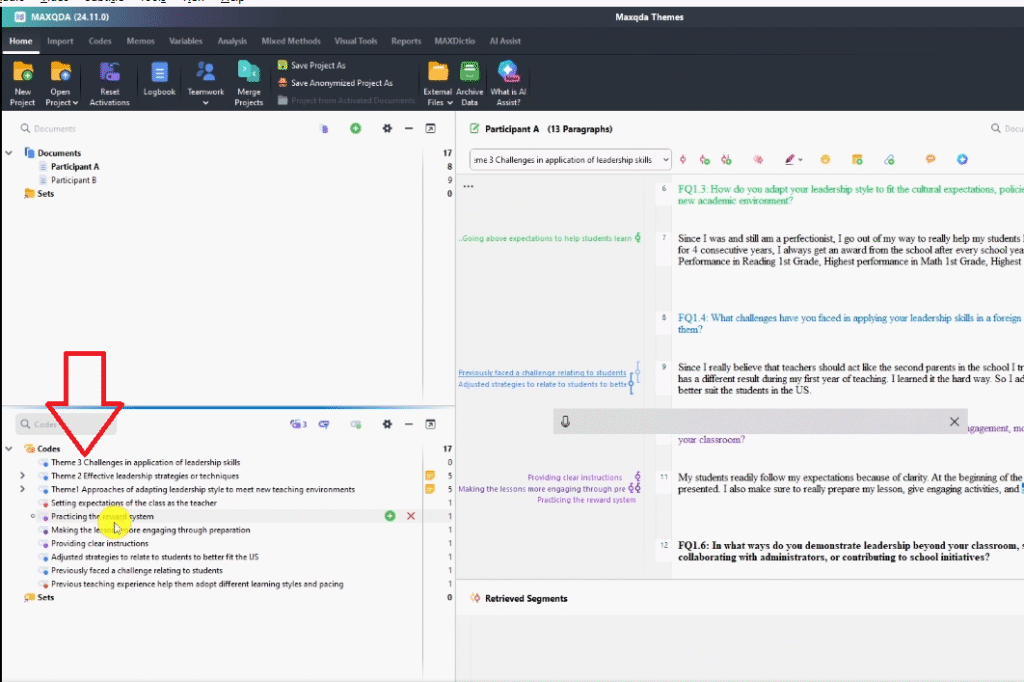
Your number of themes will depend on your data. Most qualitative studies produce between three and six themes. If you find yourself with more than eight, consider whether some are really sub-themes rather than top-level themes. MAXQDA’s official how-to resources have useful guidance on managing large code systems.
Also check that every code from your initial list has a home. Any codes that do not fit neatly into a theme need to be reviewed — either they belong somewhere you have not noticed yet, or they were too specific to be thematically useful and can be set aside.
Step 7 — Export Your Code System to Review the Structure
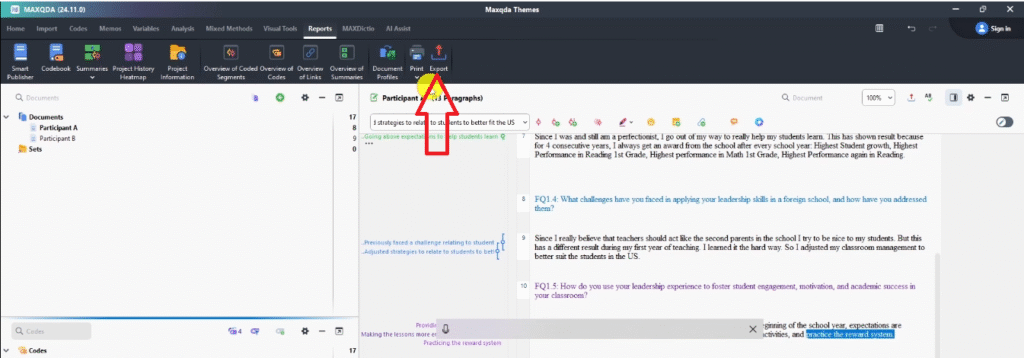
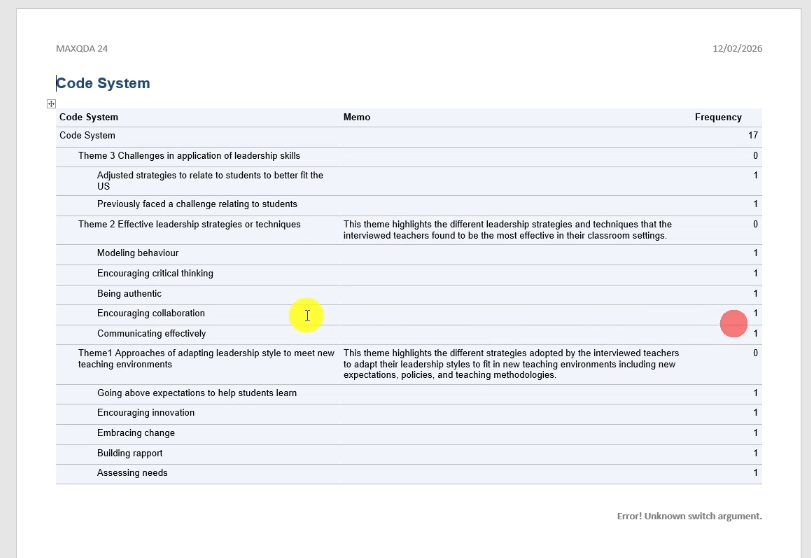
Once all your codes are nested under themes, export the code system to Word. This gives you a clean overview of your entire thematic structure — all themes, all sub-codes, and all descriptions — in one document.
To export:
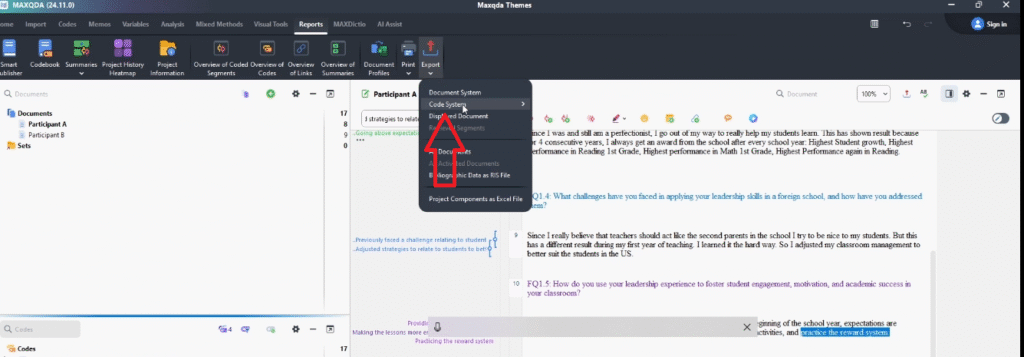
- Click Reports in the MAXQDA top menu
- Select Export Code System
- Choose Word Document
- Include memos so your descriptions appear alongside each theme
Read through the exported document from top to bottom. This is your first full review of whether the themes hold together. Ask yourself: does each theme have a clear, distinct meaning? Do the codes under it genuinely share that meaning? Does the overall set of themes answer my research questions?
If anything feels off, go back into MAXQDA and adjust. Theme development is iterative — this step is not the end of the process, it is a checkpoint.
Frequently Asked Questions
How many themes should I have in MAXQDA?
Most studies produce between three and six themes. There is no fixed rule, but fewer than three often means the themes are too broad, and more than eight often means some should be collapsed into sub-themes. Let the data — not a target number — guide you.
Can one code belong to more than one theme?
In practice, most researchers assign each code to one theme to maintain a clean structure. If a code genuinely fits two themes equally well, it usually signals that the theme boundaries need to be reconsidered. Revisit the descriptions for both themes and see if they can be made more distinct.
What if some of my codes do not fit any theme?
Set them aside in a separate “Miscellaneous” folder in MAXQDA and return to them after your main themes are established. Sometimes orphaned codes point to a sixth theme you had not identified yet. Other times they are simply too narrow to be thematically useful and can be excluded from your analysis.
Do themes have to align with my research questions?
In inductive thematic analysis, themes emerge from the data — not from the research questions. However, your research questions guide what is ‘important’ in the data, so themes that have no connection to your questions are worth questioning. In deductive analysis, themes are typically defined by the research questions from the start.
When do I move from developing themes to reporting them?
Once you have named all themes, written descriptions for each, assigned all codes, and done at least one review pass (Step 7 above), you are ready to move into writing your findings chapter. The next article in this series covers exactly that: how to report thematic analysis findings in MAXQDA.
Key Takeaways
Developing themes in MAXQDA is a seven-step process:
- Duplicate your MAXQDA file first — always preserve your original codes
- Use colour-coding to visually group codes before you start building themes
- Create each theme as a new top-level entry in the Code System panel
- Write a memo description for every theme before moving on
- Drag and drop codes under the theme they belong to by shared pattern of meaning
- Repeat until every code has a home, then review orphaned codes
- Export the code system to Word for a full structural review before writing up
If developing themes is blocking your progress, my team can step in. The done-for-you thematic analysis service covers full MAXQDA analysis — coding, theme development, codebook, and write-up support — so you can move forward with confidence. Nearly 500 PhD students have used this service to graduate. Book a consultation today.
![How to Code Qualitative Data in MAXQDA [Step-by-Step Guide]](https://survivingresearch.com/wp-content/uploads/2024/08/Maxqda-Tutorial.webp)
![Is AI Ethical for Qualitative Data Analysis? [Tested]](https://survivingresearch.com/wp-content/uploads/2025/04/Can-I-use-AI-to-do-qualitative-coding-ethically.jpg)
Pingback: Interview Coding in MAXQDA: Step-by-Step Beginner Guide -
Pingback: Report Thematic Analysis Findings in MAXQDA [Step-by-Step] -