

Last Updated on 5 months ago by Grace Nyambura
If you have interview transcripts and no idea how to start analysing them, this article is for you. I’m going to show you how to do interview coding in MAXQDA — from importing your transcripts and creating your first code, to building a complete code list ready for theme development.
This is the first article in a three-part MAXQDA series. Once you’ve finished here, the next steps are developing themes in MAXQDA and reporting your thematic analysis findings. Or if you want to see the full workflow in one place, the complete MAXQDA qualitative analysis tutorial covers all three stages.
In the past four years I’ve helped more than 600 PhD students analyse qualitative data using MAXQDA. Here is the exact process I use with every new set of transcripts.
| Quick Answer: Interview coding in MAXQDA means reading your transcripts, highlighting meaningful passages, and attaching interpretive labels (codes) to them inside MAXQDA’s document browser. The five steps below walk through the full process from a blank project to a complete code list. |
What Is Qualitative Coding? (A Simple Definition)
A qualitative code is a label or an interpretive statement attached to any piece of data that is relevant to your research question or objectives.
The emphasis is on interpretive. You are not just summarising what a participant said — you are interpreting what it means in the context of your study. A good code captures the essence of a passage in a short phrase that would make sense to someone who has not read the transcript. For a more detailed grounding in how qualitative coding works before you touch MAXQDA, Scribbr’s guide to thematic analysis is a helpful starting point.
Coding is the foundation of thematic analysis. Get good codes and everything downstream — themes, findings, write-up — becomes much easier. Rush the coding and you will pay for it later.
What Does a Good Code Look Like? (3 Real Examples)
Before going into MAXQDA, let me show you three real codes I developed from interview transcripts. These will give you a feel for the level of interpretation you should be aiming for.
The transcript extract below is from an interview about family finances. The interviewee says: “I’m the one paying my children’s school fees. God is helping me with the little amount of money they pay me for my salary as a classroom teacher — I was able to pay their school fees and that is why I register them in that public school.”
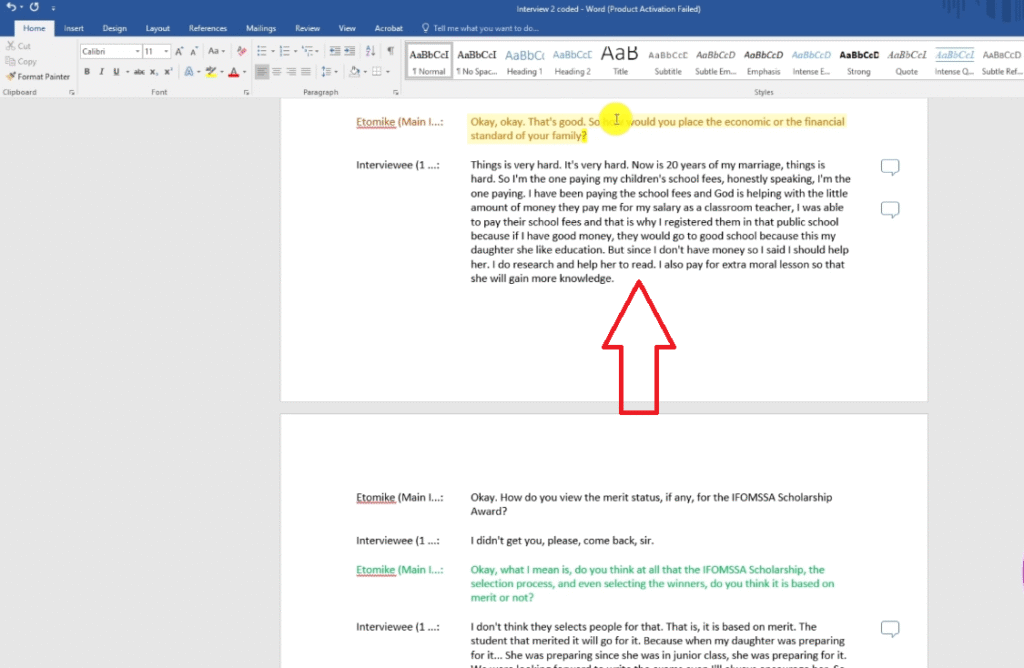
| Code 1 |
| Prominent financial challenges as the sole provider for children’s education |
| Code 2 |
| Lacks the funds to enroll daughter in a better school |
From a different extract about a scholarship selection process: “The students that merited it will go for it — just those brilliant people, at least from first position, they will select people that will write the exams.”
| Code 3 |
| Scholarship awarded based on academic merit |
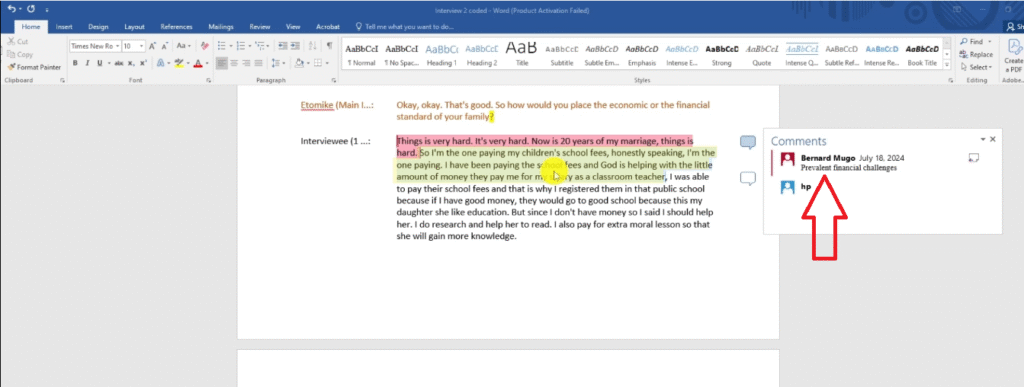
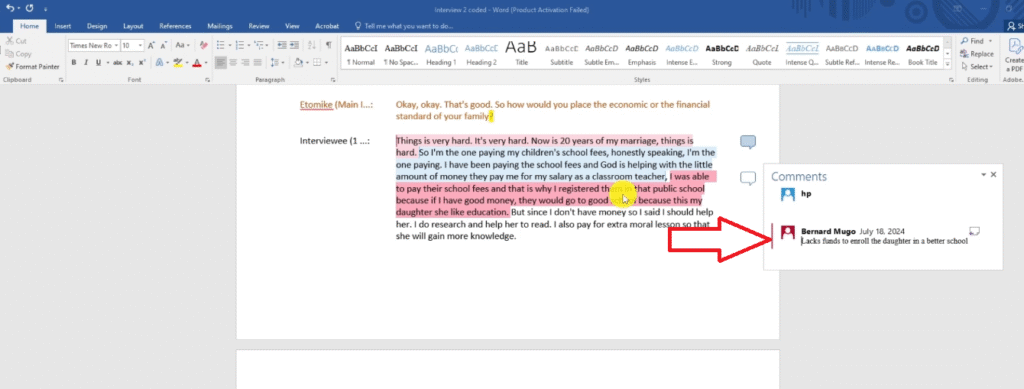
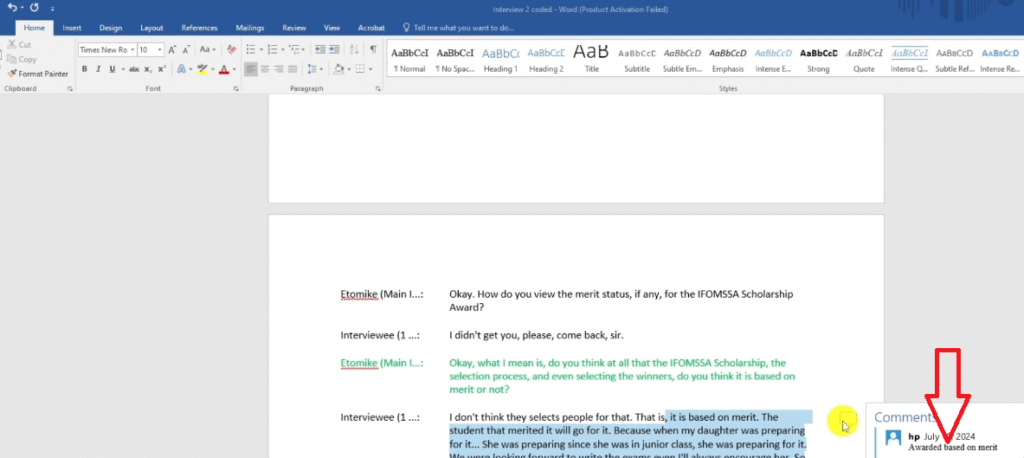
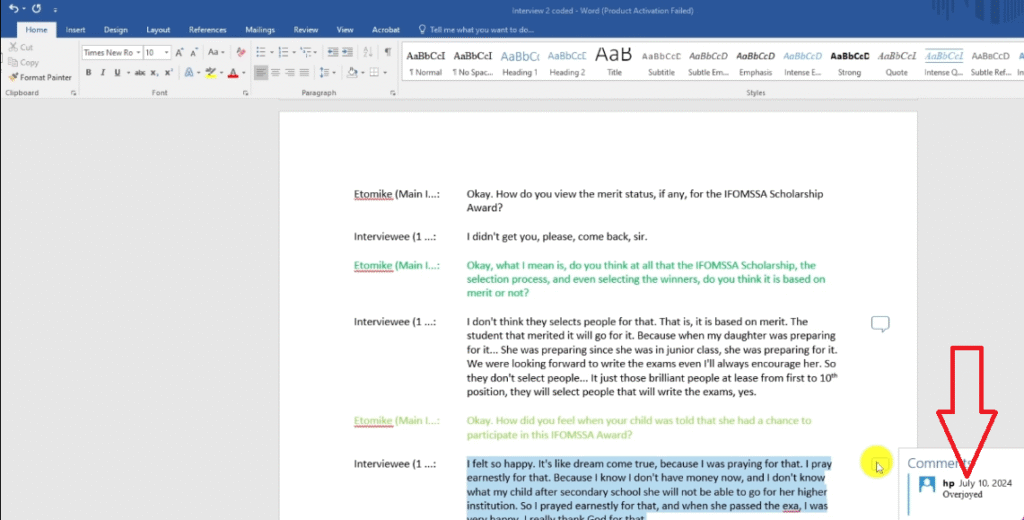
Notice that none of these codes are just a summary. Each one interprets what the participant is communicating — what it means for their lived experience, not just what they said.
Which Coding Approach Should You Use? (Braun & Clarke vs Saldana)
Before you begin coding, you need to know which methodological approach you are following. The two most common for interview-based qualitative research are the Braun and Clarke (2006) six-step framework and the Saldãa coding method.
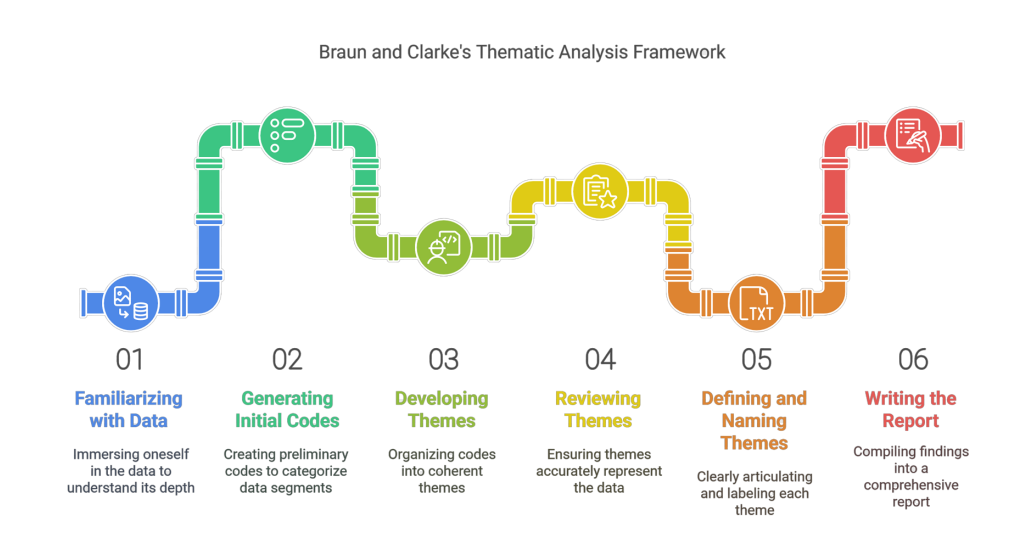
Braun and Clarke — the six steps:
- Familiarise yourself with the data
- Generate initial codes
- Search for themes
- Review themes
- Define and name themes
- Write the report
This is where interview coding fits — step 2. You are in the early stages, generating the codes that will later be grouped into themes.
Saldãa’s approach is more structured, with first-cycle and second-cycle coding stages. It is better suited to researchers who want to track how codes evolve over multiple rounds of analysis.
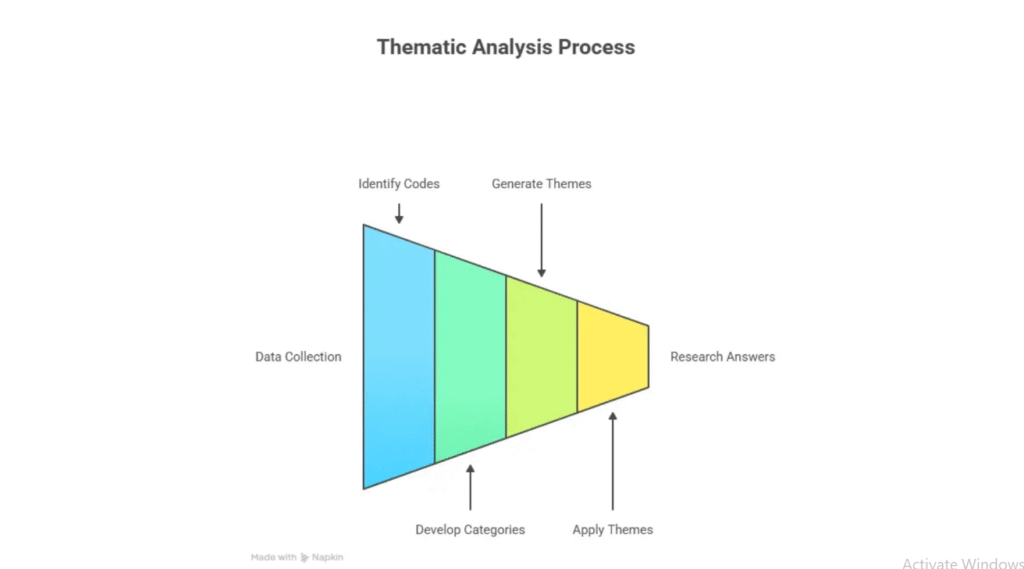
Either approach works in MAXQDA. The software does not care which method you follow — it stores your codes and retrieves your data. The method you choose is documented in your write-up, not in the tool. For most beginners, start with Braun and Clarke.
For a detailed comparison of qualitative coding approaches, MAXQDA’s official documentation includes method-specific guidance for how to set up your project.
How to Code Interviews in MAXQDA: The Full Process
Here is the step-by-step process for interview coding in MAXQDA. I will use a real study on Filipino migrant teachers’ leadership as the example throughout.
Step 1 — Set Up Your MAXQDA Project and Import Transcripts
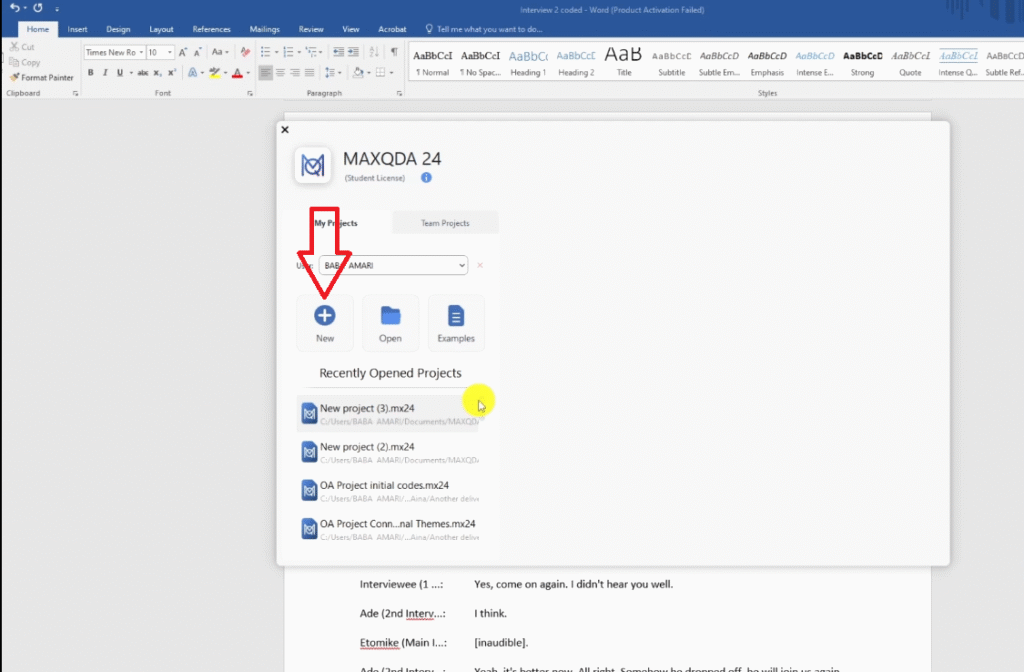
- Open MAXQDA and click New to create a new project
- Name your project and save it
- Go to the import section (Documents panel on the left)
- Select Transcripts without timestamps and locate your transcript files
- Click Open — your transcripts will appear as documents in the project
MAXQDA has five main areas you will use constantly: the main menu, the top menu bar, the Documents panel (where transcripts live), the Code System panel (where codes accumulate), and the Document Browser (where you read and code transcripts). Take a few minutes to orient yourself before you start coding.
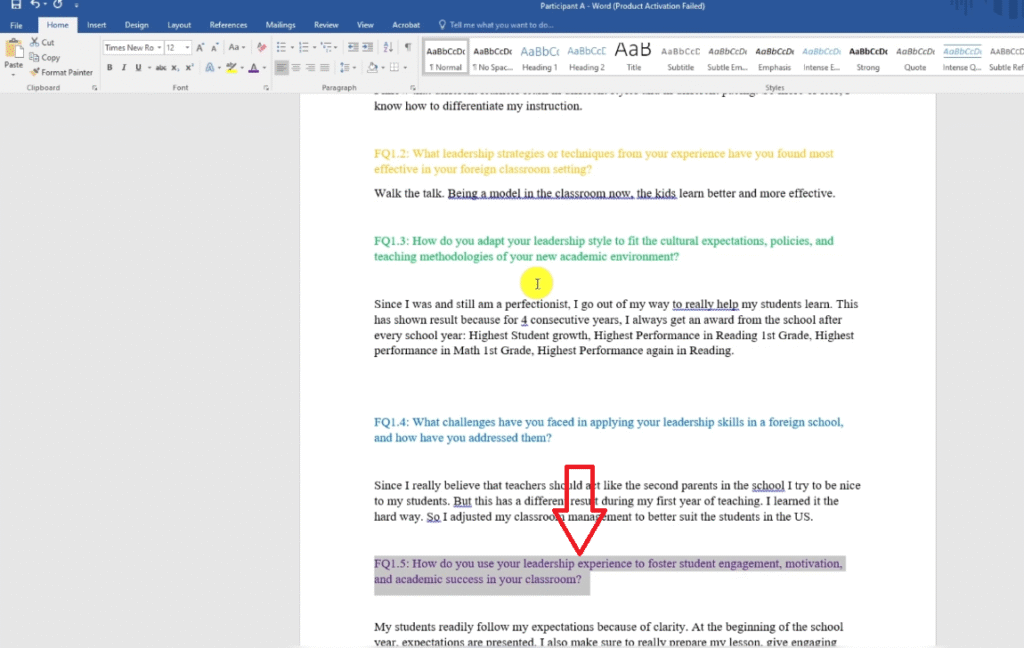
Step 2 — Colour-Code Your Interview Questions Before You Begin
This is a step most beginners skip and later regret. Before touching the transcripts, open each one and assign a different highlight colour to each interview question.
Why? Because during coding you will generate dozens of codes from multiple questions. Without colour-coding, you will have no way of knowing which research question each code came from — which you will need when developing themes later.
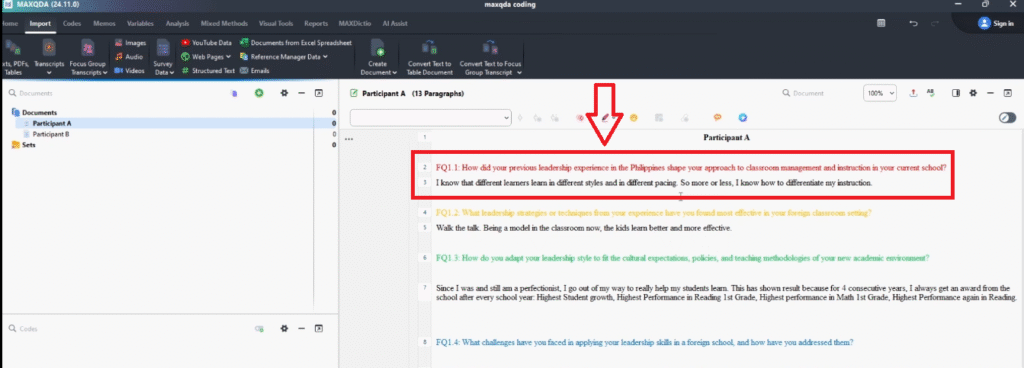
In my Filipino migrant teachers study, I used: red for question 1 (previous leadership experience), yellow for question 2 (leadership strategies), green for question 3 (adapting to environment), blue for question 4 (challenges), and so on. When I later sorted codes by colour, I could instantly see which research question each code belonged to.
Step 3 — Read, Highlight, and Create Your First Code
Now open your first transcript in the Document Browser. Read the first question and response fully before you code anything. Understanding the full response before labelling any part of it is what separates interpretive coding from surface-level summarising.
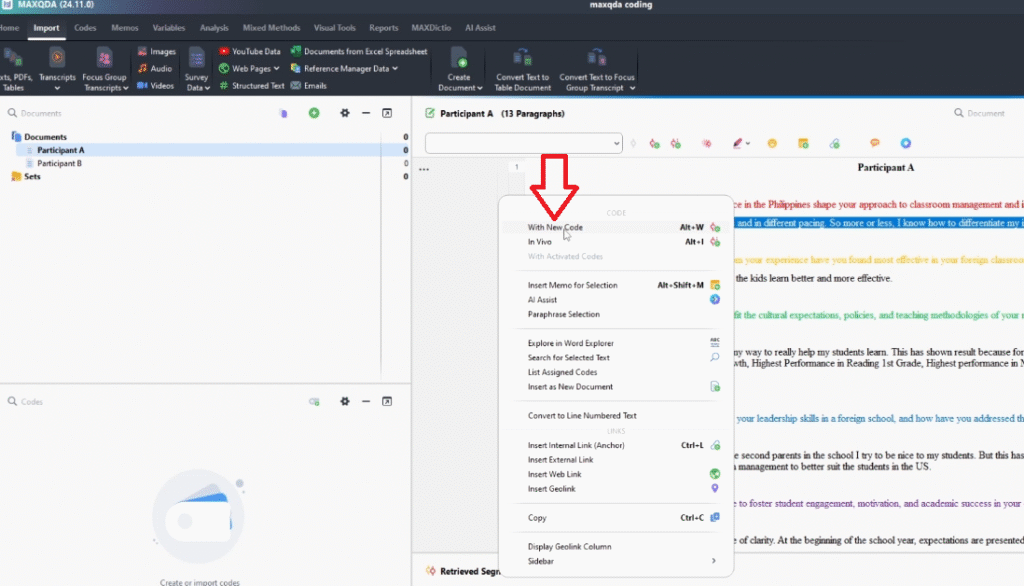
When you are ready to code a passage:
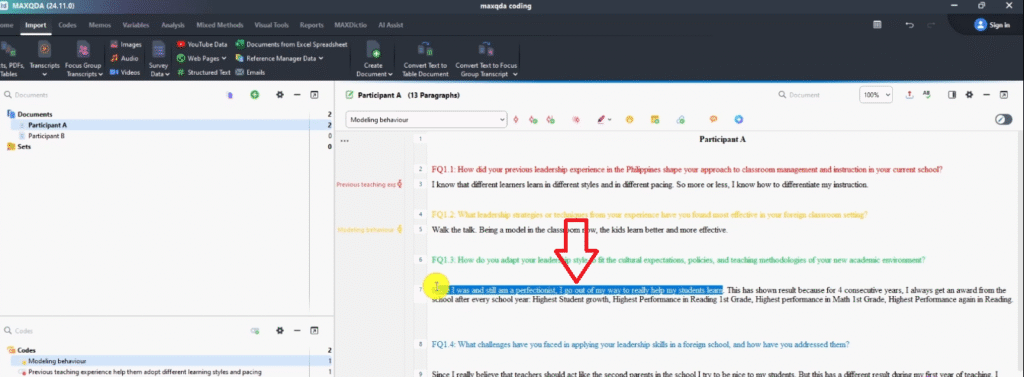
- Highlight the relevant text with your mouse
- Right-click the highlighted text
- Select With New Code from the menu
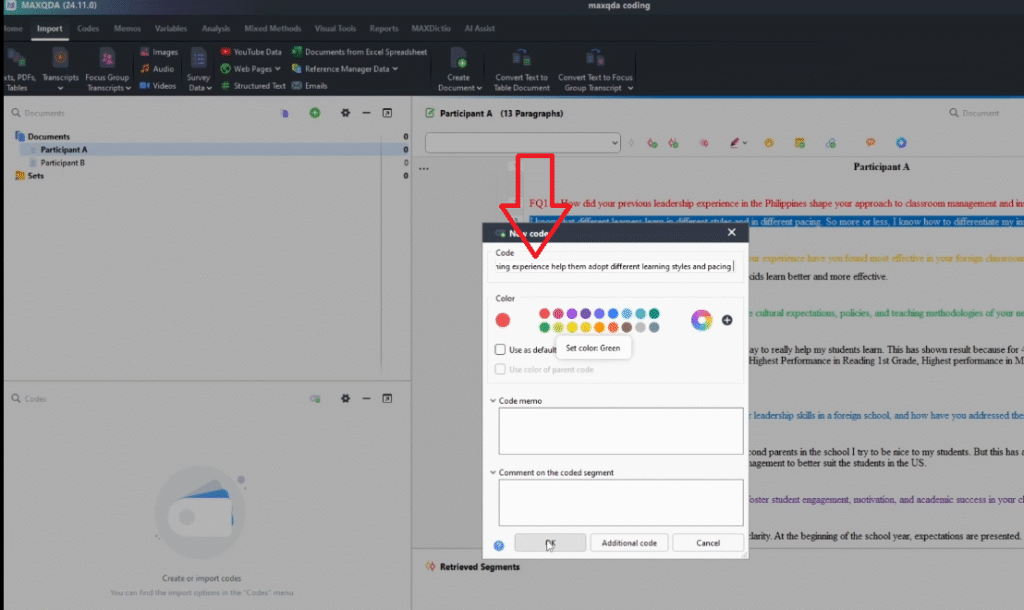
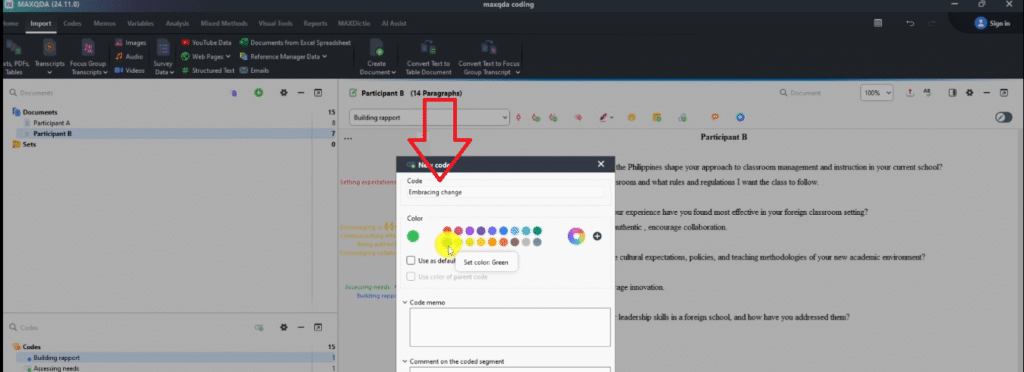
- Type your code name in the box that appears
- Assign a colour to match the question it came from, then click OK
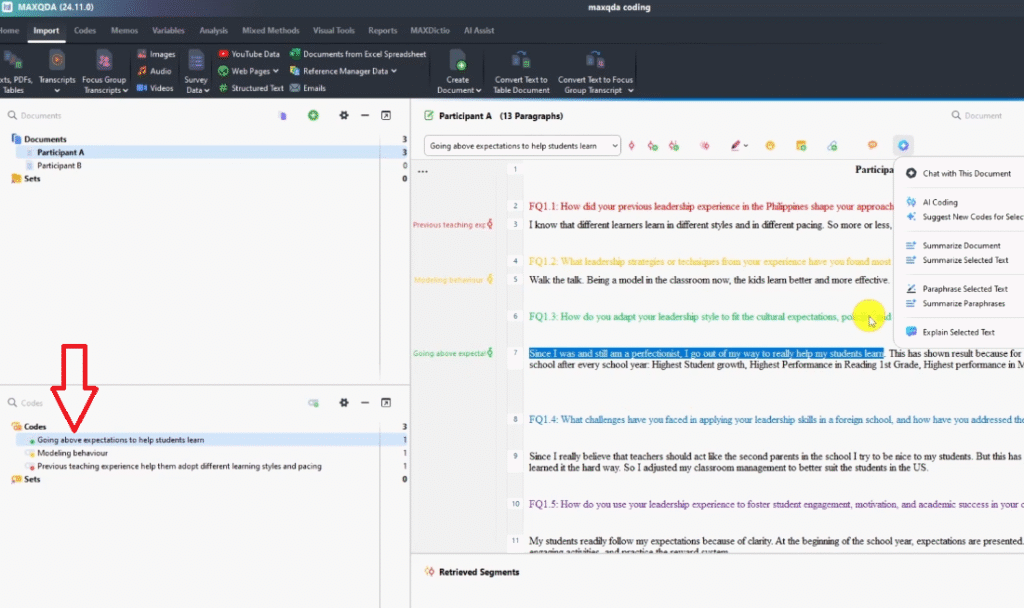
Your code will appear in the Code System panel on the left. The highlighted passage in the transcript will show the colour of that code.
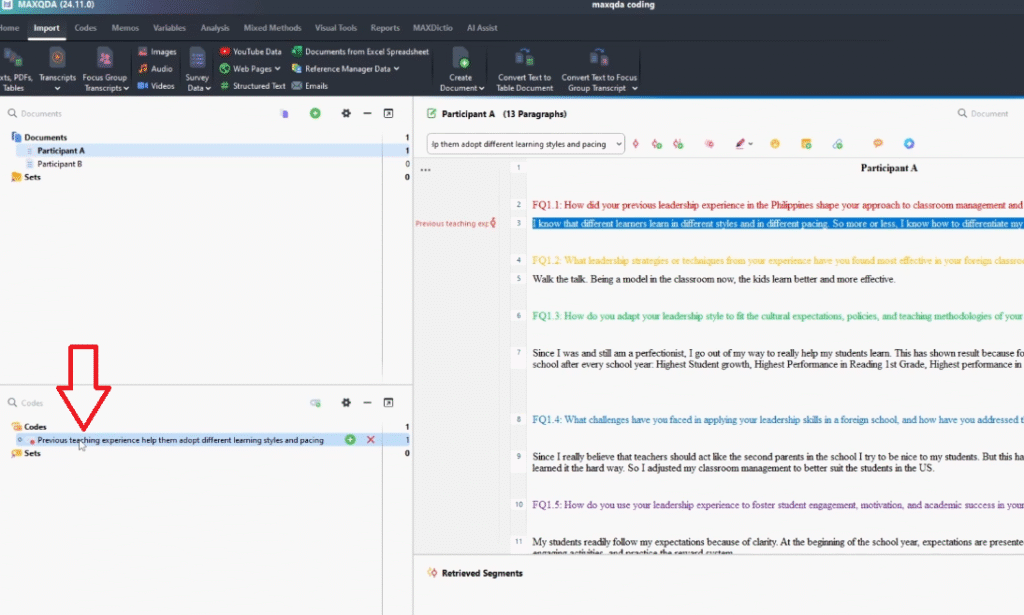
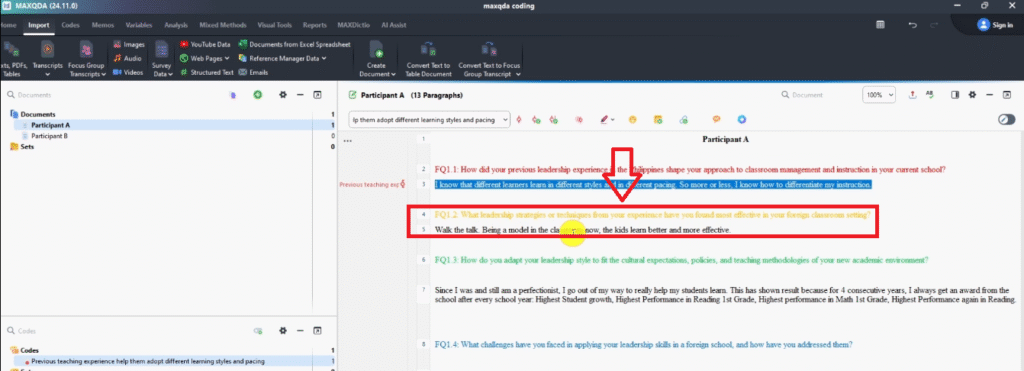
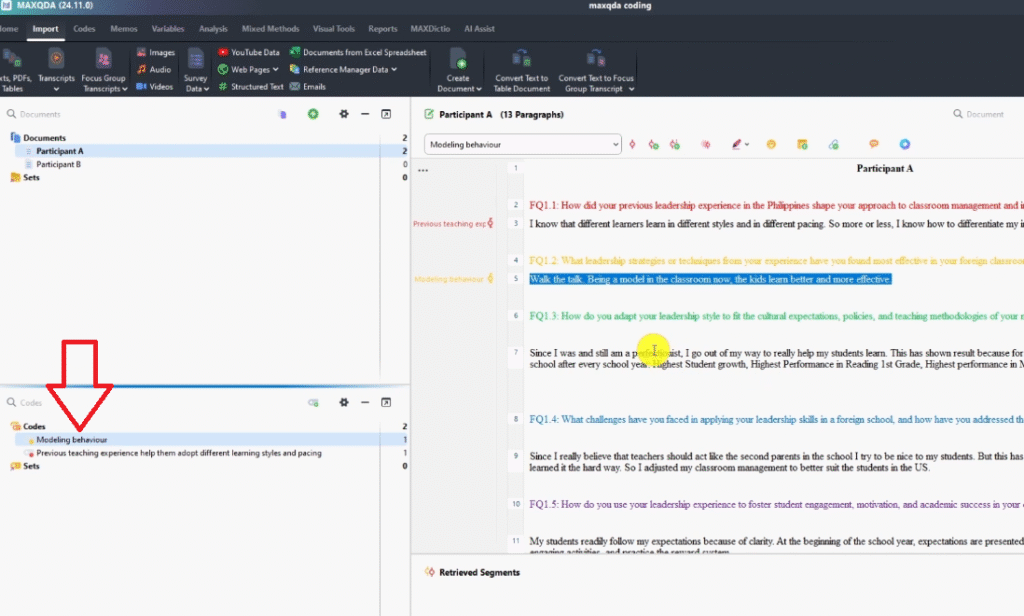
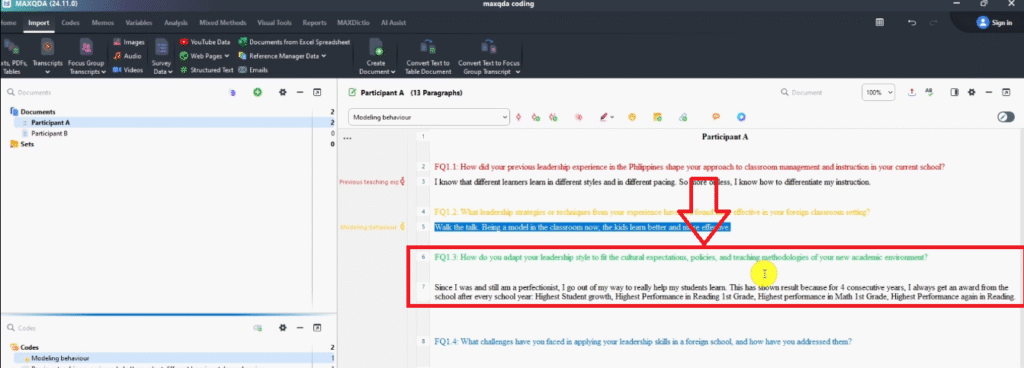
Here are the first few codes I created from Participant A’s transcript:
- Question 1 (red): “Previous teaching experience helped adapt to different learning styles and pacing”
- Question 2 (yellow): “Modeling behavior”
- Question 3 (green): “Going above expectations to help students learn”
- Question 4 (blue): “Previously faced a challenge relating to students”
- Question 4 (blue): “Adjusted strategies to better relate to students in the US”
- Question 5 (no colour): “Providing clear instructions” / “Making lessons more engaging” / “Practicing the reward system”
Your codes can be long at first — accuracy matters more than brevity at this stage. You can always shorten or rename codes later from the Code System panel.
Step 4 — Continue Coding Until the Transcript Is Complete
Work through every question and response in the transcript. Not every passage will produce a code — some responses will be off-topic or simply not relevant to your research questions. That is normal. Code what matters, skip what does not.
A few things to keep in mind as you go:
- Keep your research questions visible in a separate window while you code — they are your filter
- If two passages say the same thing, use the same code for both
- If a passage contains two distinct ideas, create two separate codes
- If you are unsure whether something is important, code it — you can always remove it later
By the end of the first transcript, you should have 10–30 codes depending on how many questions you asked and how rich the responses were.
Step 5 — Open a Second Transcript and Repeat
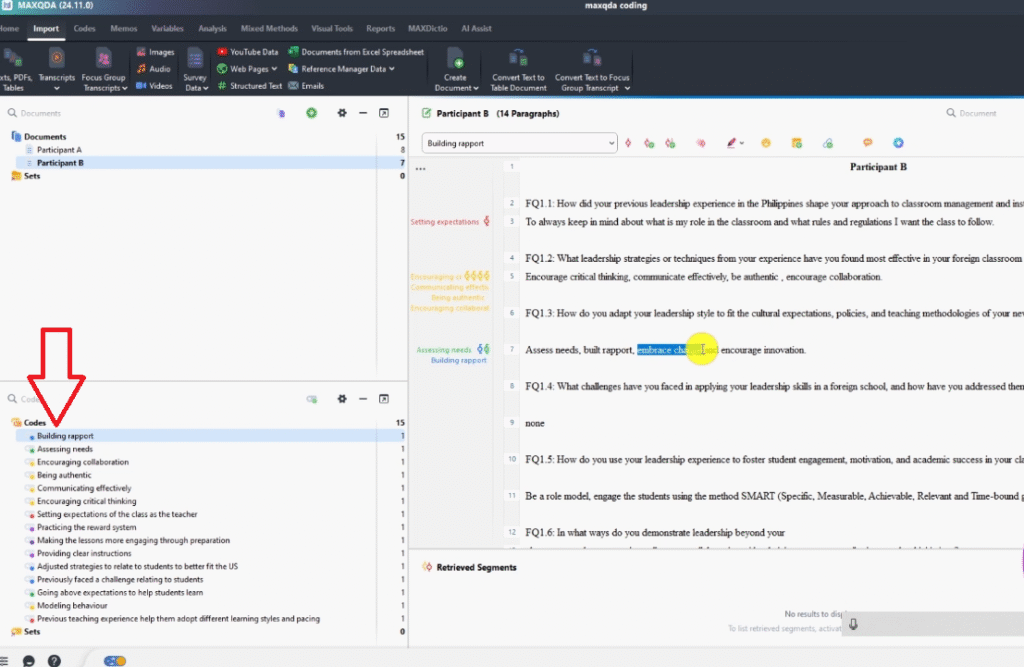
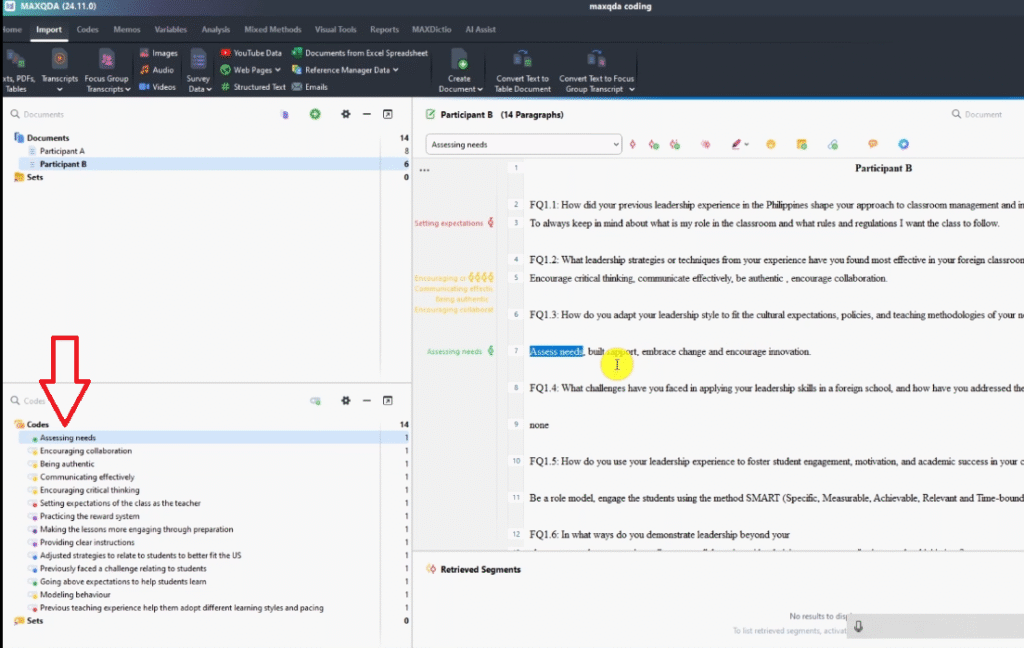
Open your second transcript and work through it using the same process. As you code, you will notice that some codes from the first transcript also apply here — when that happens, drag the existing code from the Code System panel onto the highlighted passage instead of creating a new one. This builds up a shared code list across participants.
From Participant B, I created additional codes alongside ones that matched Participant A: Encouraging critical thinking, Communicating effectively, Being authentic, Encouraging collaboration, Assessing needs, Building rapport, Embracing change.
Continue this process across all your transcripts. By the time you have coded every transcript, you will have a code list that represents everything meaningful in your data. That code list is what you will take into the next stage:
Common Coding Mistakes to Avoid in MAXQDA
- Coding before reading the full response — always read the complete answer before highlighting anything
- Over-coding — not every sentence needs a code; focus on what is relevant to your research questions
- Codes that are too vague — “Leadership” is not a code; “Adapting leadership style to meet new student expectations” is
- Skipping colour-coding by question — you will not be able to track which codes came from which question when you reach theme development
- Creating duplicate codes — when the same idea appears in a second transcript, use the existing code rather than creating a new one
- Not saving regularly — MAXQDA auto-saves, but get into the habit of saving manually after each coding session
Frequently Asked Questions
How many codes should I have by the end?
It varies by study size and topic, but most interview-based PhD studies produce between 30 and 80 initial codes across all transcripts. If you have fewer than 20, you may be under-coding. If you have over 100, some of your codes may be too granular and could be consolidated.
Do codes need to be single words or short phrases?
No. Codes should be as long as they need to be to capture the meaning accurately. Short labels like “Modeling behavior” work when the meaning is clear. Longer labels like “Previous teaching experience helped adapt to different learning styles and pacing” are fine — you can shorten them once the analysis is more advanced.
Can I import transcripts with timestamps into MAXQDA?
Yes — MAXQDA supports both timestamped and non-timestamped transcripts. For most interview coding, transcripts without timestamps are simpler to work with and produce cleaner results in the Document Browser.
What if I need to change a code name later?
Right-click the code in the Code System panel and select Properties. You can rename, re-colour, or add a description (memo) at any point without losing any of the coded passages already attached to it.
How do I know when I have finished coding?
A rough indicator is thematic saturation — when new transcripts stop producing new codes, your existing codes are covering everything in the data. In practice, most researchers feel coding is complete when they can read a new passage and immediately recognise which existing code it belongs to.
Key Takeaways
Interview coding in MAXQDA is a five-step process:
- Set up your MAXQDA project and import your interview transcripts
- Colour-code your interview questions before you start — this tracks which codes came from which question
- Read each response fully, highlight the relevant passage, then create a code using “With New Code”
- Work through every transcript until every relevant passage has a code
- Reuse existing codes across transcripts to build a shared code list
Your codes are now the raw material for the next stage of analysis. The logical next step is developing themes in MAXQDA — where you group codes by shared pattern of meaning and build the structure your findings chapter will rest on.
If your transcripts are sitting untouched and your deadline is approaching, my team can step in. The done-for-you thematic analysis service covers full MAXQDA coding, theme development, and write-up support — delivered to you. More than 600 PhD students have used this service to finish their dissertations. Book a consultation today.
![How to Code Qualitative Data in MAXQDA [Step-by-Step Guide]](https://survivingresearch.com/wp-content/uploads/2024/08/Maxqda-Tutorial.webp)
![Is AI Ethical for Qualitative Data Analysis? [Tested]](https://survivingresearch.com/wp-content/uploads/2025/04/Can-I-use-AI-to-do-qualitative-coding-ethically.jpg)
Pingback: Report Thematic Analysis Findings in MAXQDA [Step-by-Step] -
Pingback: Developing Themes in MAXQDA: Step-by-Step Guide -
Pingback: Inductive Thematic Analysis in MAXQDA: Saldaña's 4-Step Method -