

Last Updated on 5 months ago by Grace Nyambura
| Quick summary: Qualitative coding is the process of tagging meaningful segments of interview data with descriptive labels called codes. This article shows you exactly how to code interview transcripts in NVivo 15 — including how to create an initial codes folder, highlight and tag quotes, use color coding to track interview questions, and merge the same code across multiple participants. |
- What Is Qualitative Coding? (And Why It Matters)
- Qualitative Coding Examples Before We Start NVivo
- How to Set Up Your NVivo Project for Coding
- How to Generate Codes in NVivo Step by Step
- Tips for Staying Organised During Qualitative Coding
- Frequently Asked Questions
- Key Takeaways
- Need Help With Your NVivo Coding?
One of the most important skills you need to master when analysing qualitative data is generating qualitative codes — what researchers call coding. It sounds technical, but the core idea is straightforward: you read through your interview transcripts, identify the important segments, and attach short interpretive labels to them.
In this article, I’ll show you exactly how to perform qualitative coding of interview data using NVivo 15 — one of the most widely used qualitative data analysis software tools in academic research. I’ll walk through real examples before we open NVivo, so you understand what good coding looks like before you start clicking.
I’m Bernard Mugo. Over the past three years I’ve helped more than 250 PhD students work through their thematic analysis — from raw transcripts to finished findings chapters. What I’m sharing here comes directly from that experience.
What Is Qualitative Coding? (And Why It Matters)
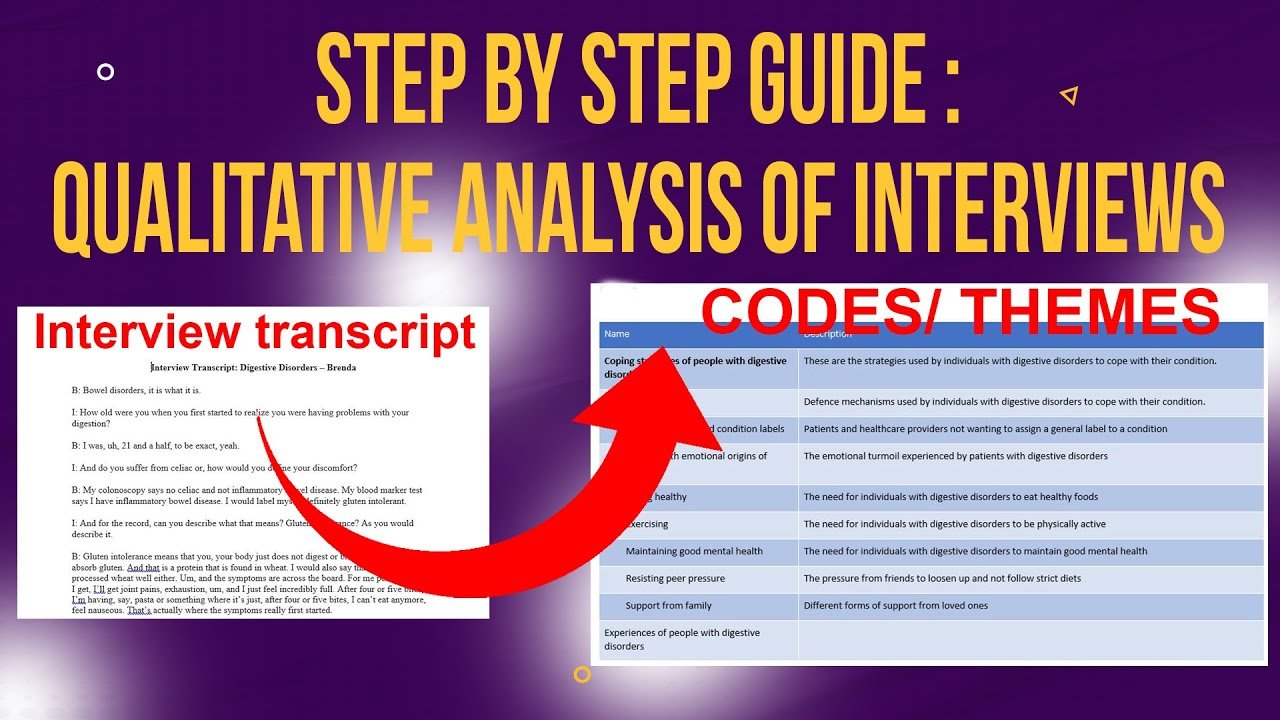
Qualitative coding is the process of tagging important quotes from your original interview data and interpreting those segments in a way that lets you group them into themes later. Think of a code as a short label — it captures the essence of what a participant is saying in a few words.
Coding sits at the heart of qualitative data analysis. Without it, you have a pile of transcripts. With it, you have a structured set of interpretive labels that you can organise into themes and present as findings. As Saldana’s Coding Manual for Qualitative Researchers explains, coding is not just labelling — it is an interpretive act that shapes the entire analysis.
There are two broad approaches: manual coding (writing codes in the margins of a printed transcript or in a Word document) and software-assisted coding using a tool like NVivo. Both are valid. NVivo simply makes it easier to track codes across multiple participants and merge quotes under the same code — which is where it really earns its place.
Qualitative Coding Examples Before We Start NVivo
Before opening NVivo, let me show you what qualitative coding looks like in practice so you know what you’re aiming for.
Example 1: Manually Coded Interview Transcript
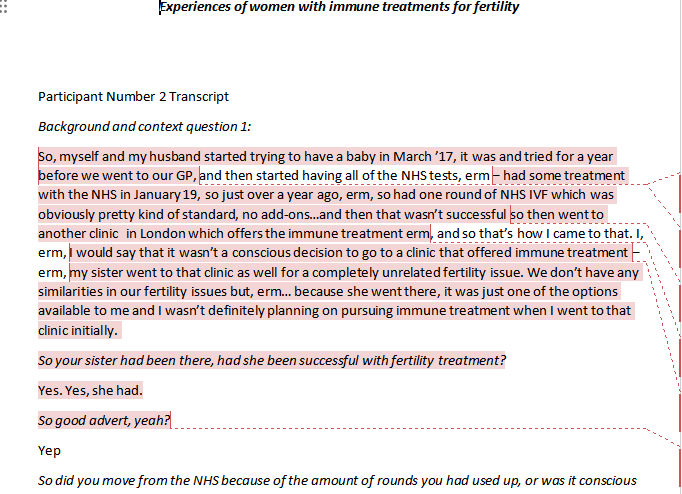
The transcripts I use in my tutorials come from Figshare, a public research data repository. In one earlier project, I was coding interviews about experiences of women with immune treatments for fertility.
Here’s a segment from one participant:
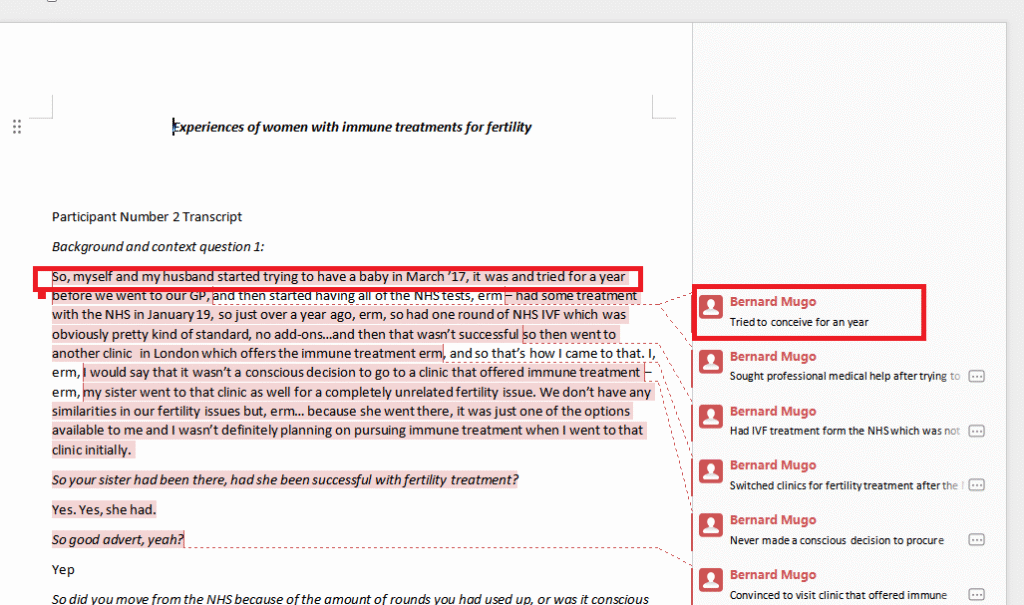
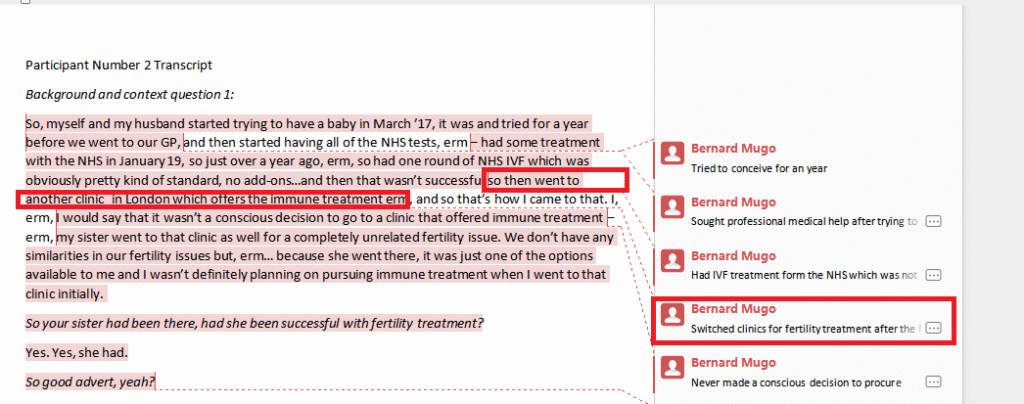
“So myself and my husband started trying to have a baby in March 17, and tried for a year before we went to our GP… Had one round of NHS IVF, which wasn’t successful, so then went to another clinic in London which offers immune treatment.”
From this segment I generated two codes:
- Tried to conceive for a year — attached to the first sentence about their timeline
- Switched clinics for fertility treatment — attached to the sentence about moving to a London clinic
What a Good Code Looks Like
Notice that neither code is a direct quote. They’re interpretive labels — I’m summarising what the participant is communicating, not just copying their words. That’s the essential distinction between coding and summarising.
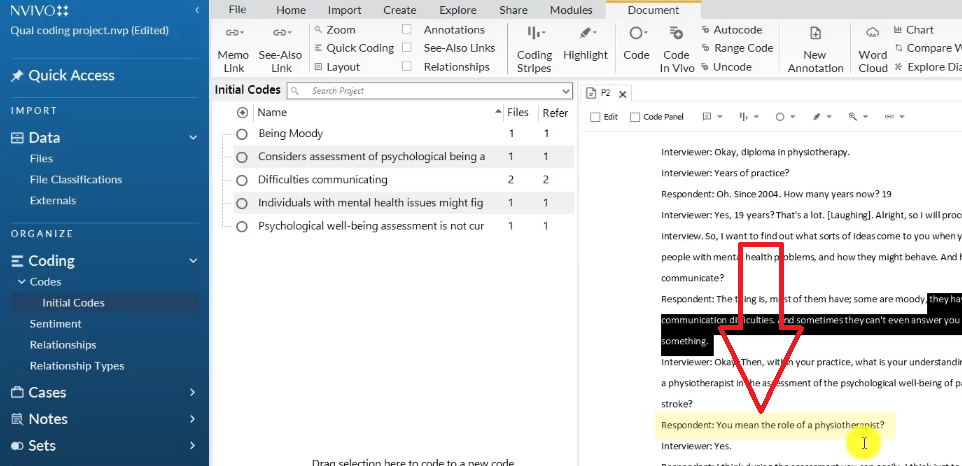
Codes can be short (“being moody”) or longer (“individuals with mental health issues might find it difficult to seek help”). Don’t over-obsess on making every code concise at the first pass — you can revise them later. What matters at the initial coding stage is capturing the meaning.
How to Set Up Your NVivo Project for Coding
Creating a New Project in NVivo 15
I’m using NVivo 15, the latest version as of 2025. The interface may look slightly different in future versions, but the core coding workflow remains the same.
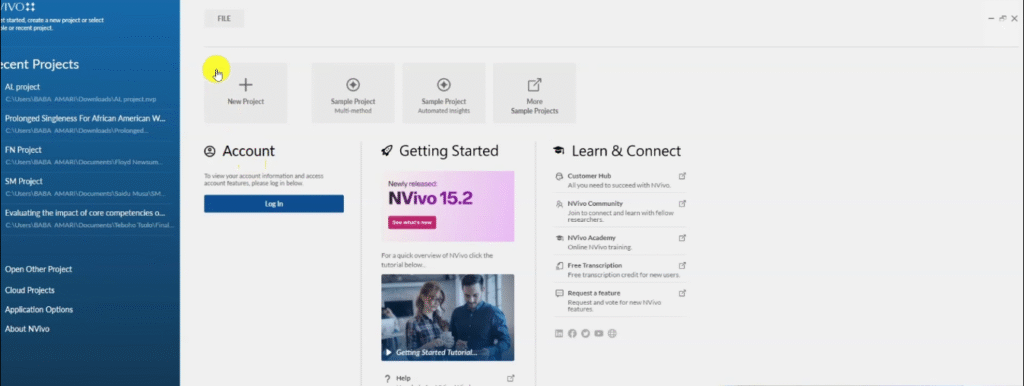
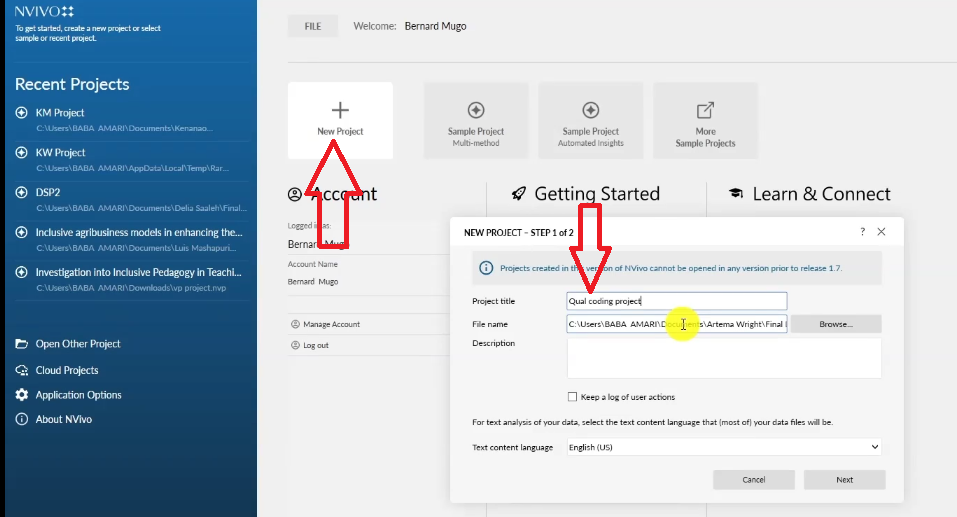
- Open NVivo — you’ll see the welcome screen.
- Click New Project.
- Name your project (I called mine “Qual coding projects” for this tutorial — use your actual study title).
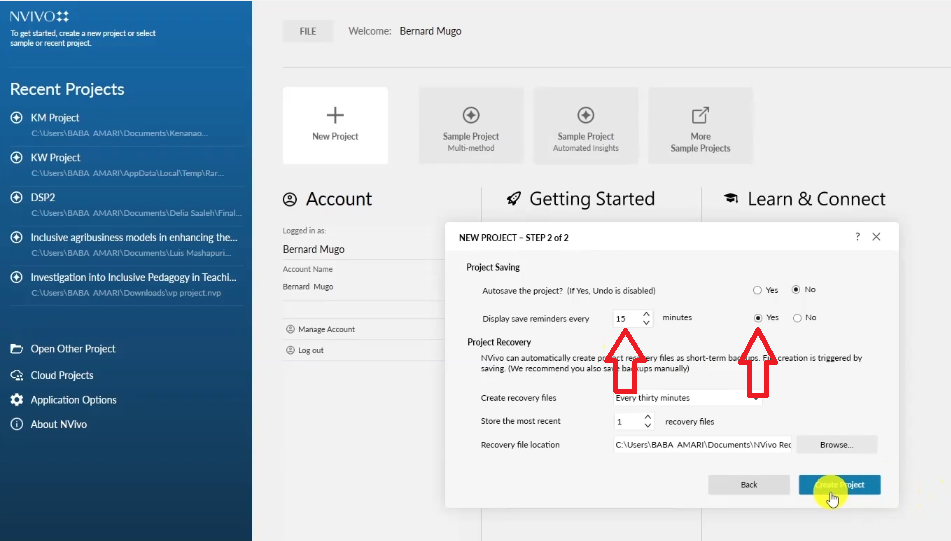
- Set the autosave reminder to your preference, then click Create Project.
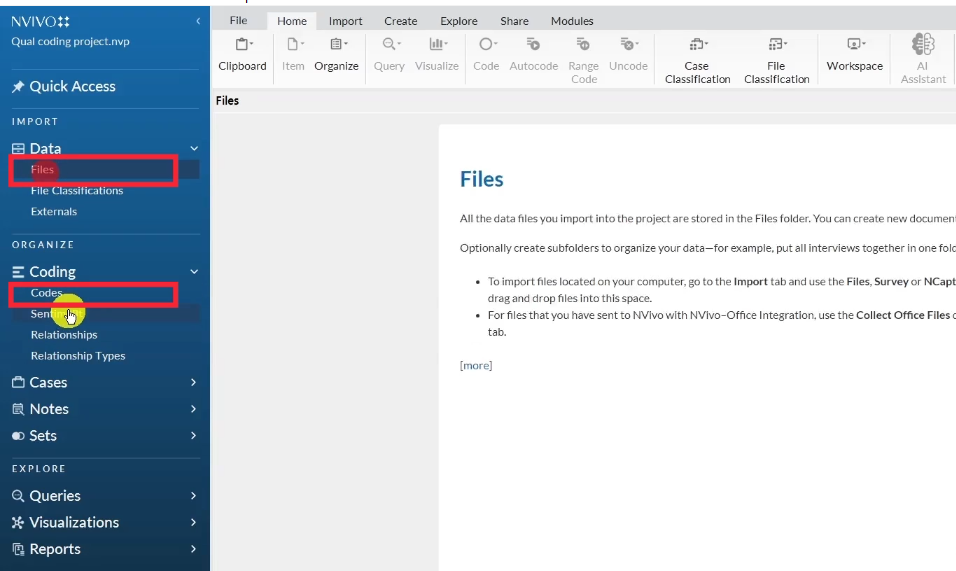
Once the project opens, you’ll see the main NVivo workspace. For thematic analysis, you only need two panels: Files and Codes. Everything else is secondary.

Importing Your Interview Transcripts into NVivo
There are two ways to get your transcripts into NVivo:
- Drag and drop — click on the Files panel, then drag your transcript documents directly into it.
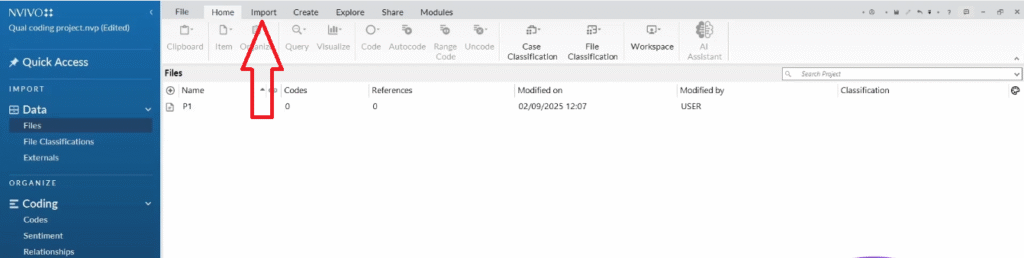
- Import menu — go to Import in the top menu, select Files, navigate to where your transcripts are saved, and select them.
Either method works. I usually use drag and drop for speed. NVivo accepts Word documents (.docx), PDFs, and plain text files.


How to Generate Codes in NVivo Step by Step
For this tutorial, the study is: Opinions of physiotherapists at a university teaching hospital on assessing the psychological wellbeing of patients with stroke. I have three transcripts to code.
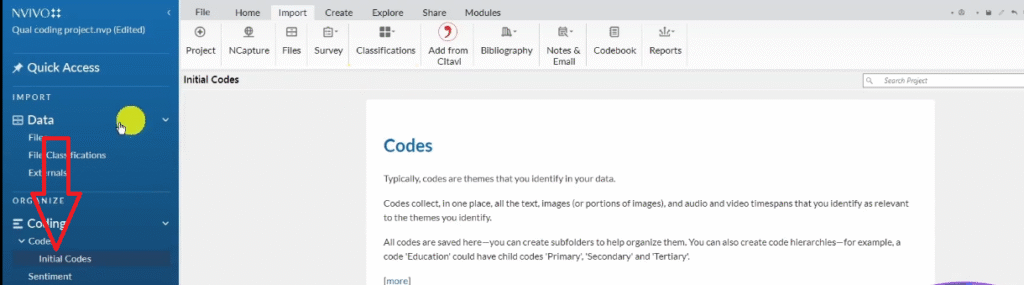
Setting Up Your Initial Codes Folder
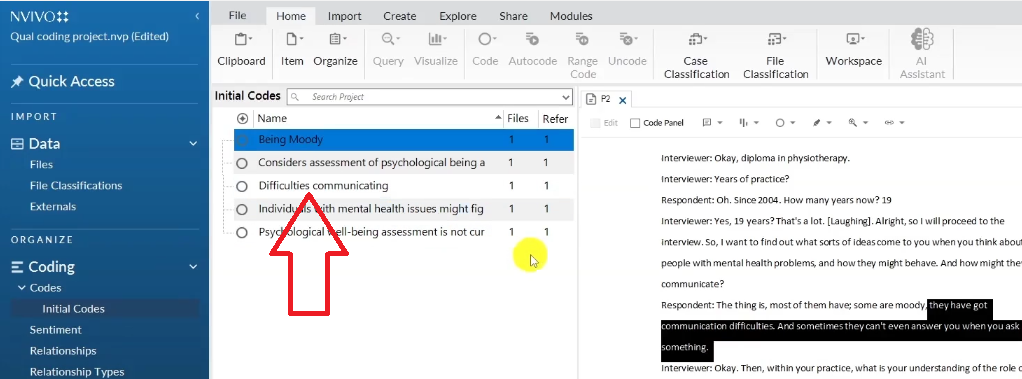
Before you start coding, create a folder in the Codes panel called “Initial Codes”. This isn’t required by NVivo, but it keeps your work organised — especially important because you’ll likely generate 30–50+ codes before you start grouping them into themes.
- In NVivo, click on the Codes panel.
- Right-click and select New Folder.
- Name it “Initial Codes”.
Using Color Coding to Track Interview Questions
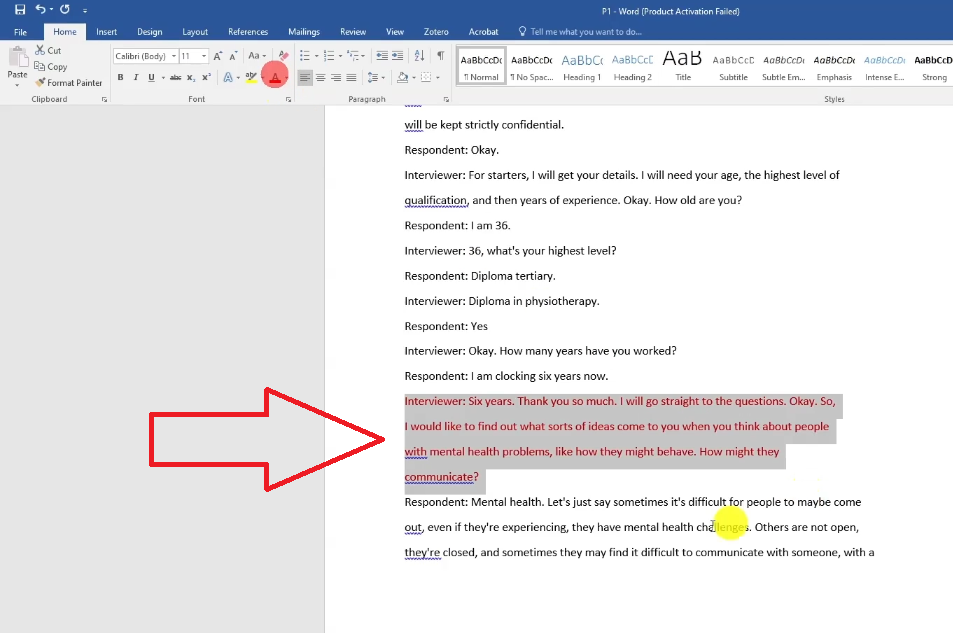
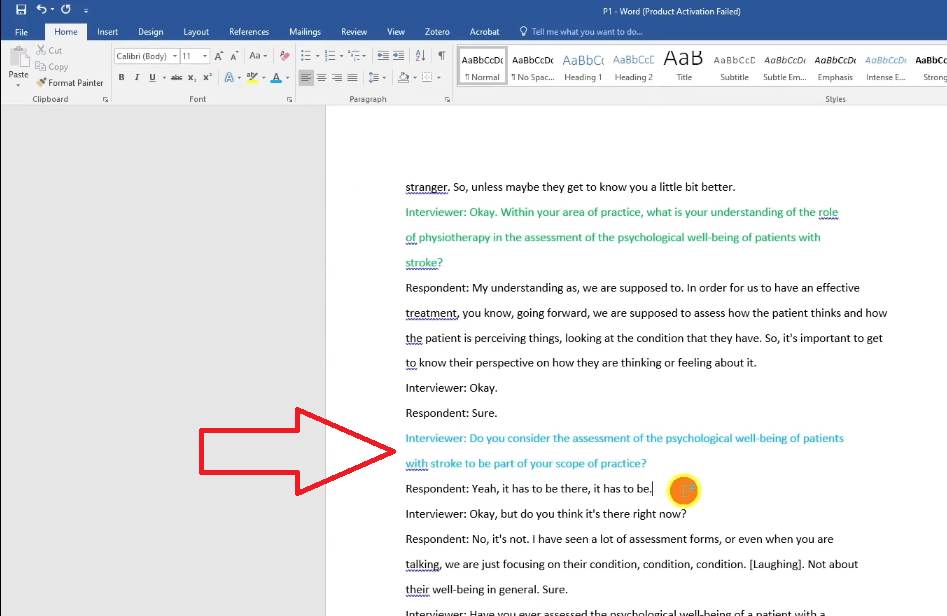
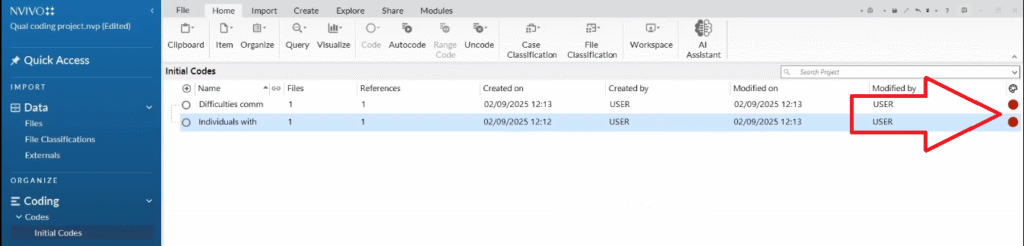
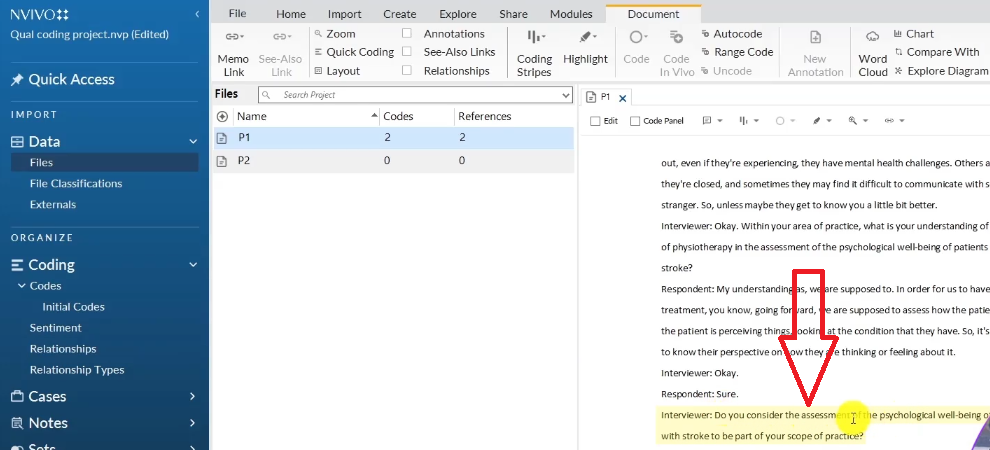
Here’s a technique I use to stay organised across multiple interview questions: I assign a color to each interview question, then apply that same color to all codes that were generated in response to that question.
- Find each interview question in the transcript.
- Highlight it and apply a color — red for question 1, green for question 2, blue for question 3, and so on.
- When you create a code from a response to question 1, right-click the code in the Codes panel, go to Color, and mark it red.
This gives you a visual map of where every code came from — essential when you have 40+ codes and need to remember which research question each one belongs to.
Opening a Transcript and Starting to Code
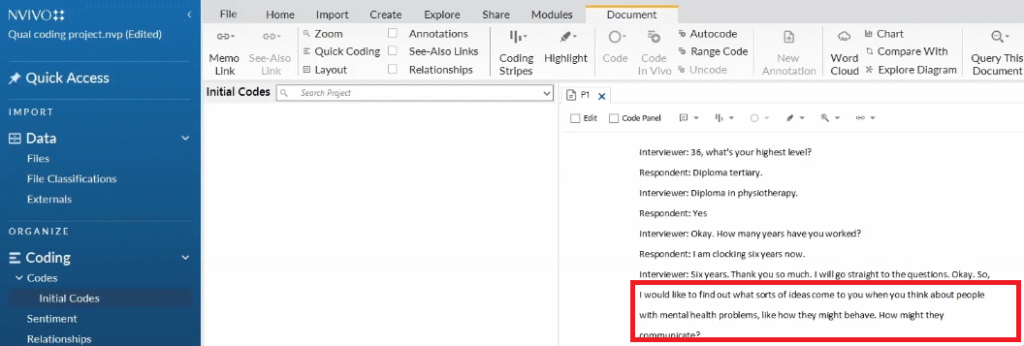
- Double-click any transcript in the Files panel to open it.
- Read through the first section before you start coding — understand the question being asked before tagging responses.
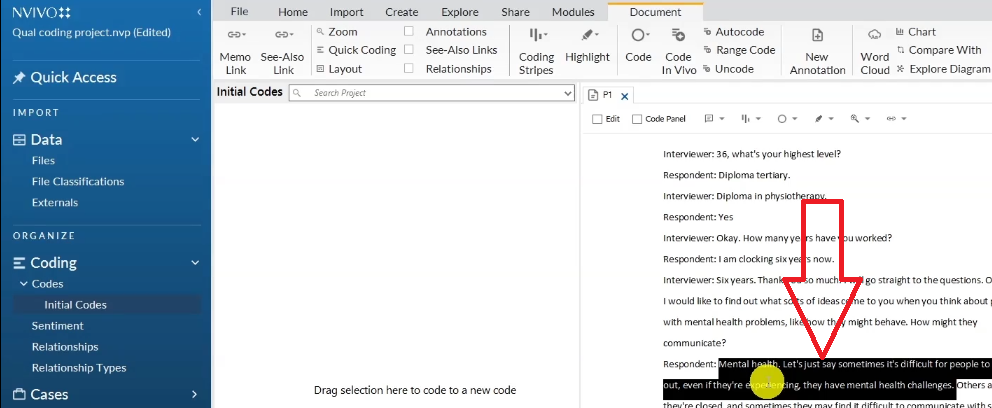
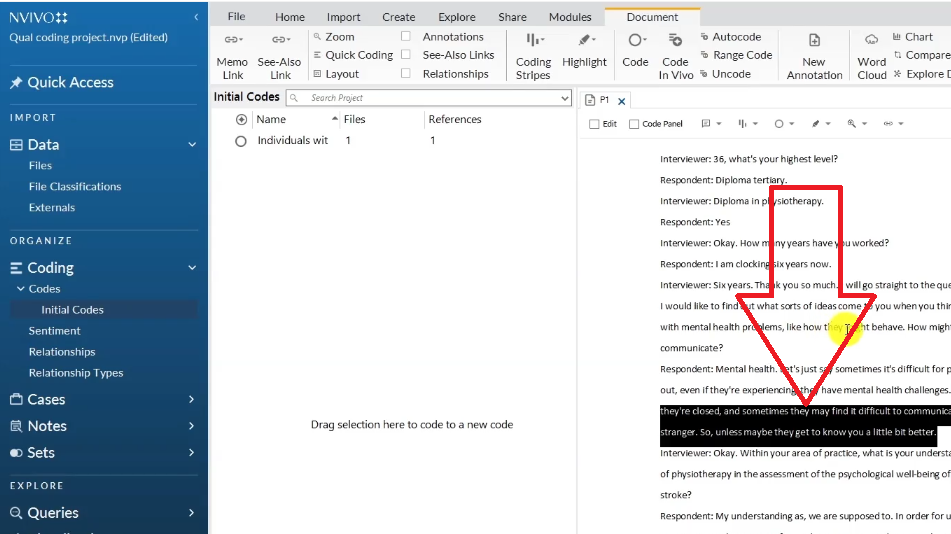
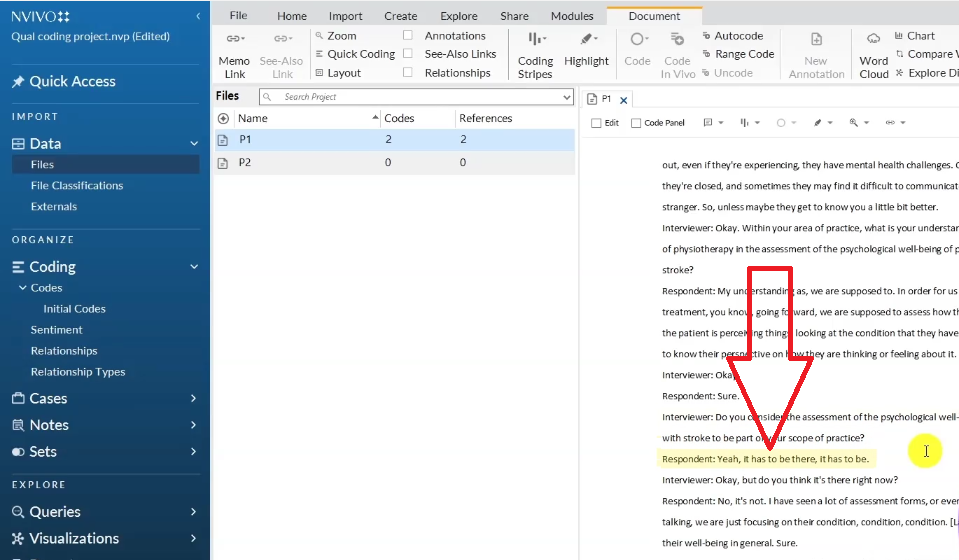
- Highlight the segment of text you want to code.
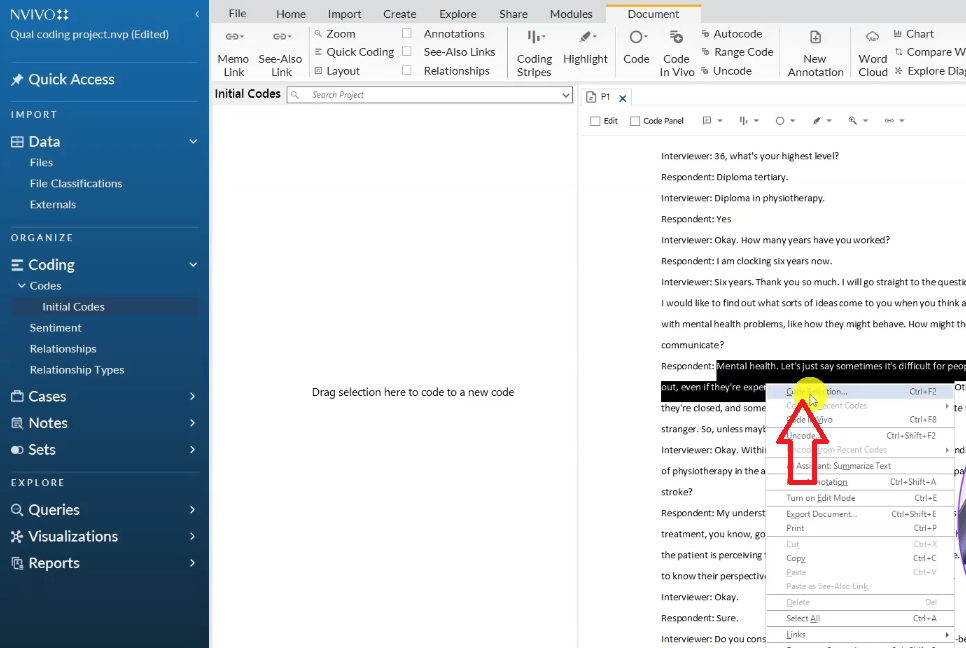
- Right-click the highlighted text and select Code Selection.
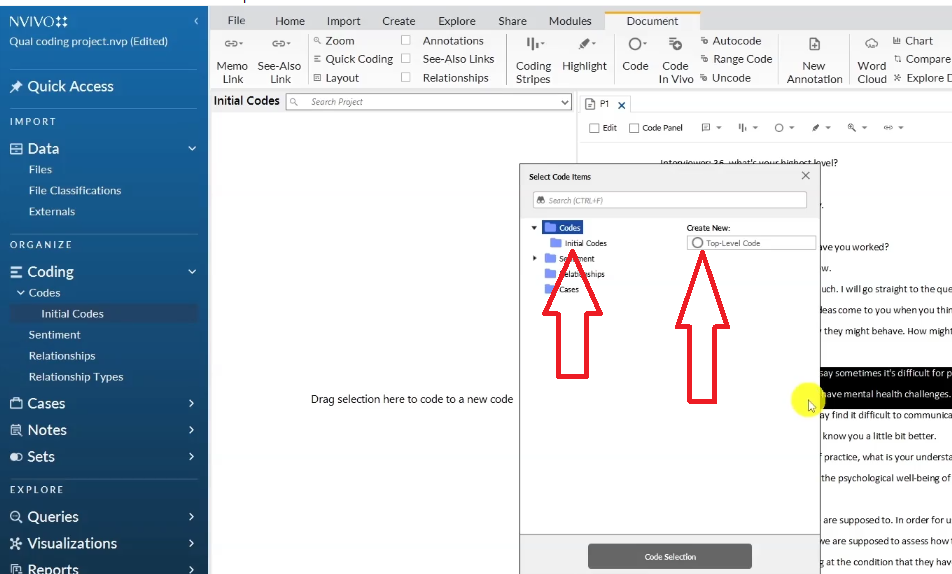
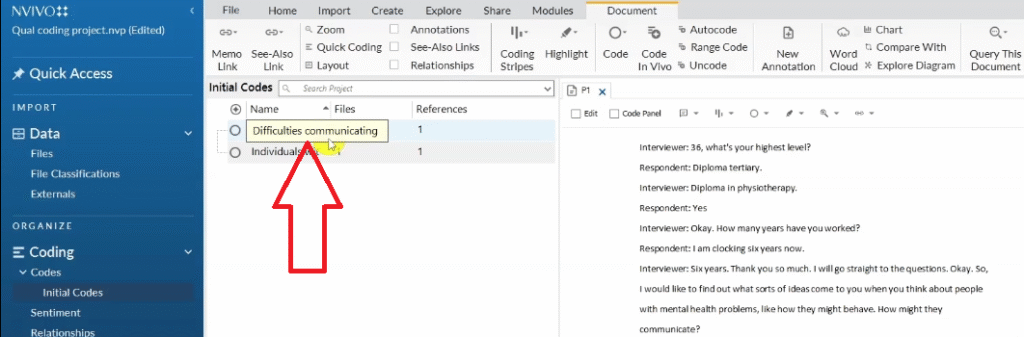
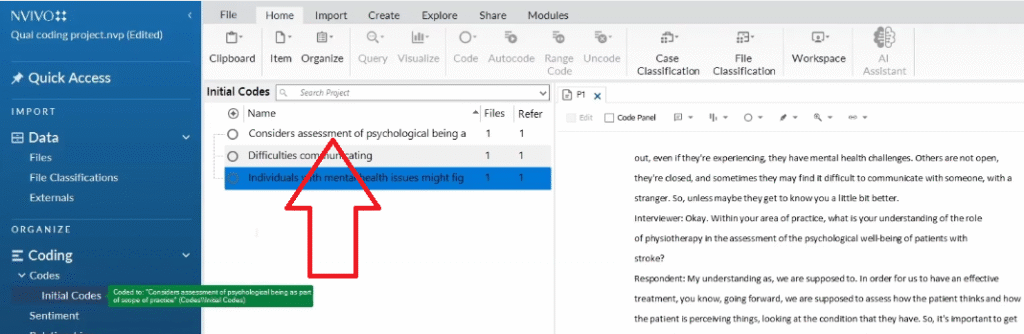
- Navigate to Initial Codes > Top Level Codes.
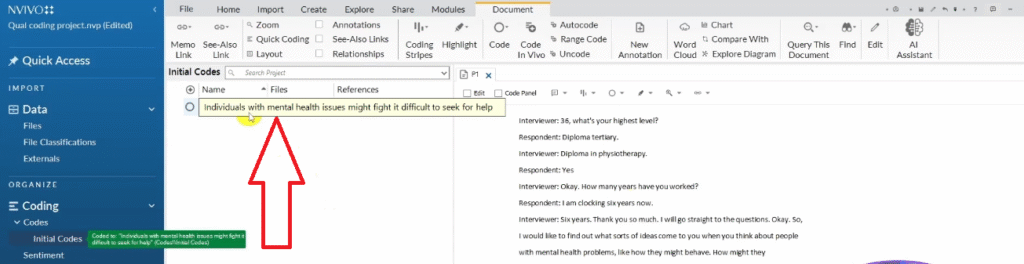
- Type your code label and press Enter.
Example: I highlighted the segment where the participant says they find it difficult to communicate when experiencing mental health challenges, and I created the code: “individuals with mental health issues might find it difficult to seek help”.
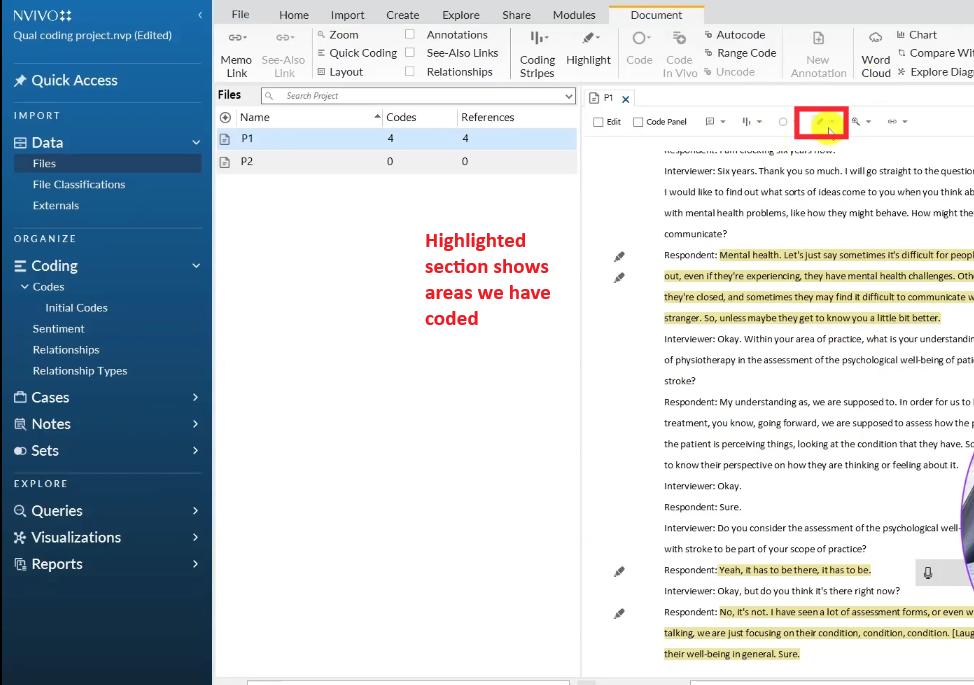
Keep coding segment by segment, working through the entire transcript before moving to the next one. Code transcript by transcript — never skip ahead.




How to Assign the Same Code to Multiple Participants
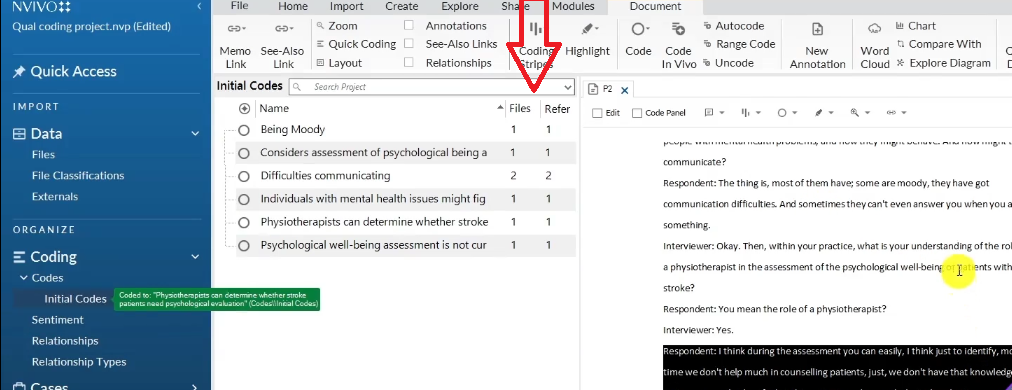
This is where NVivo becomes genuinely powerful. When two participants say something that means the same thing, you don’t create a new code — you assign the existing code to both quotes.
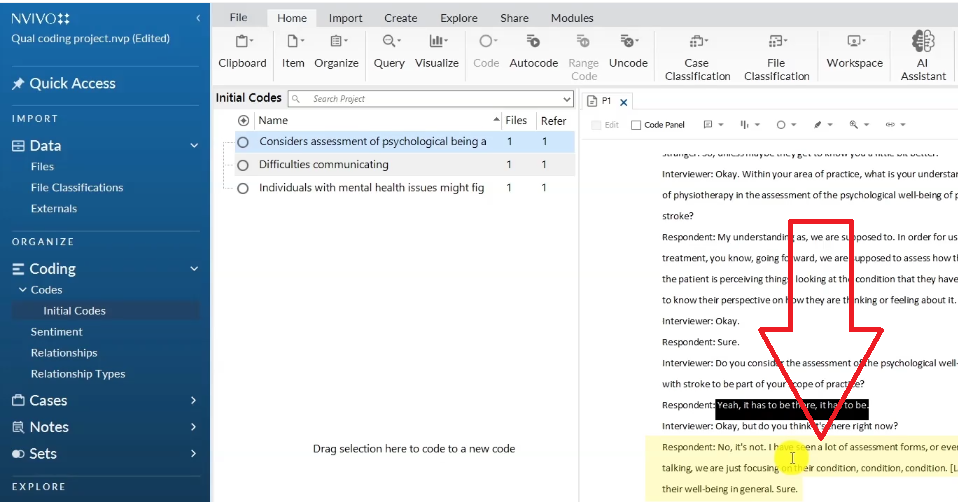
- In the second transcript, highlight the relevant quote.
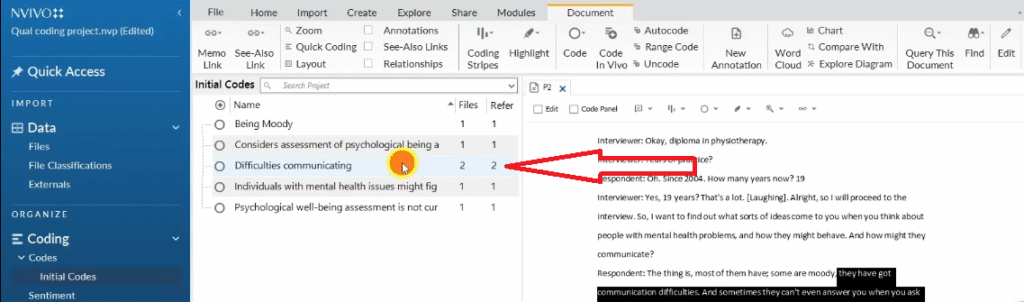
- Instead of creating a new code, drag and drop the highlighted text directly onto the existing code in the Codes panel.
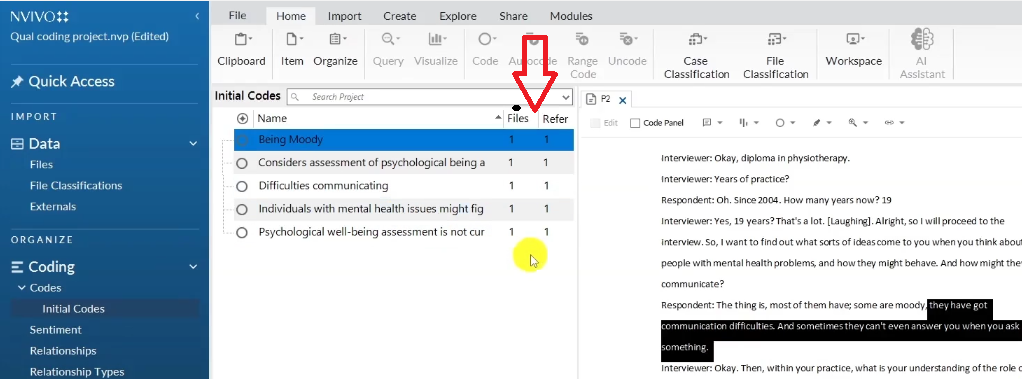
- NVivo automatically updates the code’s file and reference count — from “1 file, 1 reference” to “2 files, 2 references”.
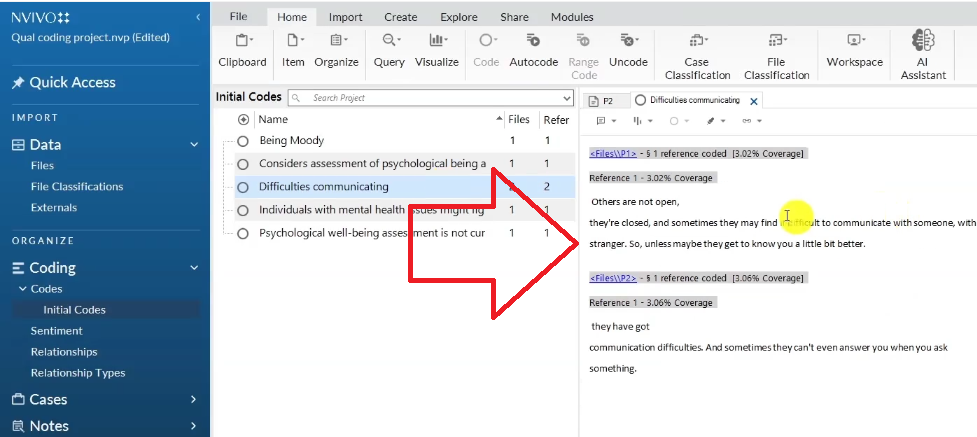
- Double-click the code to verify both quotes are now captured inside it.
This is the central advantage of coding in NVivo over manual methods. You can see at a glance which codes are appearing across multiple participants — a key signal that those codes may eventually become themes.


Tips for Staying Organised During Qualitative Coding
- Only code segments that are relevant to your research objectives — never code everything
- Make your codes interpretive, not descriptive — you’re not summarising, you’re attaching meaning
- Revise and refine codes after your first pass — initial codes are drafts, not final labels
- Use the color system consistently throughout all transcripts
- Track your files and references count in NVivo — it tells you which codes have the most evidential support
For a deeper look at what comes after coding — moving from codes to themes — read my guide on inductive thematic analysis using NVivo (Saldana’s method).
If you’re new to qualitative research interviews and want to understand what you should be asking before you start coding, my article on how to conduct a qualitative research interview covers the preparation and structure you need.
And if you’re using MAXQDA instead of NVivo, the same coding principles apply — check out my step-by-step guide on qualitative coding in MAXQDA.
For a broader overview of what NVivo can do beyond basic coding, visit my guide on mastering qualitative analysis with NVivo.
For a well-structured external overview of qualitative methodology, Scribbr’s qualitative research guide is one of the clearest resources available for PhD students.
Frequently Asked Questions
What is the difference between a code and a theme in qualitative research?
A code is a short label attached to a specific segment of an interview — it captures what that one participant said or meant. A theme is a higher-level pattern that emerges when multiple codes share a common meaning across your data. You generate codes first, then group them into themes.
How many codes should I have after coding my interviews?
There’s no fixed number, but for a typical dissertation with 3–6 interview transcripts you might generate 40–80 initial codes. After merging duplicates and refining, that usually reduces to 20–40 codes, which then group into 3–6 themes. Don’t worry about the number at the initial coding stage — quantity is fine.
Can I do qualitative coding without NVivo?
Yes. Manual coding — using printed transcripts, colored pens, or a Word document with margin notes — is entirely valid. NVivo makes it easier to merge codes across multiple participants and track references, but it doesn’t change the intellectual work of coding. Many researchers prefer manual coding for smaller datasets.
How do I know what to code and what to skip?
Always code relative to your research objectives. If a segment directly addresses one of your research questions, code it. If it’s background information, filler, or off-topic, skip it. Your research questions are the filter — everything else is secondary.
Should codes be short or long?
Both are fine. Short codes (“being moody”, “communication difficulties”) are easier to work with when grouping. Longer codes (“individuals with mental health issues might find it difficult to seek help”) are more precise but harder to sort later. A mix of both at the initial stage is completely normal — you’ll refine them before grouping into themes.
Key Takeaways
- Qualitative coding is an interpretive process — you’re attaching meaning to segments, not just labelling them
- Create an Initial Codes folder in NVivo before you start to keep your work organised
- Code transcript by transcript, working through the entire document before moving on
- Use color coding in NVivo to track which interview question each code came from
- When two participants say the same thing, drag and drop the quote into the existing code — don’t create a duplicate
- Files and references count in NVivo tells you which codes have the most cross-participant support
Need Help With Your NVivo Coding?
If you have your interview transcripts ready but aren’t sure how to turn them into a clean set of codes and themes, I can help. I’ve worked with more than 250 PhD students on exactly this — taking raw data and producing findings that are ready for a dissertation chapter.
Get in touch here and tell me where you are in your project. I’ll take it from there.

Pingback: 14 NVivo Shortcuts to Save You Hours of Work [2025] -
Pingback: How to Conduct a Qualitative Research Interview [7 Steps] -
Pingback: Qualitative Research Questionnaire Example (2026 Guide) -
Pingback: How to Analyze PDFs and Images in NVivo (Secondary Data) -
Pingback: Best tools for transcribing interviews -
Pingback: Template Analysis in Qualitative Research Using Nvivo -
Pingback: From Codes to Themes in NVivo: A Step-by-Step Guide (Part 2) -
Pingback: ATLAS.ti Qualitative Analysis of Interviews: A Step-by-Step Coding Guide -
Pingback: ATLAS.ti Tutorial: Analyze Interviews from Codes to Findings -