

Last Updated on 4 months ago by Grace Nyambura
Qualitative Coding in NVivo: Step-by-Step Guide for Beginners
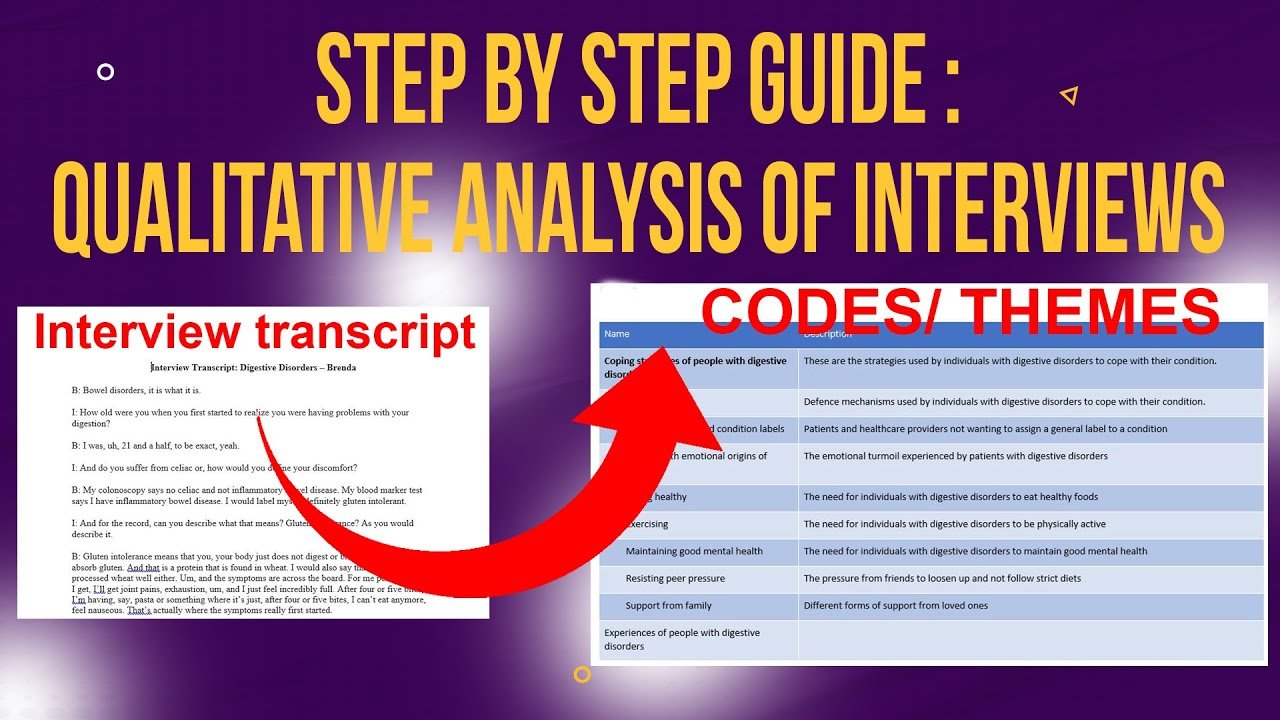
In my previous article, I showed you how to do qualitative coding with Microsoft Word. In this one, I’m going to show you how to do the same thing using NVivo — one of the most widely used qualitative data analysis tools available. NVivo makes coding significantly faster and more manageable than doing it manually, especially when you’re working with multiple transcripts.
By the end of this guide, you’ll know exactly how to import your transcript, create qualitative codes in NVivo, and keep everything organised in one place.
- Qualitative Coding in NVivo: Step-by-Step Guide for Beginners
- What Is Qualitative Coding?
- What You Need Before You Start
- How to Set Up Your NVivo Project
- How to Code Qualitative Data in NVivo (Step-by-Step)
- Example: Coding an Interview About Women's Fertility Experiences
- Common Mistakes to Avoid When Coding in NVivo
- What Comes After Qualitative Coding?
- Frequently Asked Questions
- Key Takeaways
- Need Help With Your Qualitative Coding?
What Is Qualitative Coding?
| Definition: Qualitative coding is the process of labelling meaningful segments of your data — words, phrases, or passages — that are relevant to your research questions or objectives. Each label is called a code. Codes are the building blocks of themes in thematic analysis. |

Definition of a qualitative code – a label or interpretive statement attached to data that is important to the research questions
The key rule when coding: only code information that is directly relevant to your research questions or objectives. Don’t try to code everything.
There are two types of qualitative codes you need to know:
Semantic codes
Semantic codes capture the obvious, surface-level meaning of what a participant says. If someone says “I tried IVF and it wasn’t successful,” a semantic code might be: Had unsuccessful IVF treatment. You’re labelling what’s being said directly.

Definition of semantic codes in qualitative research showing how they capture the obvious surface meaning of participants’ words
Latent Codes
Latent codes capture the deeper implied meaning behind what a participant says. If someone describes feeling relieved after a difficult fertility decision, a latent code might be: Emotional burden of fertility treatment decision-making. You’re reading beneath the surface.
According to Saldaña’s Coding Manual for Qualitative Researchers — one of the most widely cited guides on qualitative coding — latent codes require more interpretive work from the researcher and are especially useful in studies exploring experiences, perceptions, and meaning-making.
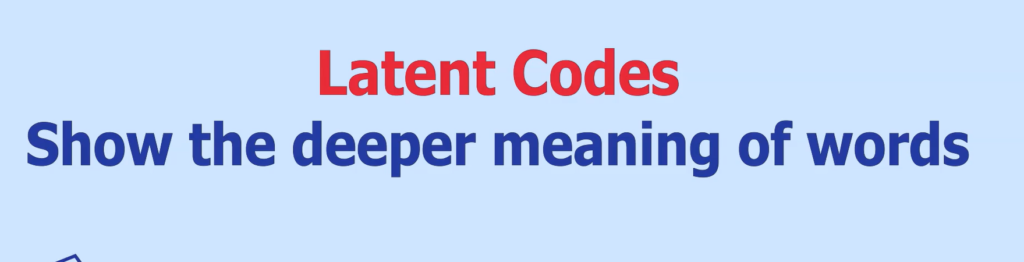
Definition of latent codes in qualitative research showing how they capture the deeper implied meaning beneath participants’ statements
What You Need Before You Start
Before opening NVivo, you need two things: the software itself, and a transcript to analyse.
Getting NVivo

You can download NVivo from Lumivero’s official NVivo page. If you’re a student, choose the student licence — it’s significantly cheaper than the professional licence and has everything you need for dissertation analysis.
Where to Get Practice Transcripts
If you don’t have your own transcripts yet, I recommend using Figshare — a free academic data-sharing platform where researchers upload their transcripts and datasets after publishing. You can search for transcripts on virtually any topic and use them to practise coding. This is exactly where I source the transcripts I use in my tutorials.
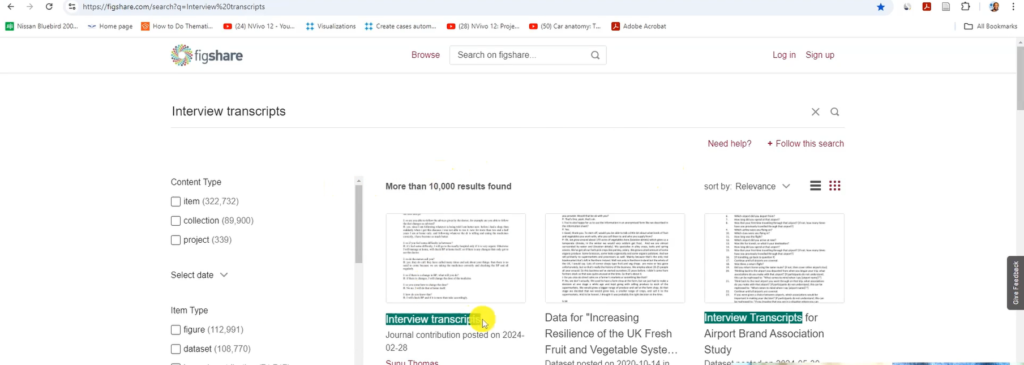
Figshare website screenshot showing where researchers can download free qualitative interview transcripts to practise NVivo coding
How to Set Up Your NVivo Project
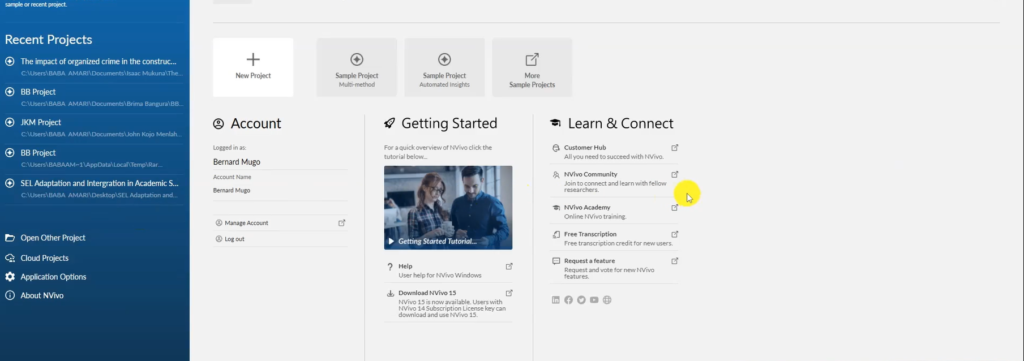
NVivo 14 software interface showing the main dashboard for qualitative data analysis
When you open NVivo for the first time, you’ll see the start screen. Here’s how to set up your project correctly from the beginning:
- Click New Project.
- Give your project a name that matches your study title.
- Click Next.
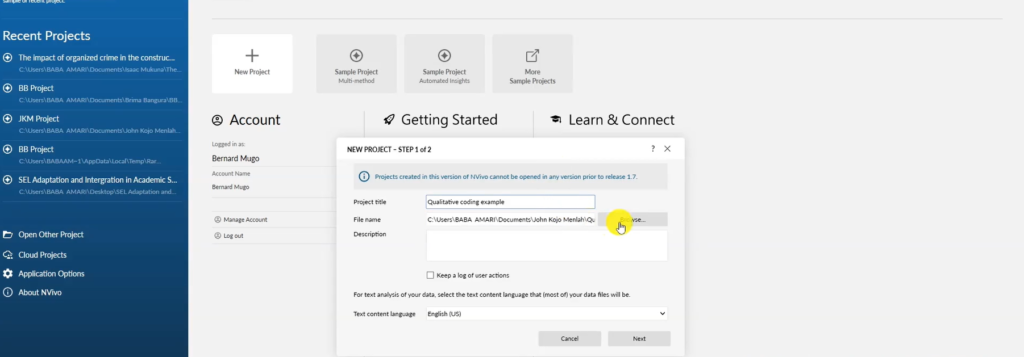
Creating a new NVivo project for qualitative coding with the project name and settings dialog box open
On the next screen, turn off auto-save and instead set a save reminder every 10–15 minutes.
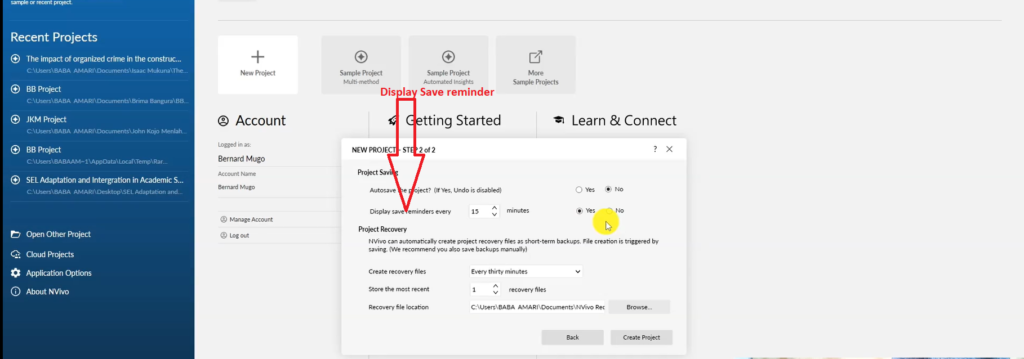
| NVivo save reminder settings showing how to set a 10–15 minute reminder to prevent data loss during qualitative coding |
This step matters. NVivo can crash, and if auto-save is on, it can sometimes save a corrupted file over your good one. A manual save reminder means you’re always in control of when your work gets saved.
- Click Create Project. Your project is now open and ready.
How to Code Qualitative Data in NVivo (Step-by-Step)
NVivo has several menus, but as a beginner you only need to focus on two areas: Files and Codes.
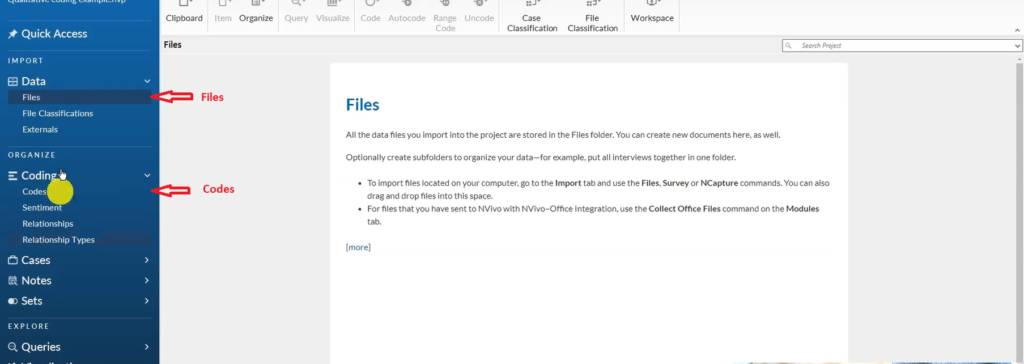
NVivo files and codes sections showing the two main areas used for importing transcripts and creating qualitative codes
- Files — where your transcripts live
- Codes — where your qualitative codes are stored and managed
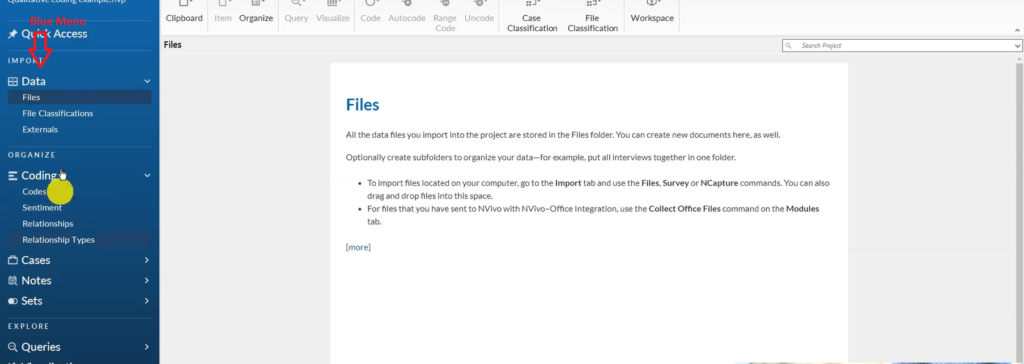
| NVivo blue menu bar showing the main navigation panel used for qualitative data analysis |
Step 1: Import Your Transcript
There are two ways to import a transcript into NVivo:
- Drag and drop the file directly into the Files section
- Go to Import → Files in the top menu, then select your document
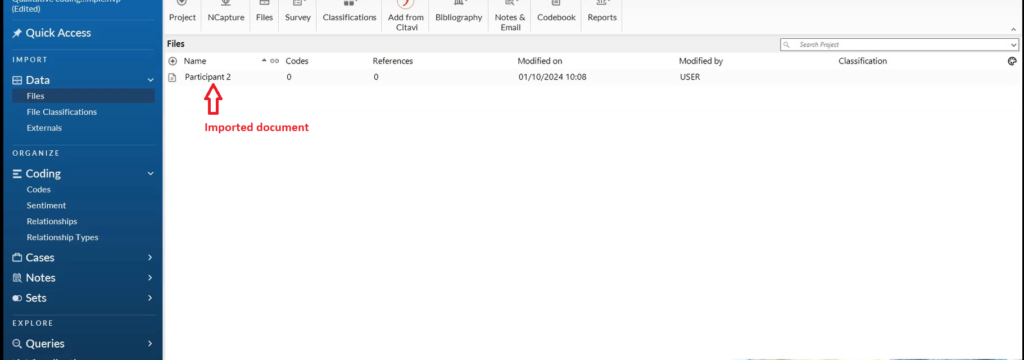
Interview transcript successfully imported into NVivo files section ready for qualitative coding
Once imported, your transcript appears in the Files section ready to open.
Step 2: Open and Read the Transcript First
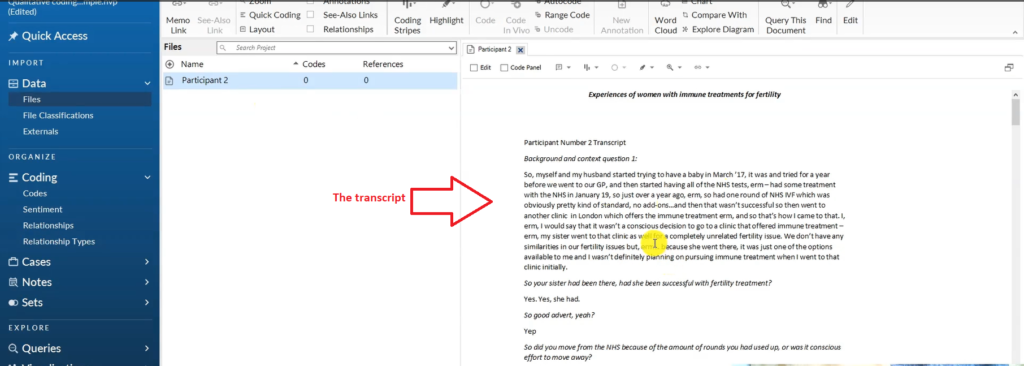
Qualitative interview transcript displayed in NVivo files section showing the text opened and ready for coding
Double-click on your transcript in the Files section to open it. Before you start creating any codes, read through the transcript once without coding anything. Familiarising yourself with the data is Step 1 of the Braun and Clarke six-step framework — and doing this first genuinely makes your coding sharper and more consistent.
Step 3: Highlight a Passage and Create a Code
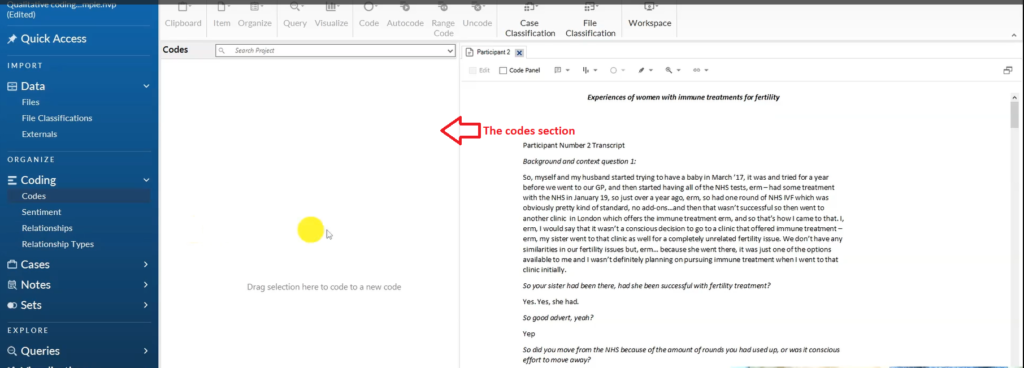
NVivo codes section showing where qualitative codes are stored and organised during thematic analysis
This is the core coding action in NVivo:
1.Read a passage in your transcript.
2.If it’s relevant to your research questions, highlight it with your mouse.
3.Drag and drop the highlighted text into the Codes section.
4.A dialog box will appear — type your code name and click OK.
The code now lives in your Codes section, and NVivo has linked it to the exact passage in the transcript it came from. That’s the power of NVivo over manual coding — the link between code and source is always preserved, making it easy to retrieve quotes later.
Step 4: Keep Coding Through the Entire Transcript
Work through your entire transcript methodically from start to finish. Don’t skip sections. Every part of the data that relates to your research questions should be coded.
If a new passage fits an existing code, drag it to that code. If it represents something new, create a new code. There is no fixed number of codes to aim for — let the data guide you.
If you need hands-on help at any stage of your coding, I offer one-on-one qualitative data analysis consulting sessions here.
Example: Coding an Interview About Women’s Fertility Experiences
Let me show you how this works in practice. The transcript I’m working with is from a study on women’s experiences with immune treatments for fertility, sourced from Figshare.
Here are the five codes I generated from one section of that transcript:
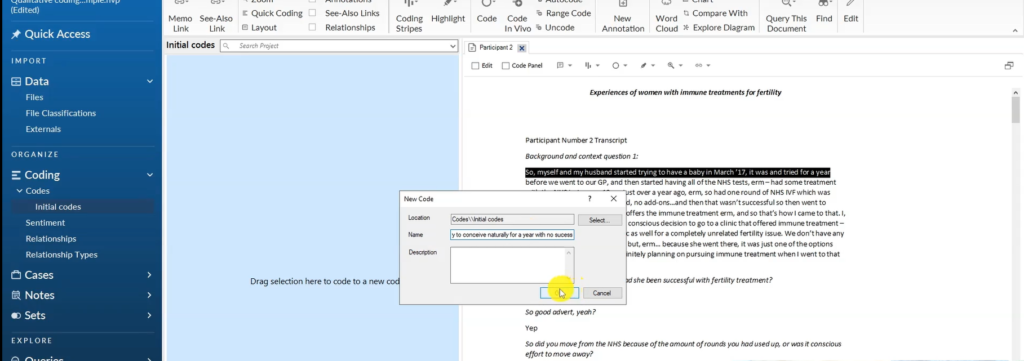
Creating the NVivo qualitative code ‘Tried to conceive naturally for a year with no success’ from a highlighted transcript passage
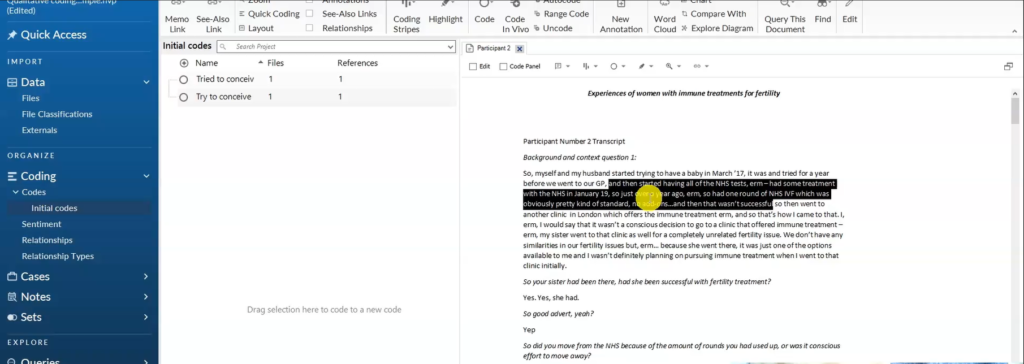
NVivo transcript highlighting the passage about NHS IVF treatment selected for qualitative coding
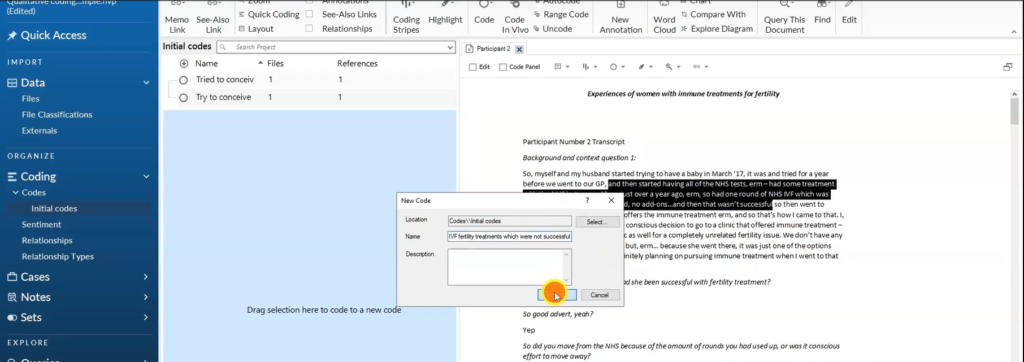
Creating the NVivo code ‘Had NHS IVF fertility treatments which were not successful’ during qualitative data analysis
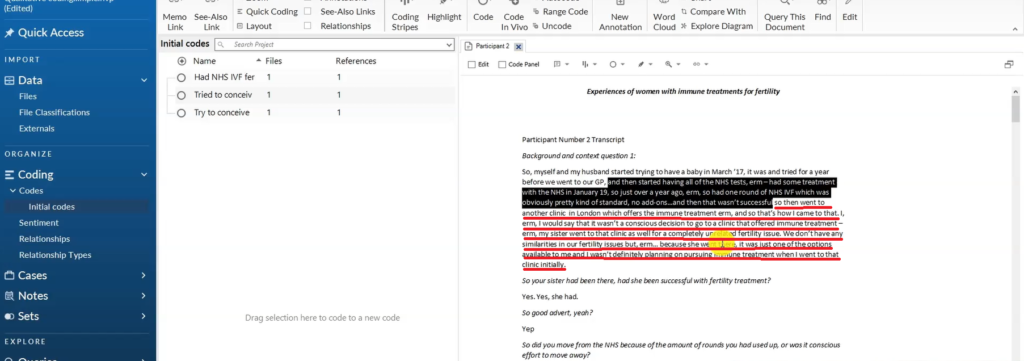
NVivo transcript highlighting the passage about attending a London clinic offering immune fertility treatment for coding
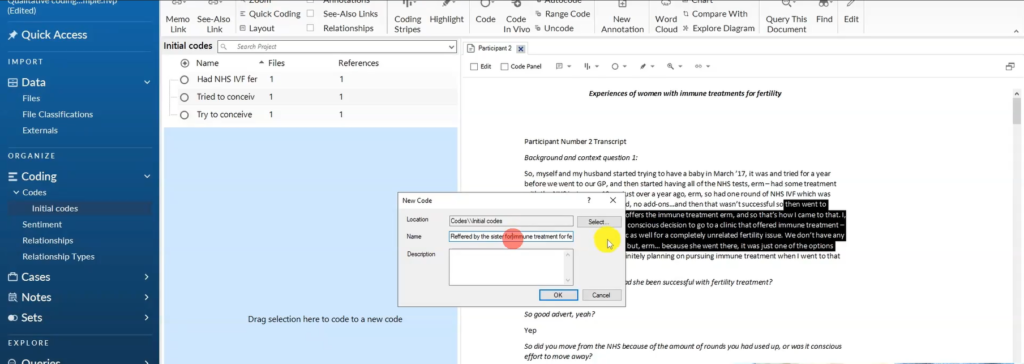
Creating the NVivo qualitative code ‘Referred by sister for immune treatment for fertility’ from the highlighted transcript passage
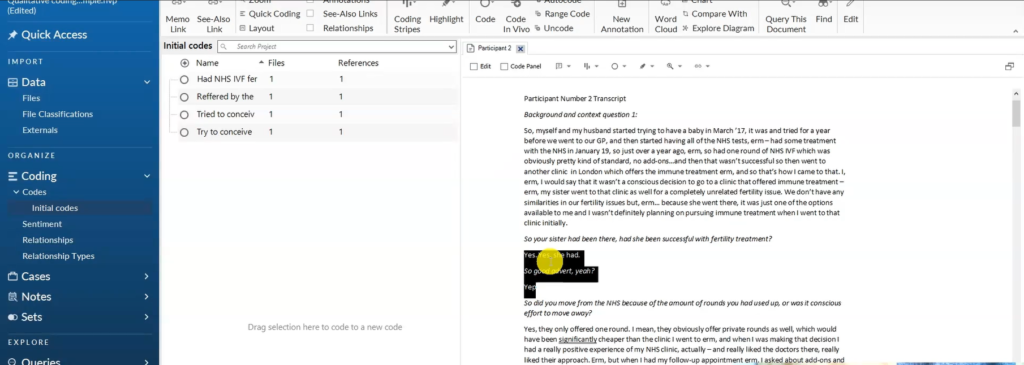
NVivo screenshot highlighting the transcript passage about the sister’s successful fertility treatment influencing the interviewee
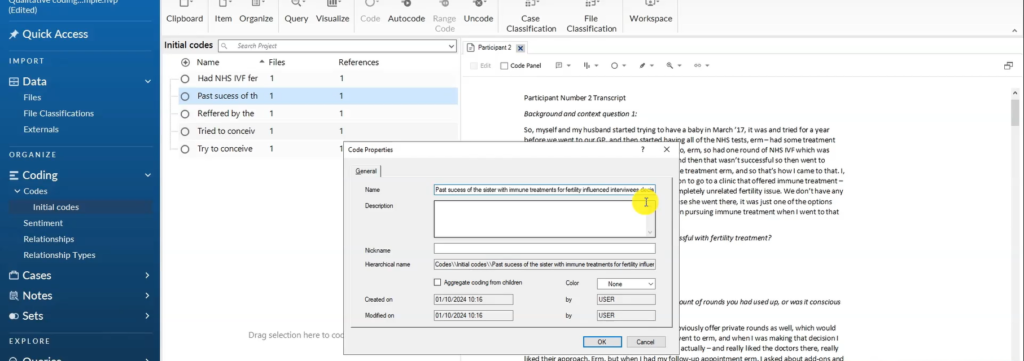
Creating the NVivo code about the sister’s past success with immune treatment influencing the interviewee’s fertility treatment decision
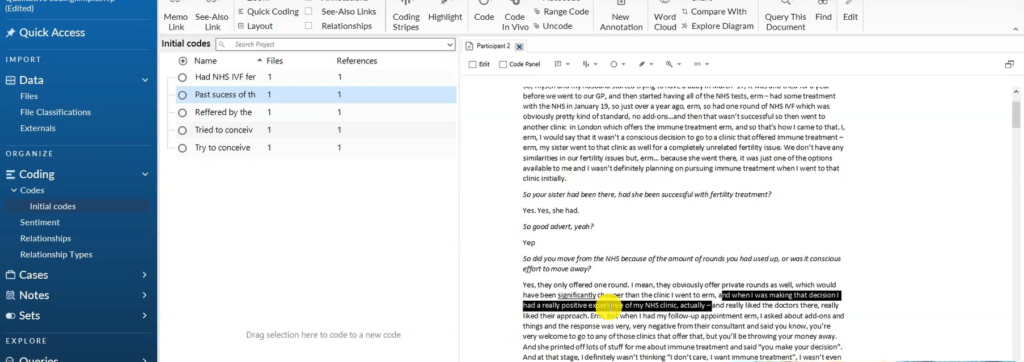
NVivo transcript highlighting the decision-making passage about immune treatment during qualitative coding
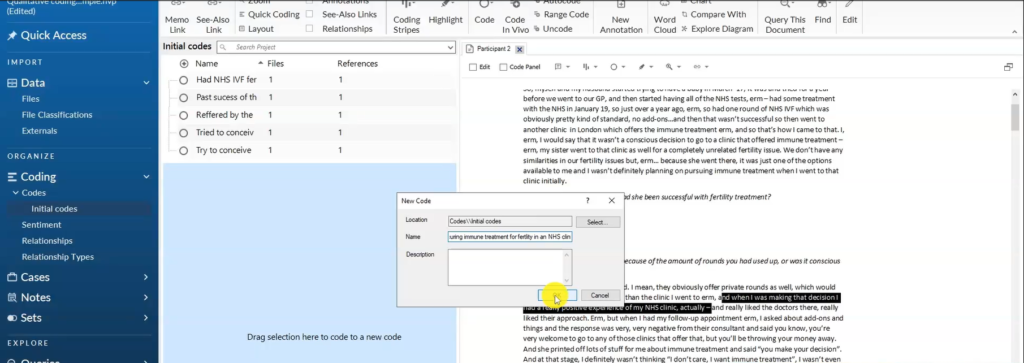
Creating the NVivo code ‘Had a positive experience procuring immune treatment for fertility in an NHS clinic’
Common Mistakes to Avoid When Coding in NVivo
Trying to code everything. Only code what’s relevant to your research questions. If you code every sentence, you’ll drown in codes and lose the signal in the noise.
Making codes too broad. “Health experience” is not a useful code. “Had unsuccessful IVF treatment” is. Be specific enough that you can distinguish between codes when you revisit them.
Not saving regularly. Set that 10-minute save reminder from the very beginning. It will save you hours of rework.
Rushing to themes before finishing coding. Complete all your coding across all transcripts before you start grouping codes into themes. Rushing this step undermines the quality of your analysis.
For a detailed guide on what happens after coding is complete, read my article on how to get themes in qualitative data analysis.
What Comes After Qualitative Coding?
Once you’ve coded all your transcripts, the next step is to look across your codes for patterns of shared meaning. That’s how you develop themes — which is Step 3 of the Braun and Clarke six-step framework for thematic analysis.
Frequently Asked Questions
What is the difference between semantic and latent codes?
Semantic codes capture what’s explicitly said — the surface meaning. Latent codes capture what’s implied — the deeper meaning beneath the words. Most qualitative studies use both types throughout the coding process.
How many codes should I aim for?
There’s no set number. A single interview transcript might yield 20–50 codes depending on length and richness of the data. The goal is completeness, not hitting a specific count.
Can I code multiple transcripts in one NVivo project?
Yes — and you should. Import all your transcripts into the same NVivo project so your codes are consistent across participants. NVivo will track which participant each coded quote came from, which makes comparison much easier.
What is the difference between qualitative coding in NVivo and in Microsoft Word?
The process is the same — you read text and create codes. The difference is that NVivo automatically links each code to its source passage and stores everything in a searchable structure. Word requires manual tracking. Both approaches work, but NVivo scales much better across multiple transcripts. If you’re working manually, see my guide on qualitative coding with Microsoft Word.
Do I need to use an inductive approach to coding?
Not necessarily. Inductive coding means you let themes emerge from the data. Deductive coding means you come to the data with pre-set categories. Most PhD researchers use an inductive approach, but the right choice depends on your research design and methodology.
Key Takeaways
- A qualitative code is a label attached to data relevant to your research questions — only code what matters
- Semantic codes capture surface meaning; latent codes capture deeper implied meaning
- In NVivo, import your transcript into Files and drag highlighted passages into the Codes section
- Always set a 10–15 minute save reminder — never rely on NVivo’s auto-save
- Code through your entire transcript before moving on to theme development
Need Help With Your Qualitative Coding?
If you’re stuck on coding — or any stage of your qualitative analysis — I offer one-on-one consulting sessions where we work through your data together. Get in touch and let’s move your analysis forward.

Pingback: Qualitative Coding in Microsoft Word: Step-by-Step Guide -
Pingback: 9 Best Qualitative Data Analysis Software Tools [Compared] -
Pingback: NVivo Qualitative Analysis Tutorial: Coding, Themes & Reporting -
Pingback: 12 Qualitative Coding Mistakes (And How to Fix Them) -