
Last Updated on 2 weeks ago by Bernard Mugo
You’ve coded your transcripts. You’ve got dozens of codes sitting in NVivo. Now what? This is exactly where most beginner researchers get stuck — staring at a long list of codes with no idea how to turn them into actual findings.
This guide walks you through moving from codes to themes in NVivo using Braun and Clarke’s six-phase framework, so you can build, refine, and export themes that actually hold up.
- A Quick Recap of Braun and Clarke's Six Phases
- Step 1: Create a Preliminary Themes Folder
- Step 2: Read Your Codes and Look for a Shared Pattern of Meaning
- Step 3: Review and Refine Your Themes
- Step 4: Export Your Codebook, Code List, and Visuals
- Common Mistakes When Moving from Codes to Themes in NVivo
- Frequently Asked Questions
- Key Takeaways
- Get Help With Your Thematic Analysis
Quick definition: Moving from codes to themes in NVivo means grouping codes that share a pattern of meaning under a single, clearly described theme, then reviewing and refining those themes until each one represents a coherent idea in your data.
This is Part 2 of a series. In Part 1, we went from a blank NVivo project to your first set of codes — if you haven’t read that yet, start there. Here, we’re finishing the job: turning codes into themes, refining those themes until they hold up, writing theme descriptions, and exporting everything into a codebook.
In the last three and a half years, I’ve helped nearly 400 researchers get through this exact stage of their thematic analysis. If you’re at the point where you’ve coded everything but you’re struggling to pull it into a coherent analysis, that’s one of the most common things my done-for-you analysis service handles — I take your coded data and turn it into a complete findings chapter. More on that at the end. For now, let’s look at how to do it yourself.
A Quick Recap of Braun and Clarke’s Six Phases
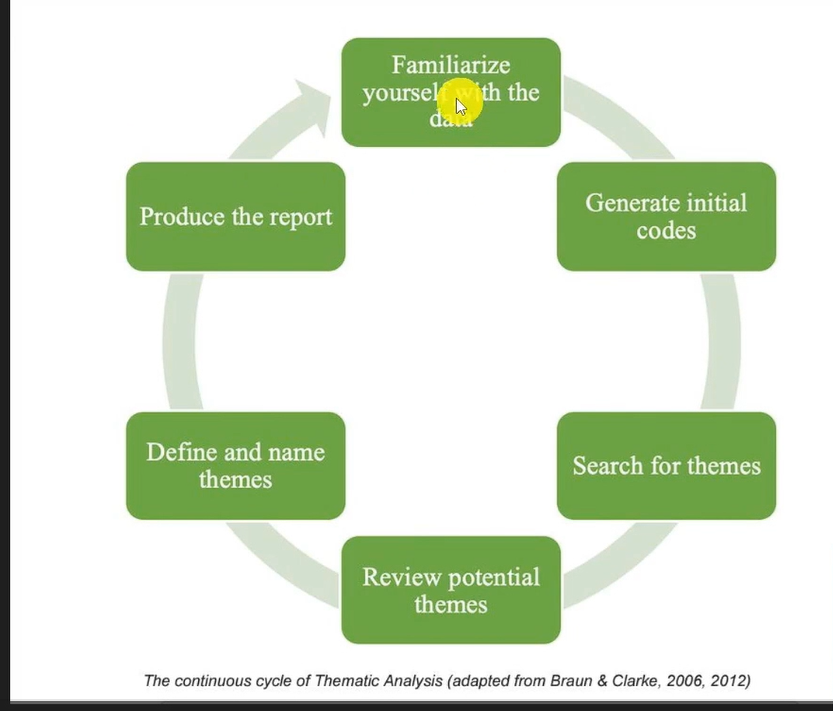
Braun and Clarke’s thematic analysis framework breaks qualitative analysis into six phases: familiarizing yourself with the data, generating initial codes, generating themes, reviewing themes, defining and naming themes, and writing up. Phases one and two are what Part 1 of this series covered. Phase three — generating themes — is where this post picks up: themes come directly from your codes, not the other way around. If you want to see the full six phases applied end to end, I’ve also written a step-by-step walkthrough of the Braun and Clarke reflexive thematic analysis approach in NVivo.
Step 1: Create a Preliminary Themes Folder
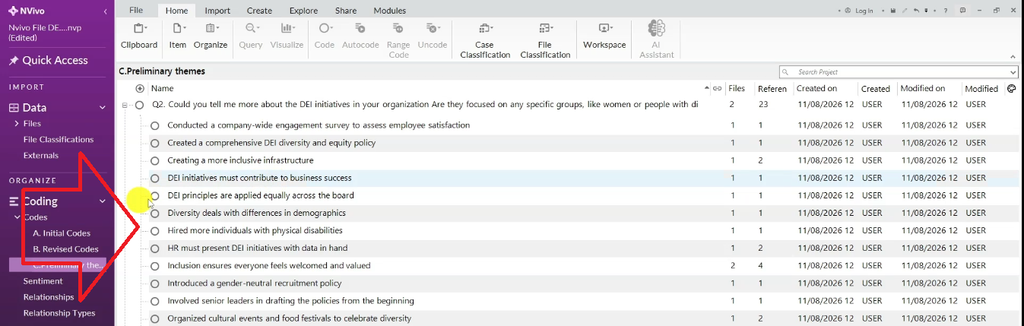
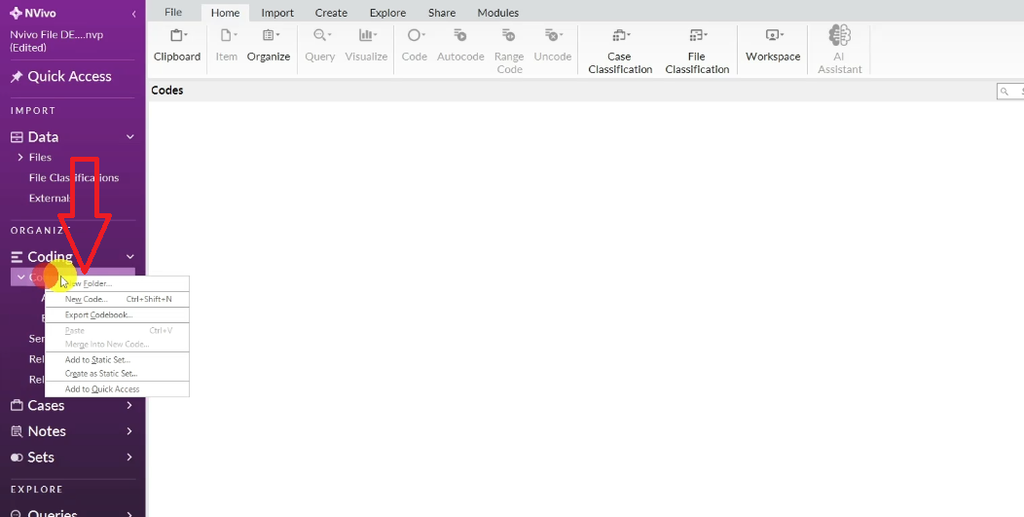
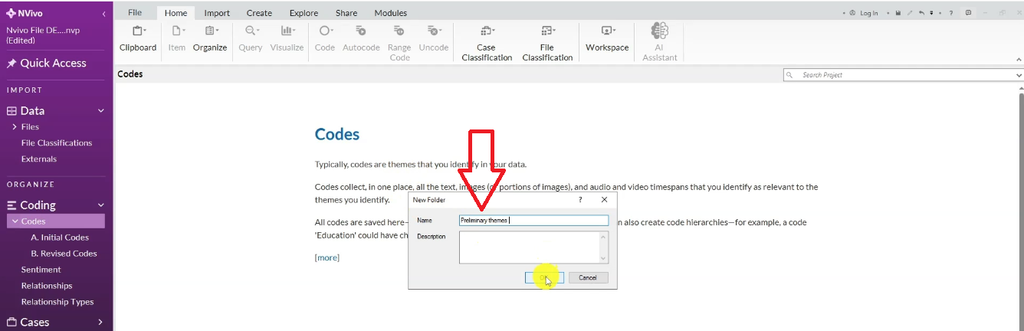
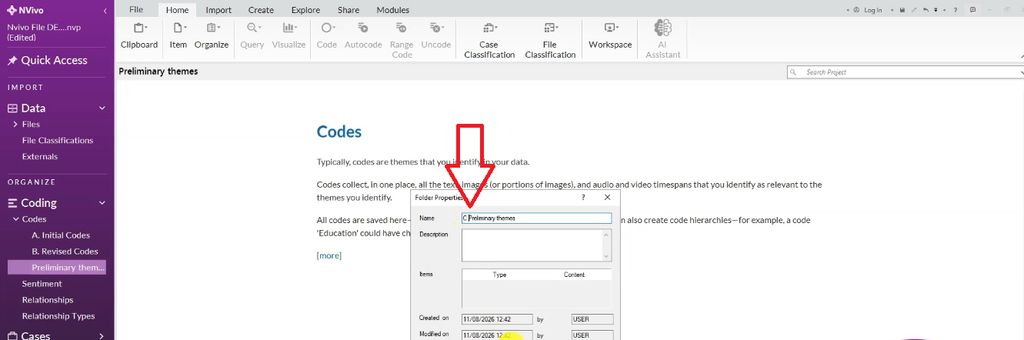
Start by creating a new folder in your NVivo project — call it “Preliminary Themes.” Right-click it, open Folder Properties, and give it a number (I use “C — Preliminary Themes”) so your folder structure stays organized as your coding framework grows.
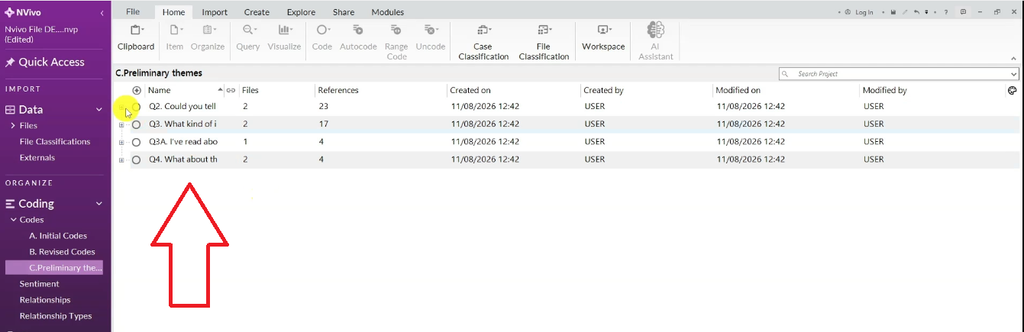
Inside that folder is where your themes will take shape. A useful trick is to copy your interview questions in first as containers — for example, “Could you tell me more about your organization’s DEI initiatives?” or “Are they focused on any specific groups, like women or people with disabilities?” These question containers don’t affect the meaning of your codes. They’re just a scaffolding to keep related codes close together while you work through them.
Step 2: Read Your Codes and Look for a Shared Pattern of Meaning
With your codes grouped loosely under question containers, read through them one by one and ask: what pattern of meaning runs across these?
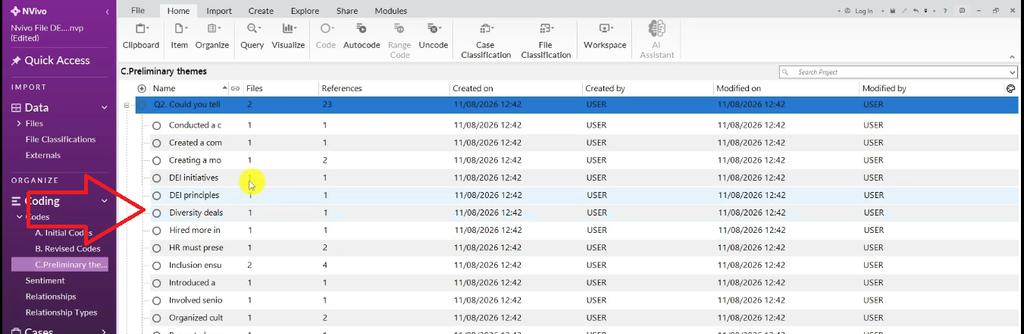
Example: Building a First Theme from DEI Codes
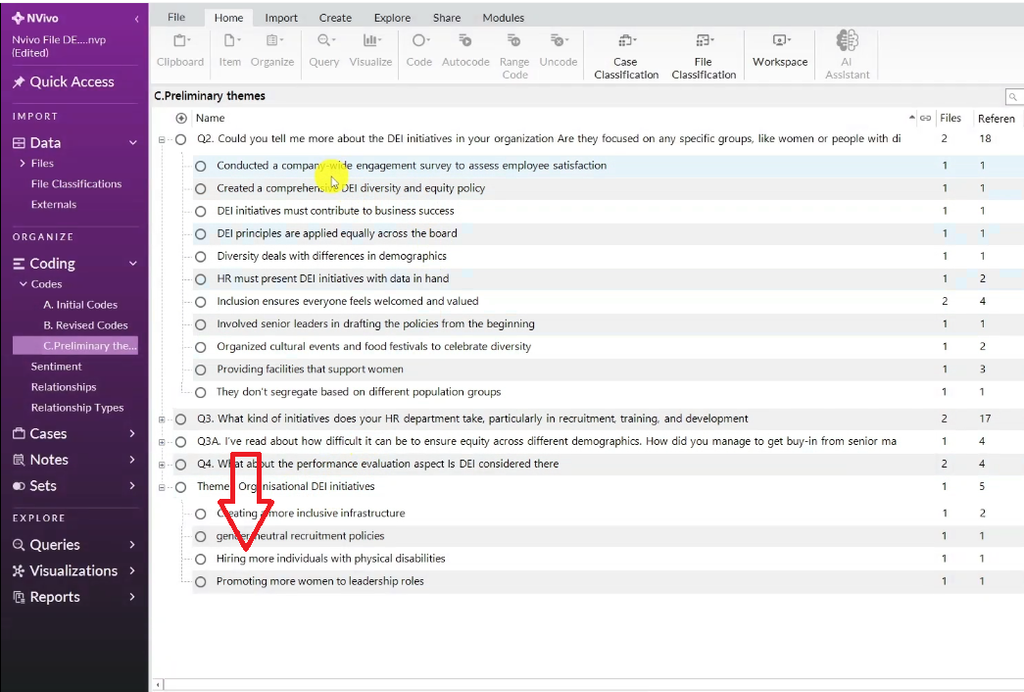
Under the DEI-related questions, I had codes like: conducted a company-wide engagement survey to assess employee satisfaction, created a comprehensive DEI policy, created more inclusive infrastructure, hired more individuals with disabilities, adopted gender-neutral recruitment policies, promoted more women into leadership roles, ran cultural events, and provided facilities that support women.
Read together, those codes all point to one thing: DEI initiatives. So I created a theme called “Organizational DEI Initiatives,” flagged it as preliminary (theme 1), and gave it a short description: “This theme represents the different DEI initiatives undertaken in the interviewees’ organizations.”
- Right-click to create the new theme and write its description.
- Select Aggregate coding from children so the theme rolls up everything nested inside it.
- Drag in every code that shares that meaning — inclusive infrastructure, hiring individuals with disabilities, gender-neutral recruitment policies, promoting women to leadership, facilities that support women, and the DEI and equity policy.
- Clean up inconsistent code wording as you go — I edited “hired more individuals with disabilities” to “hiring more individuals with disabilities” so the coding framework reads consistently.
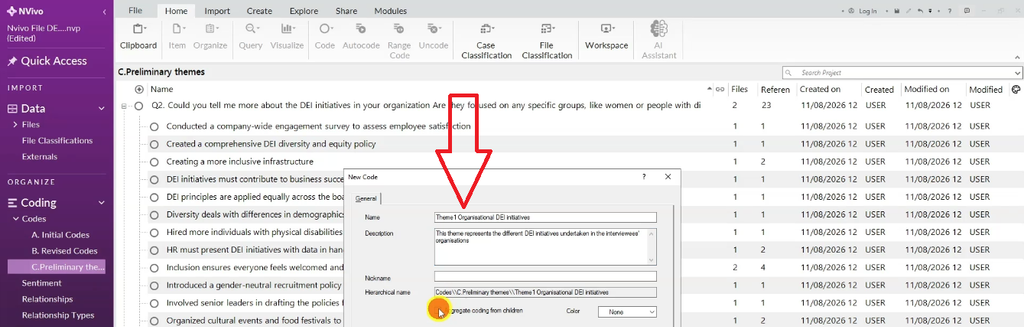
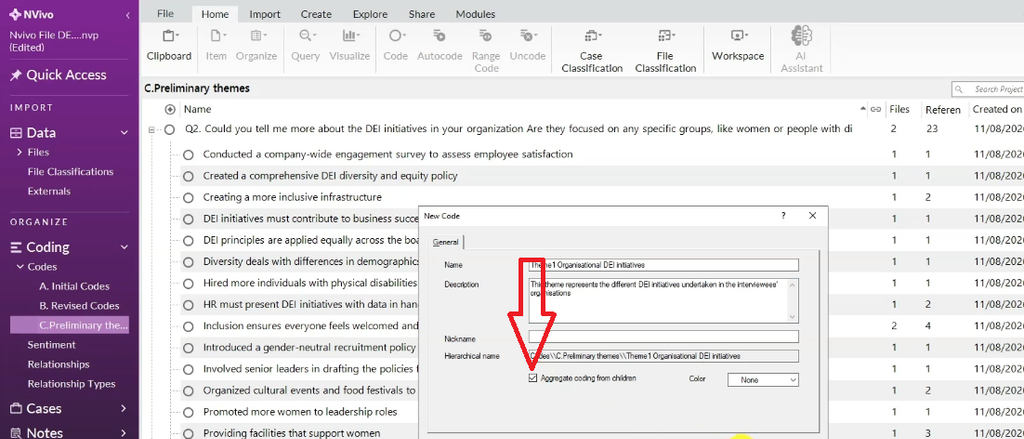
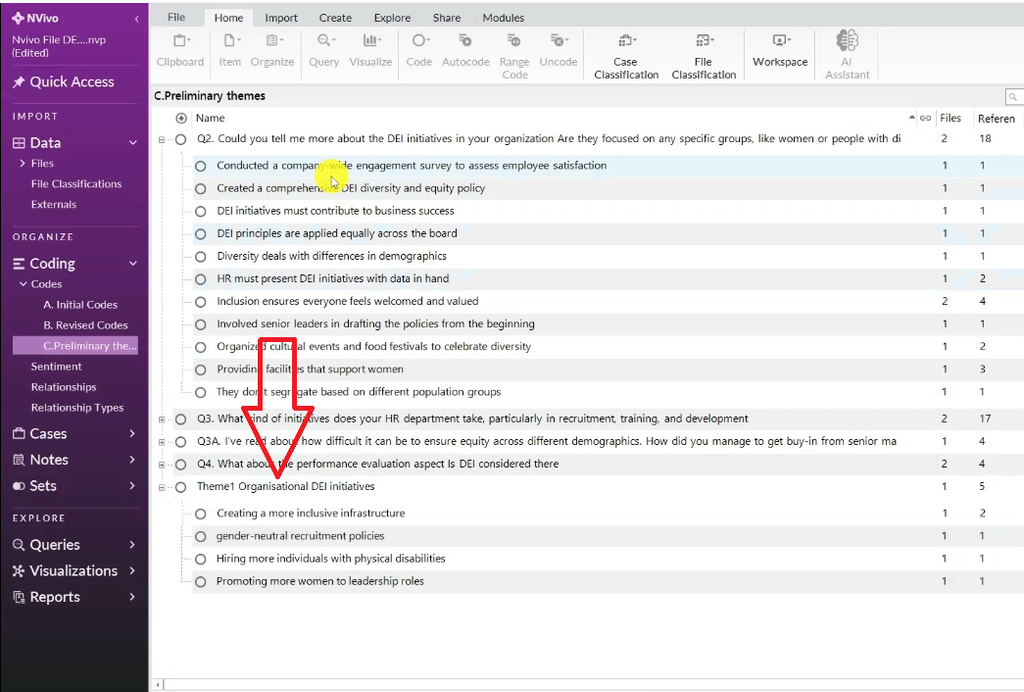
Themes come from a shared pattern of meaning across codes — not from the question containers themselves. Keep that distinction in mind or you’ll end up with themes that just mirror your interview guide.
Example: Building a Second Theme from HR Codes
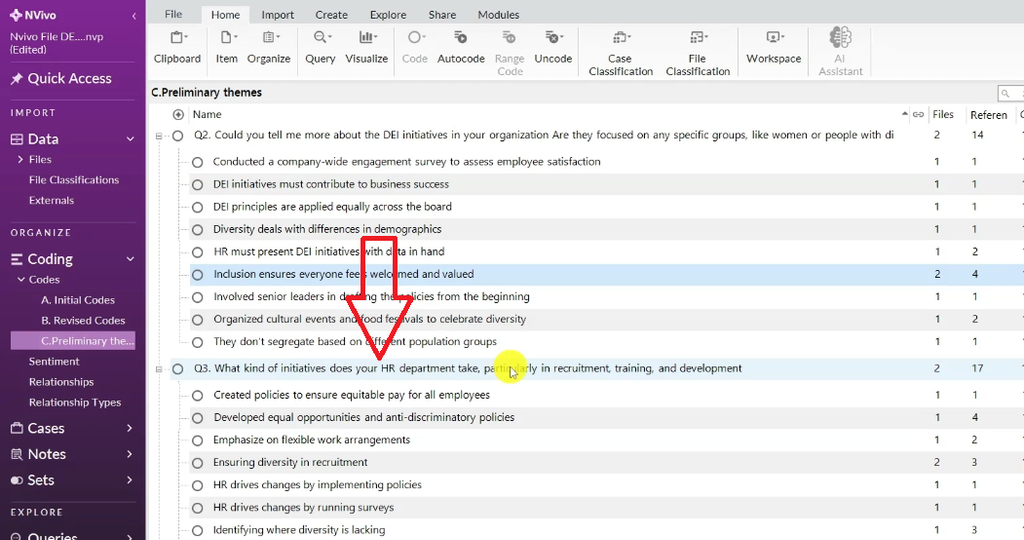
Under the question “What kind of initiatives does your HR department take, particularly in recruitment, training, and development?” I found codes like flexible work arrangements, diversity in recruitment, DEI training programs, and leadership and employee training at all levels.
Read together, these pointed to a second theme: “DEI Initiatives in Recruitment, Training, and Development” (theme 2), described as: “This theme represents the different DEI initiatives adopted by the human resource department in recruitment, training, and development across the organization.”
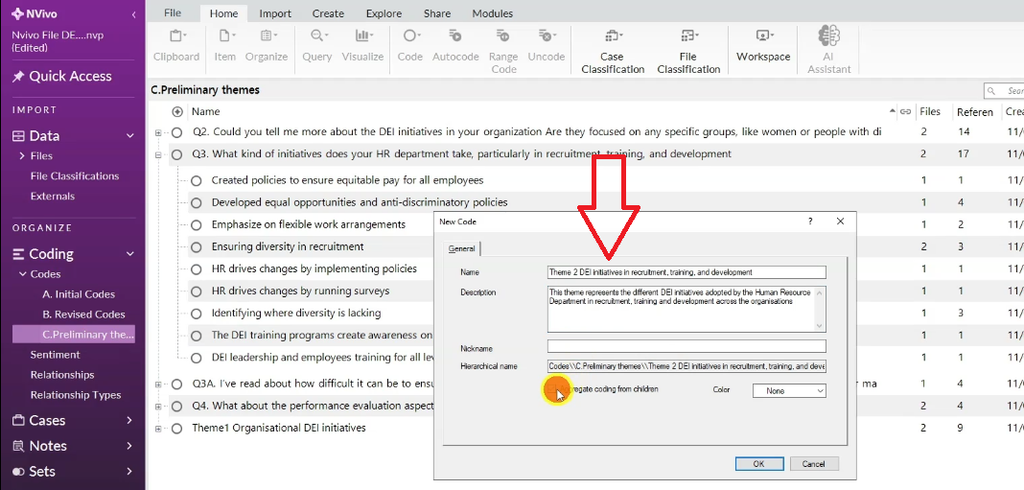
I clicked Aggregate coding from children again.
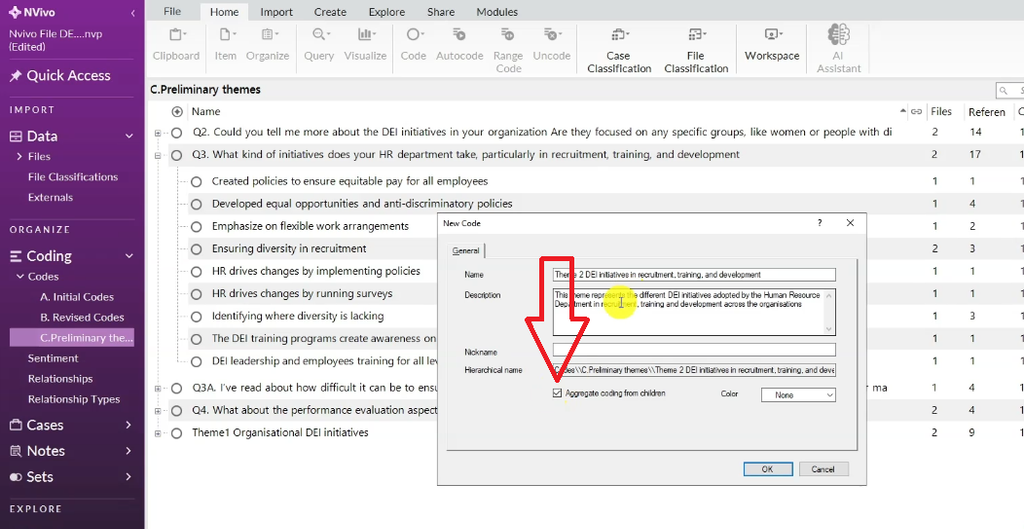
Then dragged in the matching codes: DEI leadership training, equal opportunities and anti-discriminatory policies, diversity in recruitment, equitable pay, and flexible work arrangements.
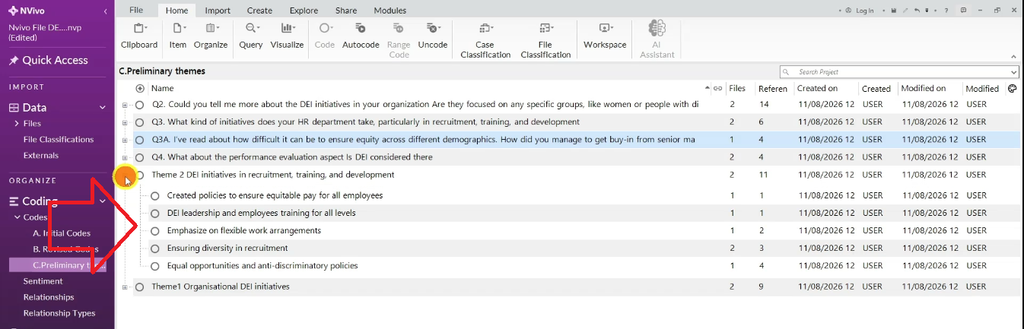
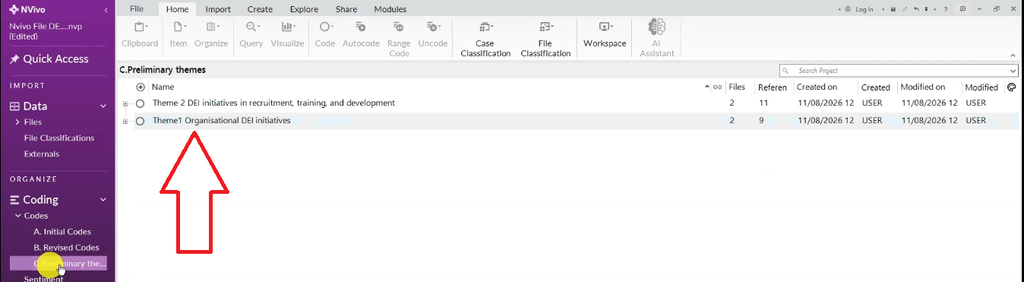
Once every code has been reviewed and sorted into a theme, delete the empty question containers. What’s left is a clean set of preliminary themes — codes with shared meaning, grouped and described. Tidy up spacing in each theme’s properties so your coding framework stays readable.
Step 3: Review and Refine Your Themes
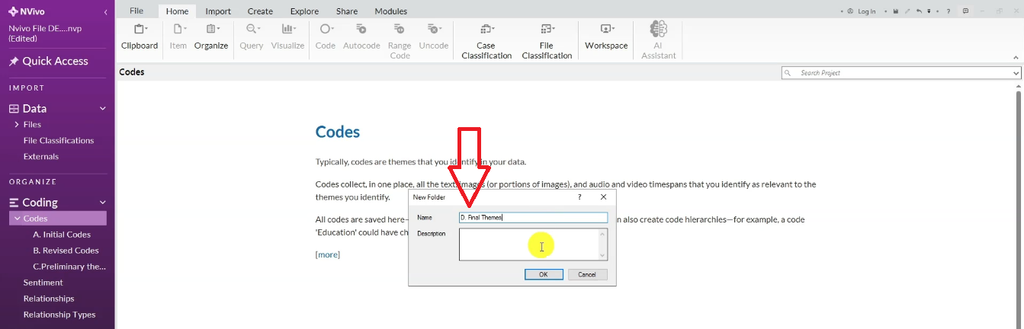
Create a second folder at the parent level — “Final Themes” (folder D) — and copy your preliminary themes into it. This is phase four of Braun and Clarke’s framework: reviewing themes.
This step is worth slowing down for — see my dedicated guide on getting themes in qualitative data analysis if you want more examples of what a well-formed theme looks like. For each theme, open Code Properties and ask: does this theme actually represent what I want it to represent? You can rename a theme to sharpen its wording, or combine two themes into one overarching theme if they’re really pointing at the same underlying idea.
In this example, both “Organizational DEI Initiatives” and “DEI Initiatives in Recruitment, Training, and Development” were fundamentally about DEI — themes are grouped by meaning, not wording. So I combined them into one overarching theme, “DEI Initiatives,” with a description covering both: “This theme represents the current DEI initiatives that the human resource department implements in the organization, and the various specific forms those initiatives take in training, recruiting, and development.”
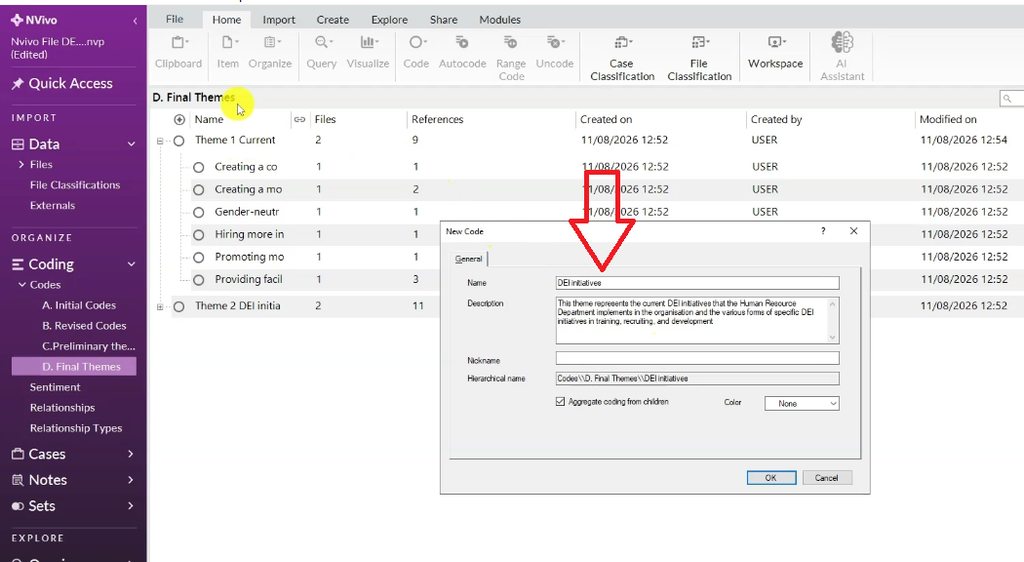
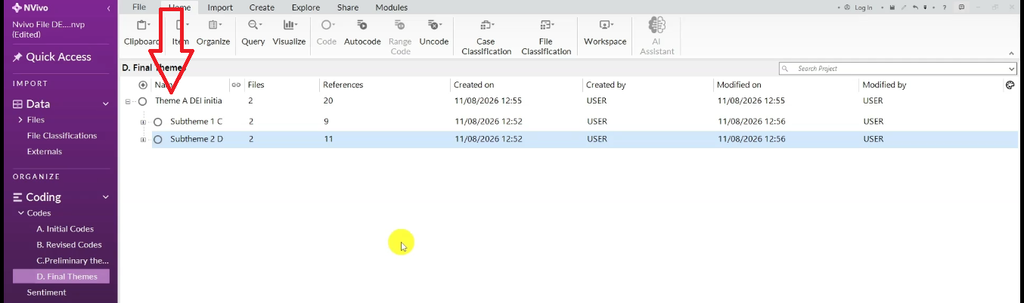
I dragged both original themes into this new overarching theme, renamed it “Theme A,” and the two nested themes automatically became sub-themes — Sub-theme 1 and Sub-theme 2. This is what phase five of Braun and Clarke’s framework — defining and naming themes — looks like in practice: a main theme with clearly named, clearly described sub-themes underneath it.
Step 4: Export Your Codebook, Code List, and Visuals
Once your themes are refined, NVivo gives you several ways to pull your work out for writing up.
Exporting a Codebook
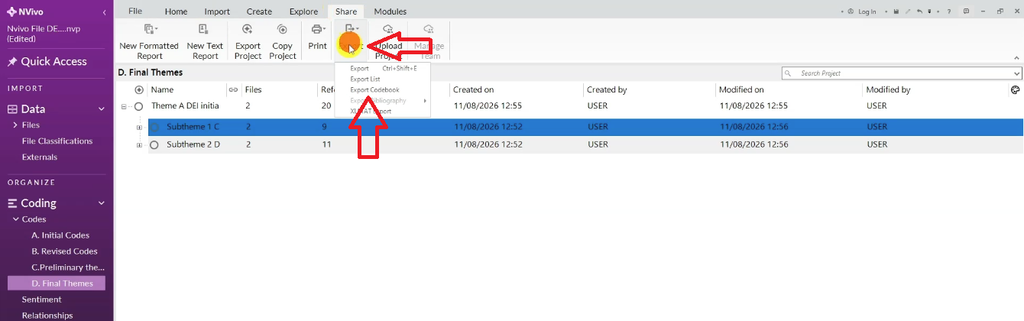
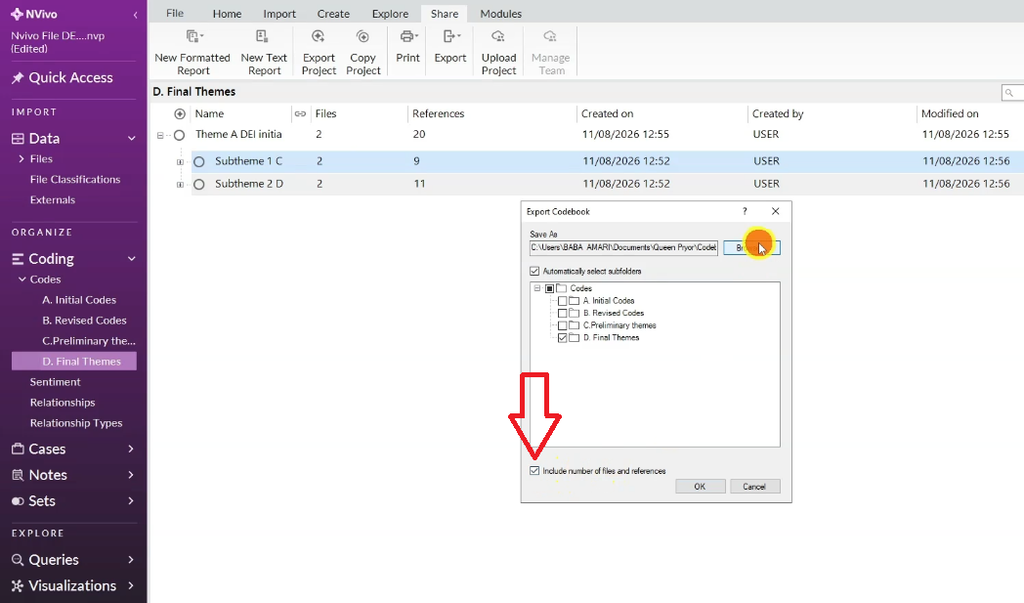
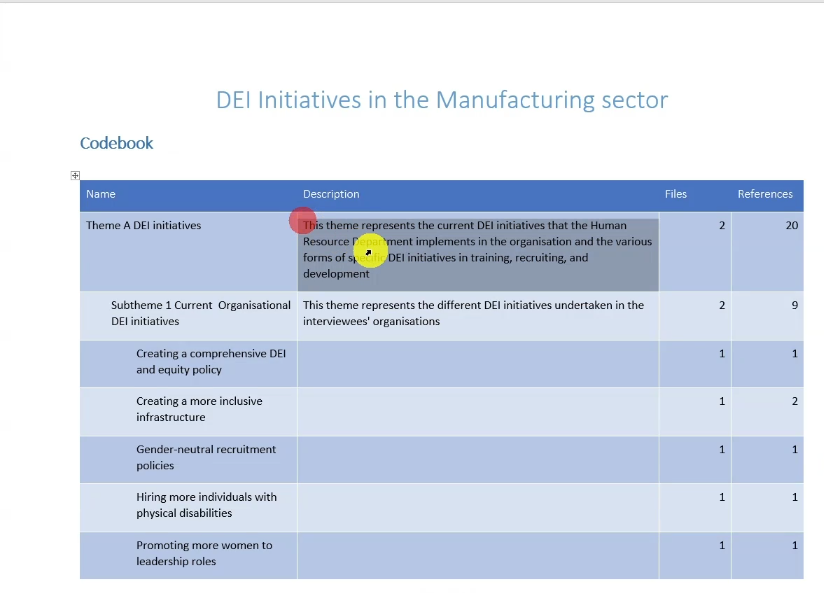
From the top menu, click Export → Export Codebook, then select Include Files and References. This produces a full codebook showing every theme and sub-theme with its description, plus the number of files (participants) and references (quotes) behind it. In this example, the overarching theme drew on two participants and 20 references total — nine quotes for the first sub-theme, eleven for the second. This codebook is what typically goes into a thesis appendix.
Exporting a Code List
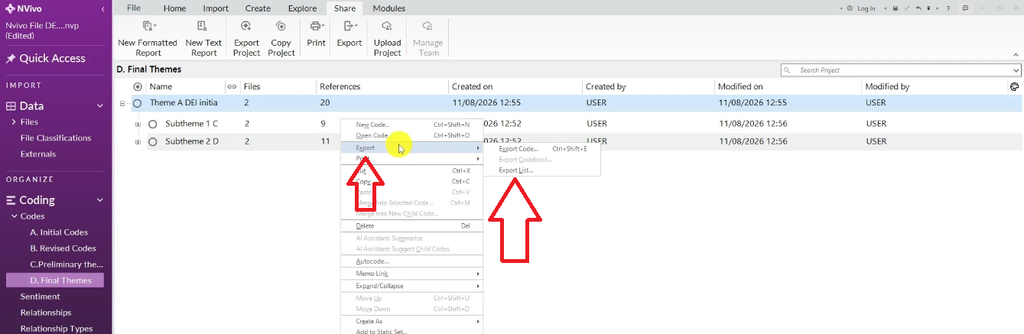
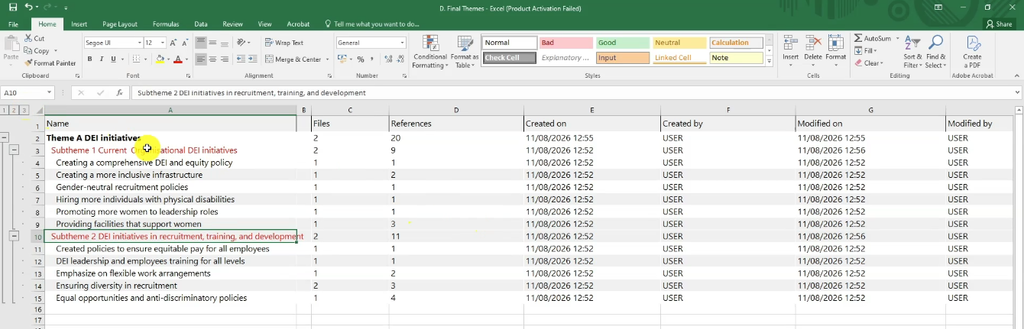
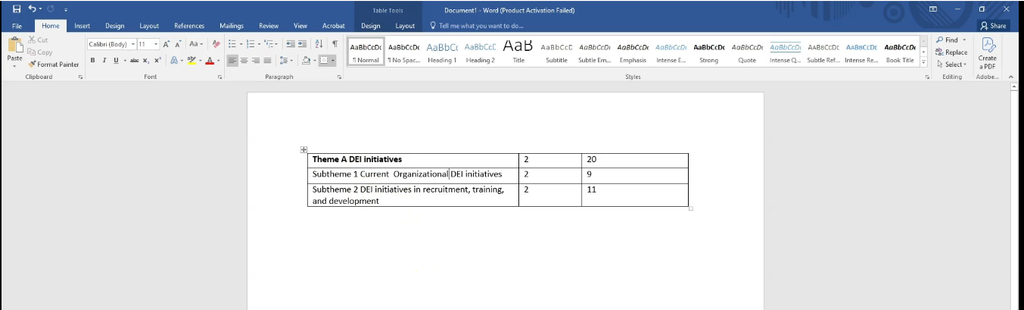
Right-click a theme and choose Export List to save it as an Excel file. Opening it shows your full coding structure laid out in columns — main theme, sub-themes, and everything nested underneath. I copy this structure directly into a Word document to build the “themes and sub-themes” tables that go into a findings chapter.
Generating a Word Cloud
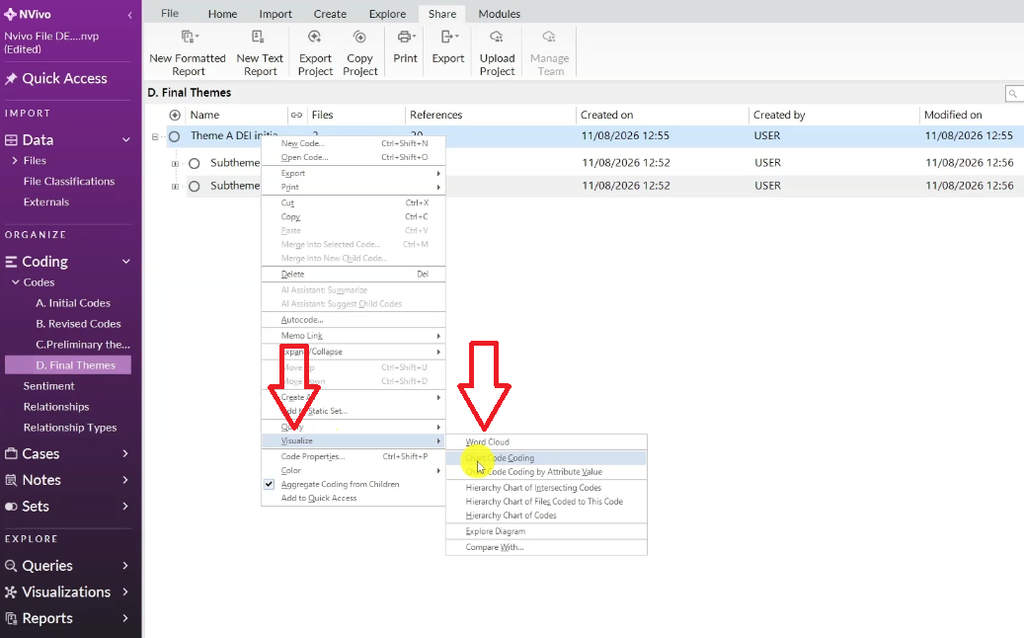
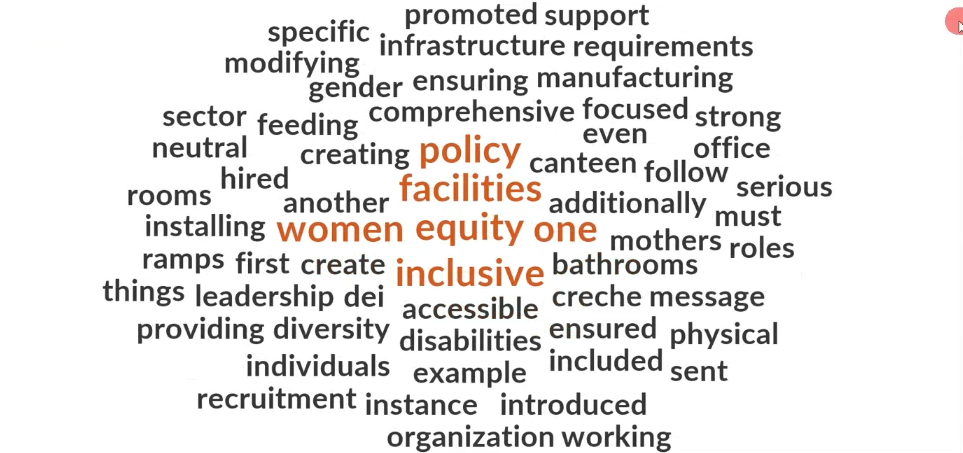
Right-click a theme and go to Visualize to generate a word cloud of everything participants said within that theme. Right-click to remove any words you don’t want, then export the image to drop straight into your findings report.
Generating a Hierarchy Chart
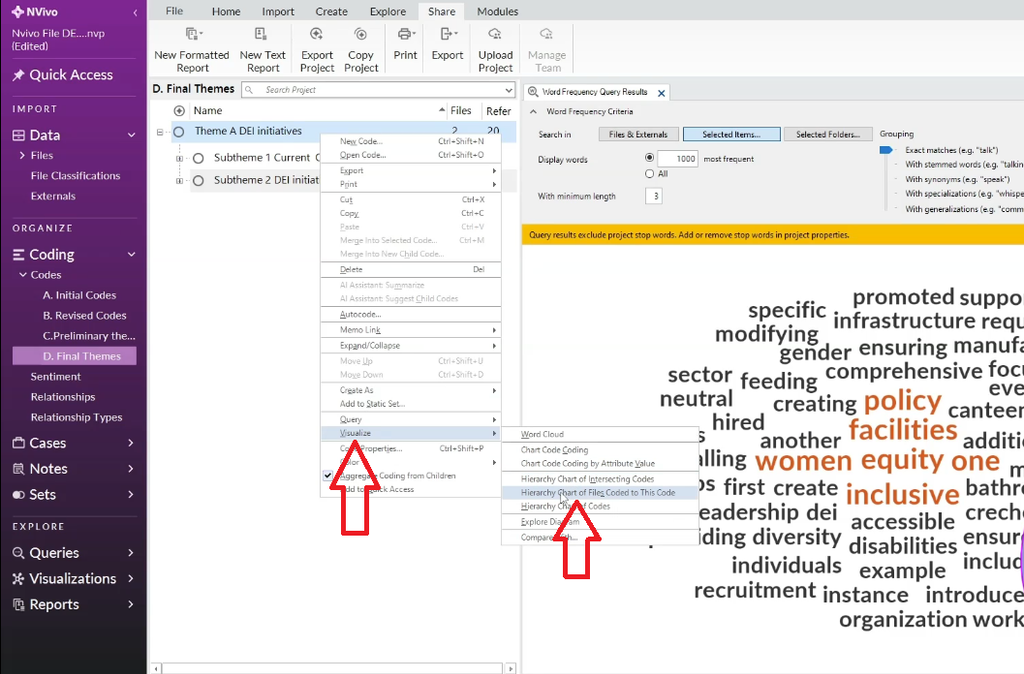
You can also generate a hierarchy chart, which visually maps a theme, its sub-themes, and every code nested underneath. Like the word cloud, export it and use it directly in your write-up.
Common Mistakes When Moving from Codes to Themes in NVivo
- Treating interview questions as themes. Question containers are for organization only — a theme has to come from a shared pattern of meaning across codes, not from the question that prompted them.
- Skipping the review phase. It’s tempting to stop once you have preliminary themes. But phase four — reviewing themes — is where mismatched codes and overlapping themes get caught before they end up in your write-up.
- Leaving codes unedited. Messy or inconsistent code wording (like “hired” vs. “hiring”) makes it harder to spot shared meaning later. Clean it up as you go.
- Forgetting theme descriptions. A theme without a written description is hard to defend in your methodology chapter and hard for a supervisor or examiner to evaluate.
- Not aggregating coding from children. If you skip this step, your overarching theme won’t reflect the coding stored in its sub-themes when you run queries or export.
Frequently Asked Questions
What’s the difference between a code and a theme in NVivo?
A code is a label applied to a specific piece of data — a phrase, sentence, or idea. A theme is a broader pattern built by grouping codes that share meaning, complete with its own description explaining what it represents.
How many themes should a thematic analysis have?
There’s no fixed number. Most qualitative studies land somewhere between three and six main themes, often with two or three sub-themes each, but the right number depends entirely on the patterns actually present in your data — not a target to hit.
Can I combine themes after I’ve already written descriptions?
Yes. Combining themes into an overarching theme with sub-themes is a normal part of Braun and Clarke’s review and refinement phase, and NVivo lets you drag existing themes into a new parent theme without losing any of the underlying coding.
Do I need to export a codebook for my thesis?
Most universities expect a codebook or coding framework in the appendix of a qualitative thesis, showing your themes, sub-themes, descriptions, and supporting evidence counts. Exporting it directly from NVivo keeps it consistent with your actual coding.
Key Takeaways
- Themes come from a shared pattern of meaning across codes — not from your interview questions.
- Build preliminary themes first, then move to a separate “Final Themes” folder to review and refine them.
- Combine closely related themes into one overarching theme with sub-themes when they represent the same underlying idea.
- NVivo can export a codebook, a code list, a word cloud, and a hierarchy chart — all useful for a findings chapter or thesis appendix.
- Read Part 3 of this series on how to report thematic analysis findings in NVivo to turn these themes into a written findings report.
Get Help With Your Thematic Analysis
Across Part 1 and this post, you’ve gone from a blank NVivo project to a full set of refined, described themes ready for write-up. If you want a reference you can come back to without re-reading both posts, grab my free NVivo Starter Guide — it covers correct project setup, importing transcripts, and building your first codes.
And if you’ve got real interview, focus group, or open-ended survey data waiting and want someone who’s done this nearly 400 times to handle it for you, my done-for-you NVivo thematic analysis service is available too — whether you need help with coding, theme development, or the full write-up.
For a broader look at the method outside of NVivo specifically, read Scribbr’s overview of thematic analysis. NVivo’s own product documentation is also worth bookmarking as you work through your coding framework.